Homework 8: Interactivity Practice
In this homework, you will practice implementing static interactivity using code snippets.
The course material needed to complete this assignment was covered in classes 19, 20, and 21.
Learning Objectives
- Plan JavaScript static interactivity with pseudocode.
- Implement JavaScript static interactivity using code snippets.
- Troubleshoot interactivity using the browser's Developer Tools console.
Help & Support Resources
We want you to get the help and support you need. Use the course's support resources for help with this assignment.
Git Repository & Codespace
-
Create your assignment repository.
Visit https://landrace.infosci.cornell.edu/courses/info1300-2026fa/repos/hw8 in your browser to create your assignment repository.
-
Open your assignment repository in GitHub.
After creating your repository, visit https://landrace.infosci.cornell.edu/courses/info1300-2026fa/repos/hw8 in your browser and follow the link to open the repository on github.com
-
Open your assignment repository as a codespace.
Submission Requirements
Professionalism means meeting the client's requirements. Not doing less and not doing more.
Your submission should meet the requirements specified for this assignment and no more (or less). If you do more than the requirements, you will receive a 0 for the assignment. If you do less than the requirements, you will receive a 0 for the assignment.
Your assignment should meet the following requirements for credit:
-
Submit your own original work (design and code) for this assignment.
No credit is provided for submitting design and/or code that is taken from the course-provided examples.
-
Your code should be original. However, the structure of the code will mirror the class examples.
The structure of your code will align with the class examples. This is to be expected. We are learning web programming and there's only so many ways to structure code to solve its problems.
-
You are required to use the methods and techniques covered in class.
No credit is provided for using methods that are not covered in this class.
You may not use any methods that have not been covered in class prior to the release of this assignment.
-
Implement your interactivity using the provided JavaScript snippets.
You are required to use the provided JavaScript snippets to implement your interactivity. You may not modify the snippets, including the comments. Use them exactly as provided. If any JavaScript code exists in your interactivity that is not from the provided snippets, or you have modified the snippets, you will receive 0 credit for the assignment.
-
You may not implement interactivity with HTML and CSS only techniques.
This includes, but is not limited to:
- HTML
data-attributes - The CSS
:targetpseudo-class - The "checkbox hack" (e.g.
<input type="checkbox">with the CSS:checkedpseudo-class) - The
<details>and<summary>HTML elements - The
popoverHTML attribute - The CSS
:hover,:focus,:focus-within, or:has()pseudo-classes to show/hide interactivity
- HTML
-
The interactivity must be functional for credit.
We are only able to grade your interactivity if it is functional. If it doesn't work, then we can't grade it. If it doesn't work, we are not able to provide partial credit either; non-functional interactivity will receive 0 credit. Test your interactivity thoroughly before submitting this assignment.
-
Your JavaScript code should be error free. (warnings are okay)
There is no validator for JavaScript like HTML and CSS. To check for errors in your JavaScript, run your code and test it while checking the Console in the browser's developer tools. If there are errors in the console, then you have errors in your JavaScript code, and you must fix them.
-
Use external JavaScript. Inline or internal JavaScript is prohibited.
All of your JavaScript should be in scripts/flashcard.js.
No JavaScript code may exist in your HTML code. This includes using the
onclick=HTML attribute and JavaScript code inside the<script>tag. -
Your JavaScript code should be properly indented.
-
Your assignment's website should be visible in the browser and functional upon launching the development web server using Go Live.
If your assignment's website does not launch using this method or is not visible in the browser after launching the development web server, we are unable to provide any credit.
-
All files should be in the location specified in this document for credit.
Professionalism is important. Incorrectly placed files will not be graded; no partial credit is provided either.
-
Follow the submission instructions below.
Submit all materials to your GitHub repository's main branch for this assignment. When you're finished stage, commit, and push your submission to GitHub. Then fill-out the submission form to complete your submission.
Failure to complete the submission form will result in 0 credit; no submission form = no submission. No leniency. No exceptions.
Instructions
Part I: JavaScript Interactivity Review
Credit: 0 points
When implementing interactivity, we first implement Phase I, where we plan and implement the HTML and CSS needed for the interactivity. Then, we implement Phase II, where we plan and implement the JavaScript needed for the interactivity.
In this homework, Phase I has already been completed for you. You will implement Phase II. As a reminder, Phase II:
-
Plan your interactivity using pseudocode.
-
Copy pseudocode into the
.jsfile as comments. -
Implement the interactivity using Codespace snippets.
-
Test everything and verify your JavaScript produced 0 errors.
You want to make sure your interactivity is 100% functional for your users. Test it.
-
Tidy up your code.
When you're all finished, tidy up your code. Remove all
action: debug console messagesnippets and make sure any code inside a block/snippet is properly indented (simply save the file, it will auto format). Well formatted code is a best practice that all programmers employ.
Part II: Flashcard Pseudocode
Credit: 10 points. Your pseudocode plan aligns with the interactivity requirements. (Answer should be close for credit, but need not be perfect.)
For this homework you will implement a flashcard style interactivity:
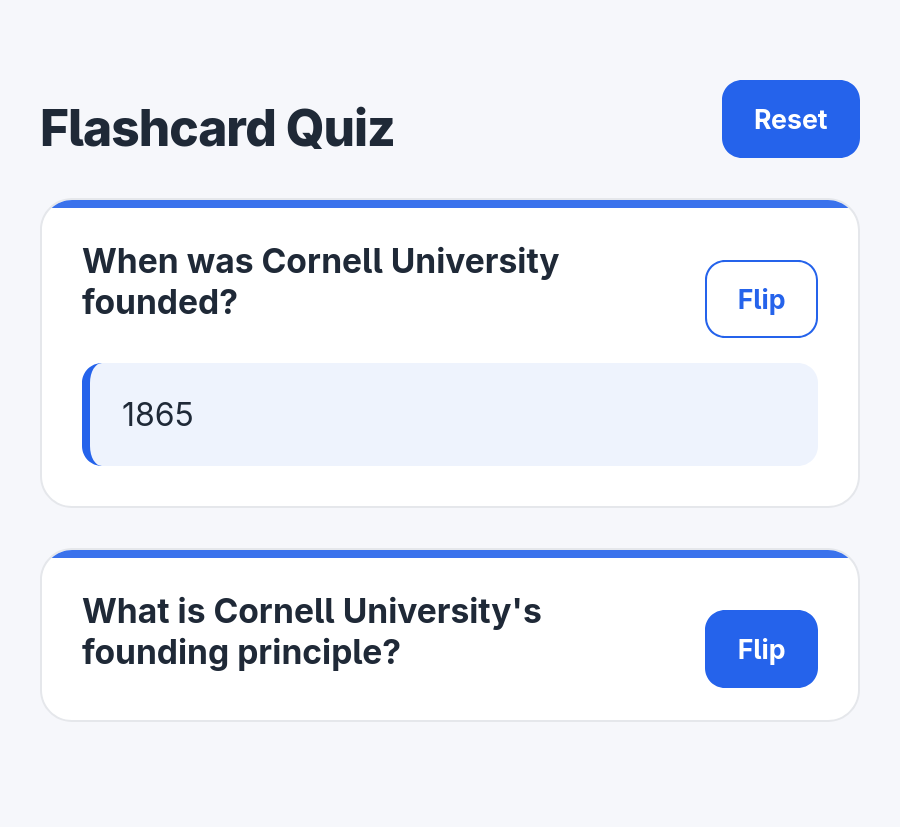
In this design, when the user clicks the Flip button, the answer is shown and the Flip button's style is inverted. When the user clicks the Flip button again, the answer is hidden and the Flip button's style is reverted to normal.
When the Reset button is clicked, all answers are hidden and all the Flip buttons' styles are reverted to normal.
Below is the interactivity planning sketch for implementing this interactivity:
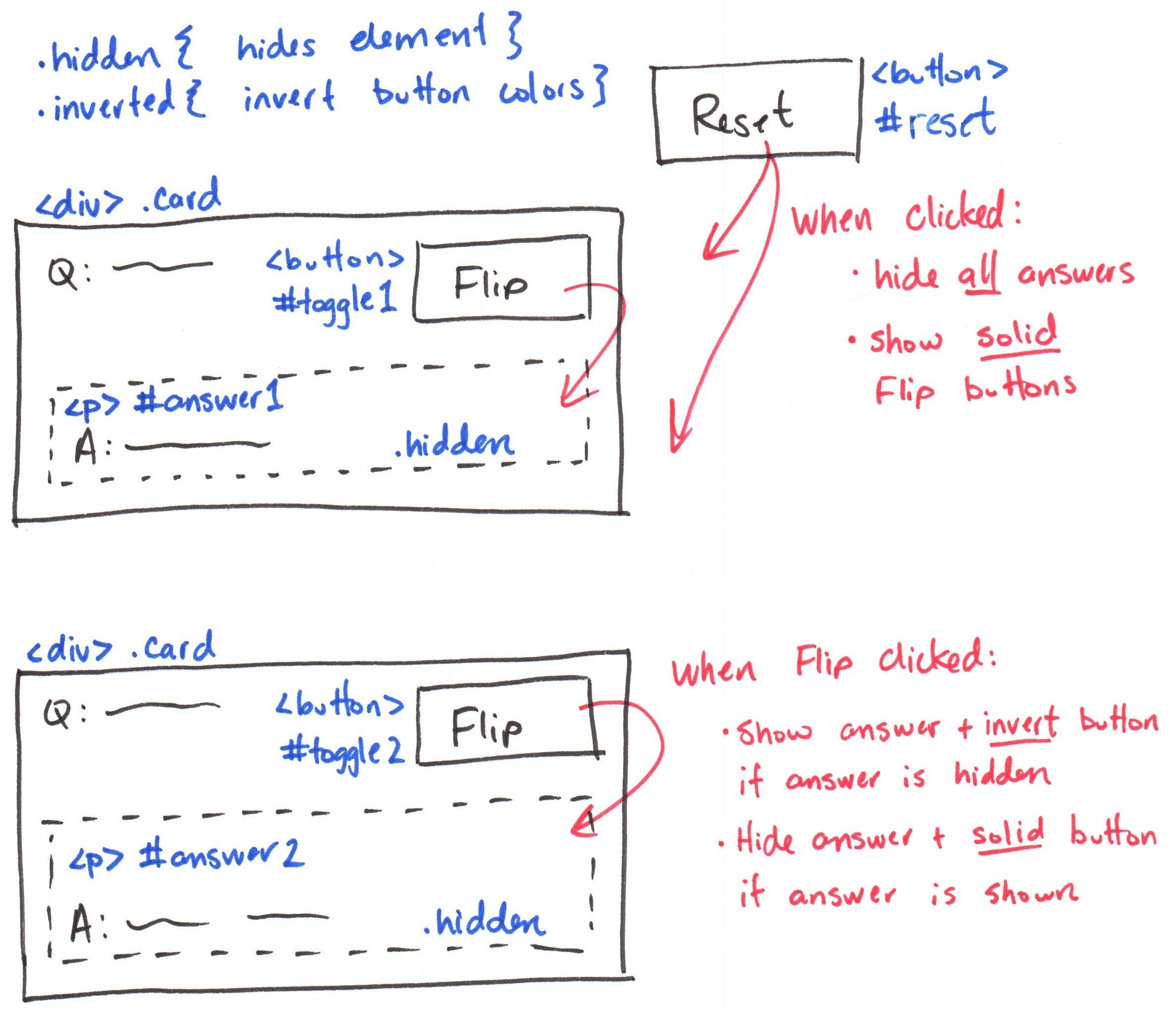
Write the pseudocode plan to implement this interactivity in the scripts/flashcard.js file.
Part III: Flashcard Snippets
Credit: 10 points. A fully functional, snippets-only implementation of the flashcard interactivity.
Implement your pseudocode plan from Part II using the provided interactivity snippets in your Codespace. (Do not delete the pseudocode plan from the previous part. If you delete the pseudocode plan, you will receive 0 credit for this part also.)
You must use the provided snippets exactly. Insert each snippet from Codespaces' snippet menu and change only the TODO placeholders (and indentation). Any other change results in 0 credit for this assignment, including:
- writing the snippet code by hand
- using AI-generated code
- deleting or editing the snippet comments
- adding code that isn't a snippet
| Type | Snippet | Description |
|---|---|---|
| Event | event: click element | When the user clicks/taps an element |
| Event | event: page ready | When the page finishes loading |
| Event | event: resize browser window | When the browser window is resized |
| Action | action: add css class | Add a CSS class to an element |
| Action | action: remove css class | Remove a CSS class from an element |
| Action | action: debug console message | Log a message to the browser console |
| If | if: browser narrow or wide | Check if the browser is narrow or wide |
| If | if: element has css class | Check if an element has a specific CSS class (useful for toggling a CSS class) |
-
The HTML and CSS from Phase I have already been implemented for you.
The HTML and CSS are completely correct for this assignment. You should not need to modify them at all to complete this assignment. If you are modifying them, you should stop and re-evaluate your approach.
-
Using only the provided interactivity snippets in Codespaces, implement and test the Flip button for the first card.
Remember, when a Flip button is clicked/tapped, if the answer is hidden, show the answer and invert the button's style. If the answer is shown, hide the answer and revert the button's style to normal. Study the plan above if you're confused.
-
Once your first card is working, implement the second card.
-
Finally, implement the Reset button.
You may use exactly 3 snippets total to implement the Reset button interactivity.
You must use CSS class selectors to change all toggle buttons and all answer paragraphs at once. You may not use ID selectors for the toggle buttons or answer paragraphs.
Troubleshooting Tips
If your interactivity is not working as intended, use the steps below to help troubleshoot and try to identify the problem.
- Did you load the JavaScript file in the HTML?
- Is the JavaScript loaded as the very last element in the
<body>? - Is jQuery loaded before your JavaScript file?
- Do all of your interactivity elements have a unique ID? (
id="") - Does your code match the snippet exactly? (Only the
TODOs change.) - Did you forget the
#in the selector in the snippet? - Did you mistakenly add a
.to the class name in the add/remove class snippet? - Are you adding a class when you should be removing one?
- Are you removing a class when you should be adding one?
- Does the CSS class exist in your CSS file?
- If the CSS class styling is subtle, temporarily make it loud:
background-color: red; - Use
action: debug console messageto test that an event works. - Is the HTML and CSS correct? Validate it!
- Are there errors in the JavaScript code? Check the console.
Submission
Stage, commit and push all changed files in your Git repository to the GitHub server. (All commits should reside on the main branch.)
Complete the submission form for hw8 to submit the assignment.
Note: The submission form asks you to check your submission. Checking your work will ensure you receive credit for this assignment. We ask you to check your submission because this is where some students lose points. It's easy to forget something and checking your work prevents the heartache of getting a 0 because your submission wasn't submitted in a way that we can access and grade it.
Contributors
Copyright © 2017 - 2026:
- Kyle Harms
- Axel Bax