Project, Milestone 2: Professional Mobile Website
Credit: ~70 points. Graded for correctness against the requirements provided in the document.
For this project, you will design and code an original, ambitious, usable, and accessible responsive static 3–5 page interactive website from scratch designed for a cohesive audience with substantial content (primarily text).
This is an opportunity for you to demonstrate your front-end web design and development knowledge and showcase your creativity in a portfolio-worthy website.
Your website may be about anything. It's your choice. It might be a personal/professional website; it might be a site that emphasizes some aspect of your interests or activities (e.g. a hobby or an interest of yours, etc.)
Throughout this project, you will employ the user-centered design process to design and code your website for a cohesive audience with clear goals. You are required to design and plan your site first, and then code it.
As a general rule, use the methods and strategies we've learned and practiced in class. In web programming, there are many ways to solve a coding problem. For credit, you should only use the approaches presented in this class.
Learning Objectives
- Build a static front-end website using HTML and CSS.
- Use HTML to structure your content.
- Use CSS to style your content.
- Apply visual design principles to communicate effectively with the users.
- Design and implement a professional website for mobile devices.
- Co-program with generative AI to program more effectively.
- Evaluate generative AI output for correctness and appropriateness.
- Use reference documentation to solve coding problems.
- Evaluate your own work against a set of requirements.
Help & Support Resources
We want you to get the help and support you need. Use the course's support resources for help with this assignment.
Git Repository & Codespace
-
Create your assignment repository.
Visit https://landrace.infosci.cornell.edu/courses/info1300-2026fa/repos/project in your browser to create your assignment repository.
-
Open your assignment repository in GitHub.
After creating your repository, visit https://landrace.infosci.cornell.edu/courses/info1300-2026fa/repos/project in your browser and follow the link to open the repository on github.com
-
Open your assignment repository as a codespace.
Submission Requirements
Professionalism means meeting the client's requirements. Not doing less and not doing more.
Your submission should meet the requirements specified for this assignment and no more (or less). If you do more than the requirements, you will receive a 0 for the assignment. If you do less than the requirements, you won't receive full credit.
Your assignment should meet the following requirements for credit:
-
Submit your own original work (design and code) for this assignment.
No credit is provided for submitting design and/or code that is taken from the course-provided examples or other assignments.
-
Your code should be original. However, the structure of the code will mirror the class examples.
The structure of your code will align with the class examples. This is to be expected. We are learning web programming and there's only so many ways to structure code to solve its problems.
-
You are required to use the methods and techniques covered in class.
No credit is provided for using methods that are not covered in this class.
You may not use any methods that have not been covered in class prior to the release of this assignment.
-
Your assignment's website should be visible in the browser and functional upon launching the development web server using Go Live.
If your assignment's website does not launch using this method or is not visible in the browser after launching the development web server, we are unable to provide any credit.
-
All files should be in the location specified in this document for credit.
Professionalism is important. Incorrectly placed files will not be graded; no partial credit is provided either.
-
All textual content and images should be visible in the design journal when using "Markdown: Open Preview" for credit.
If it's not visible in the Markdown preview, then we can't grade it. We also can't provide partial credit either.
All images in Markdown must be web-safe formats:
.jpg,.jpeg,.png, or.gif. No credit is provided for images in other formats. -
Follow the submission instructions below.
Submit all materials to your GitHub repository's main branch for this assignment. When you're finished, stage, commit, and push your submission to GitHub. Then fill-out the submission form to complete your submission.
Failure to complete the submission form will result in 0 credit; no submission form = no submission. No leniency. No exceptions.
Milestone Requirements
Your milestone and final submission should adhere to these requirements.
Scope Requirements
-
Your website may be about anything of your choosing.
It's your choice. It might be a personal/professional website; a portfolio website; it might be a site that emphasizes some aspect of your interests or activities (i.e. a hobby or an interest of yours, etc.)
-
Your website should be original, ambitious, usable, and accessible.
The website you design and code should be 3–5 pages, each with substantial content.
Your website should demonstrate your creativity and mastery of front-end web design and development. A website that is "minimalist" or "plays it safe" will not receive full credit.
-
Your website should be impressive.
This project should demonstrate your mastery of the course learning objectives and that you can apply them in a professional context.
You need to go beyond the basic examples provided in lecture and homeworks.
-
Design and code your website from scratch.
You may not use any pre-existing website templates, web builders, themes, or frameworks (e.g. Wix, TailwindCSS, etc.)
You may not copy an existing website and modify it; you may not redesign an existing website.
You must design and code your website from the ground up.
-
Your website should have substantial content.
Each page should be content-rich with substantial content. Nothing should be minimal.
The majority of the content should be written text. However, you are also required to include images as decoration and content.
Your website's content should not be primarily images. (You are not designing an image gallery; you are designing a content-rich website.)
-
Your website should be static.
The website will be coded using HTML and CSS only.
-
The website should be in English.
We cannot grade websites in other languages; no credit is provided for non-English websites.
Design Process Requirements
-
Plan before you code.
Plan your website in the design journal before coding.
The design journal is used to document your entire design process from start to finish.
-
Thoroughly document your design process and provide a rationale for your design choices.
We want to see the ideas that you considered, but didn't make the final cut. We want to see the evolution of your design and your reasons for changing it.
We want to understand the design decisions you made.
-
All design/planning content, including images, should be legible and visible in your design journal when using "Markdown: Open Preview".
If we are unable to understand or read your handwriting, we are unable to provide any credit.
We are unable to provide credit for design content, including images, not visible in the Markdown preview.
Content Requirements
-
Your implemented website should include the actual content for the website.
No credit is provided for placeholder content.
-
All content should address the goals of your site's audience.
-
Your implemented website (3-5 pages) should include substantial content; each page should be content rich.
This includes substantial text content. You are also required to include image content.
-
You may use any content you find or create.
- You may create your own content. You are not required to do so.
- You may find content from other sources, including social media. You are not required to do so.
- You may share content with your peers in this class. You are not required to do so.
- You may use generative AI to create content. You are not required to do so.
-
The content you use need not be real nor accurate. However, it must be realistic and believable for your site's audience.
You may "invent" content. You are free to use your artistic license for your content.
Design Requirements
-
The design of your implemented website should be based on your planned design from the previous milestone.
You may revise your design as you implement it. However, your implemented design should resemble your planned design.
-
Only the design of your website for narrow screens (i.e. mobile devices) will be evaluated in this milestone.
ProhibitedDo not implement a responsive website in this milestone. Only implement the narrow screen design.
0 credit is provided for this entire milestone if you implement a responsive website. No exceptions. No leniency.
-
The implemented narrow design of your website should be polished, professional, and complete.
Your narrow design should be ready to publish and use on mobile devices. It should be polished and ready to use in your portfolio. It should appear to be a professionally authored website.
Remember, details matter for professional work. Little misalignments, inconsistent spacing, using the default browser style, etc. will detract from the professionalism of your design. For full credit your design should be extremely polished.
-
The design of your website should be 3-5 pages, usable, and address the goals of your audience.
The content should be organized and structured to meet the goals of your audience.
For example, the current page should be clearly indicated in the navigation. Important content should be located prominently and not take a backseat to decoration (e.g. some hero images).
-
Design your implemented website's URLs so that they are usable and meaningful for your site's audience.
Your URLs should employ URL best practices and should use terminology that is familiar to your site's audience.
-
Your implemented design should be reasonably complex and ambitious.
Your design should have many flexboxes. Some flexboxes should be nested inside other flexboxes. (Though you may find that you don't need that many flexboxes in this milestone; You'll probably need more flexboxes when implementing the responsive design in a future milestone.) (You may optionally use CSS Grid. However, you must include flexboxes nested in flexboxes for credit at the final milestone's submission.)
Your design should be interesting. It should probably use colored boxes, decorative images, and interesting decorative elements. If your design is "minimal", you should expect a lower design grade. Your website's design should impress.
Use your example websites from the previous milestone as inspiration for your design's complexity and ambition.
-
Your implemented design should employ the principles discussed and practiced in class.
Prioritize content over decoration. (But don't forget decoration entirely! Decoration is important for a professional quality design.)
Your design should employ common web and responsive design patterns.
Your design should employ visual design principles to communicate effectively with your audience.
The main body should have a maximum width to ensure readability that does not require any horizontal scrolling.
-
Your implemented design should employ familiar web design patterns.
At minimum, this includes the following for every page:
- A header with a logo and page title
- A navigation bar that is the same for all pages
- A footer
Website Requirements
-
Code a multipage website for mobile devices only (i.e. narrow screens) with at least 3 pages, but no more than 5 pages.
-
Implement a static website using only HTML and CSS.
-
Revise AI generated HTML and CSS to produce professional quality website with professionally structured code.
You should use GitHub Copilot to kick-start your HTML and CSS coding.
You should make substantial revisions to the AI generated code to ensure it meets the milestone requirements and is of professional quality. (You should not use generative AI to write all the code for this milestone.)
-
Your HTML and CSS code should employ the best practices covered in class.
For example, your HTML and CSS code should be properly indented and include minimal duplicate code (i.e. do not copy and paste CSS code to style multiple elements; use classes instead). Your homepage should be named index.html (all lowercase) and should reside at the root of your repository.
In industry your boss will expect your code to employ best practices, and they will not provide you a rubric of those practices. While not listed here, your code is expected to follow all best practices covered in class.
-
Your website's content should be accessible.
Content should be visible and usable by all users, including users with disabilities.
Your content should be well-structured using appropriate HTML elements.
You should use appropriate
alttext for all images.Your website should never require horizontal scrolling; all content should fit within the viewport width and not overflow beyond the viewport/screen's width.
-
All media files (i.e. images, videos, etc.) should be located in an
imagesormediafolder at the root of your repository.If you include video files, they should be less than 10MB each. (GitHub has file size limits.)
-
Use only external styling with exactly one CSS file. Do not use inline or internal styling.
Use a single CSS file for the entire site:
styles/site.css. All styling should be defined in this file.Do not use inline (
style="") or internal (<style>) styling. -
Cite all content according to the course citation policy.
-
HTML and CSS is free of errors (warnings okay) when validated.
Prohibited
If any of the following prohibited items are included in your milestone, you will receive no credit for the entire milestone. No exceptions.
-
Do not code a responsive website in this milestone.
Only code your website for narrow screens (i.e. mobile devices) in this milestone.
-
You may not include any hotlinked resources.
All resources should be local to your repository/website.
You may not embed videos (or other resources) from other websites, like YouTube or Instagram.
You may not use Google Fonts. However, you may download font files and include them locally in your repository and use them via
@font-facein your CSS. -
You may not use any CSS libraries or frameworks (e.g. Bootstrap, Tailwind, etc.) or hotlinked font resources.
You may not copy their code into your CSS either. (If your CSS classes use same name as a framework class, you will receive no credit for your CSS.)
-
You may not use HTML forms on your website.
Forms require server-side code. We can only program client-side (front-end) code in this course.
You may not use the
<button>,<input>,<textarea>,<select>,<option>,<form>HTML elements. -
Do not design or code any interactive website elements in this milestone.
Interactive elements are those elements that cause a change on the website when a user interacts with them. For example, a hamburger menu shows and hides the navigation when clicked.
Your website for this milestone should be entirely static. Assume that nothing can change on the website when a user interacts with it.
This includes, but is not limited to:
- HTML
data-attributes - The CSS
:targetpseudo-class (e.g.<a href="#menu">links that show/hide the menu) - The "checkbox hack" (e.g.
<input type="checkbox">with the CSS:checkedpseudo-class) - The
<details>and<summary>HTML elements - The
<dialog>HTML element or thepopoverHTML attribute - The CSS
:hover,:focus,:focus-within, or:has()pseudo-classes to show/hide content
- HTML
-
You may not code any JavaScript in this milestone.
JavaScript is prohibited. You will receive a 0 for the entire milestone if you include any JavaScript code. (You need to demonstrate that you understand how to build a website with only HTML and CSS first.)
Milestone Instructions
In this milestone you will implement the narrow screen design of your website planned in the previous milestone. Much like professional programmers, you will employ AI tools to help you program more effectively.
-
You may stage, commit, and push as many times as you want to back up your work. Responsible UX engineers back up their work frequently.
-
Please don't wait until the last minute; technologies don't always cooperate and require some fiddling, especially the first time you use them.
Each milestone builds on the previous milestone. If you are going to use your resubmission accommodation for Milestone 1, you should do so before starting Milestone 2.
If you wait until after starting Milestone 2, you will have to undo your Milestone 2 work to resubmit Milestone 1.
No milestone 2 work may be present in milestone 1 resubmissions. If milestone 2 work is present in your milestone 1 resubmission, you will receive a 0 for milestone 1. No exceptions.
Review the Project Requirements
When working for a client, you'll need to check their requirements frequently to ensure you're meeting their expectations. You don't want to spend weeks working on something only to discover at the last minute that what you've been working on doesn't meet their requirements.
Carefully read the milestone requirements.
Synchronize your Repository
Synchronize your repository to obtain the Milestone 2 resources.
-
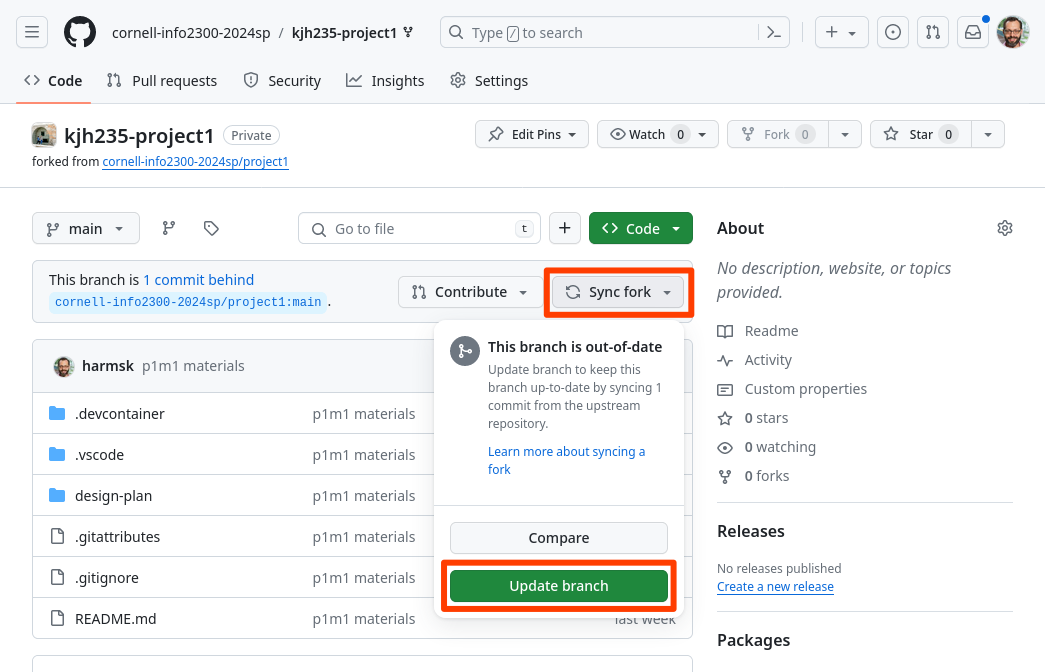
View your project repository on GitHub. Select Sync fork and then Update branch. This will synchronize the milestone 2 resources into your repository.
-
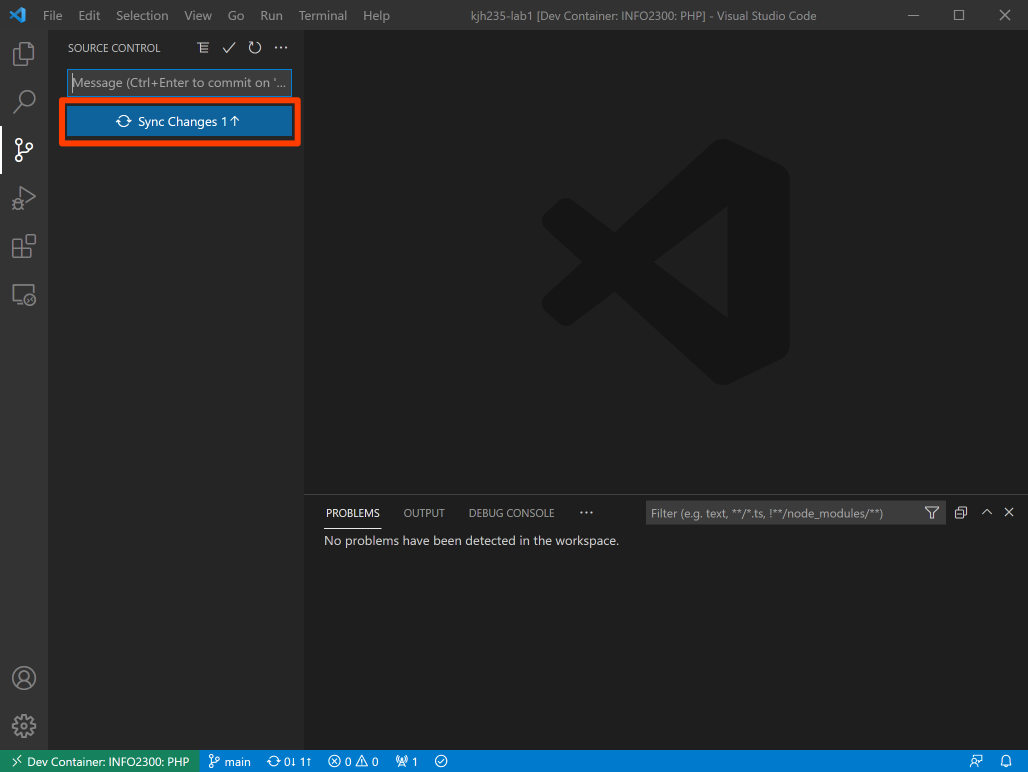
In your codespace, open the Source Control pane from the Activity Bar and click Sync Changes.
-
You should now be able to open the design-plan/milestone-2.md design journal in your codespace.
If you do not see the design-plan/milestone-2.md file, visit office hours. Avoid asking for help in the discussion forum for this issue. We rarely can resolve these issues in the forum.
Structure the Content
-
Create an HTML file for every page of your website you planned in the previous milestone. Ensure the file names are usable for your site's audience and follow best practices.
-
Move (not copy) the text content from your
design-plan/contentfolder into the appropriate HTML files. (Don't structure it yet, just move it to the HTML file.) -
Move (not copy) your media files (i.e. images, videos, etc.) from your
design-plan/contentfolder into animagesormediafolder at the root of your repository. -
Delete the
design-plan/contentfolder from your repository. Do not link to any files in this folder from your HTML files (point deduction warning). -
Structure the content in your HTML files using appropriate HTML elements.
First use GitHub Copilot to help you structure your content. Prompt it to structure the content and then evaluate its output for correctness and appropriateness.
Use the Apply to button to apply Copilot's suggested changes to the active HTML file and then revise as necessary to ensure your HTML's content is well-structured.
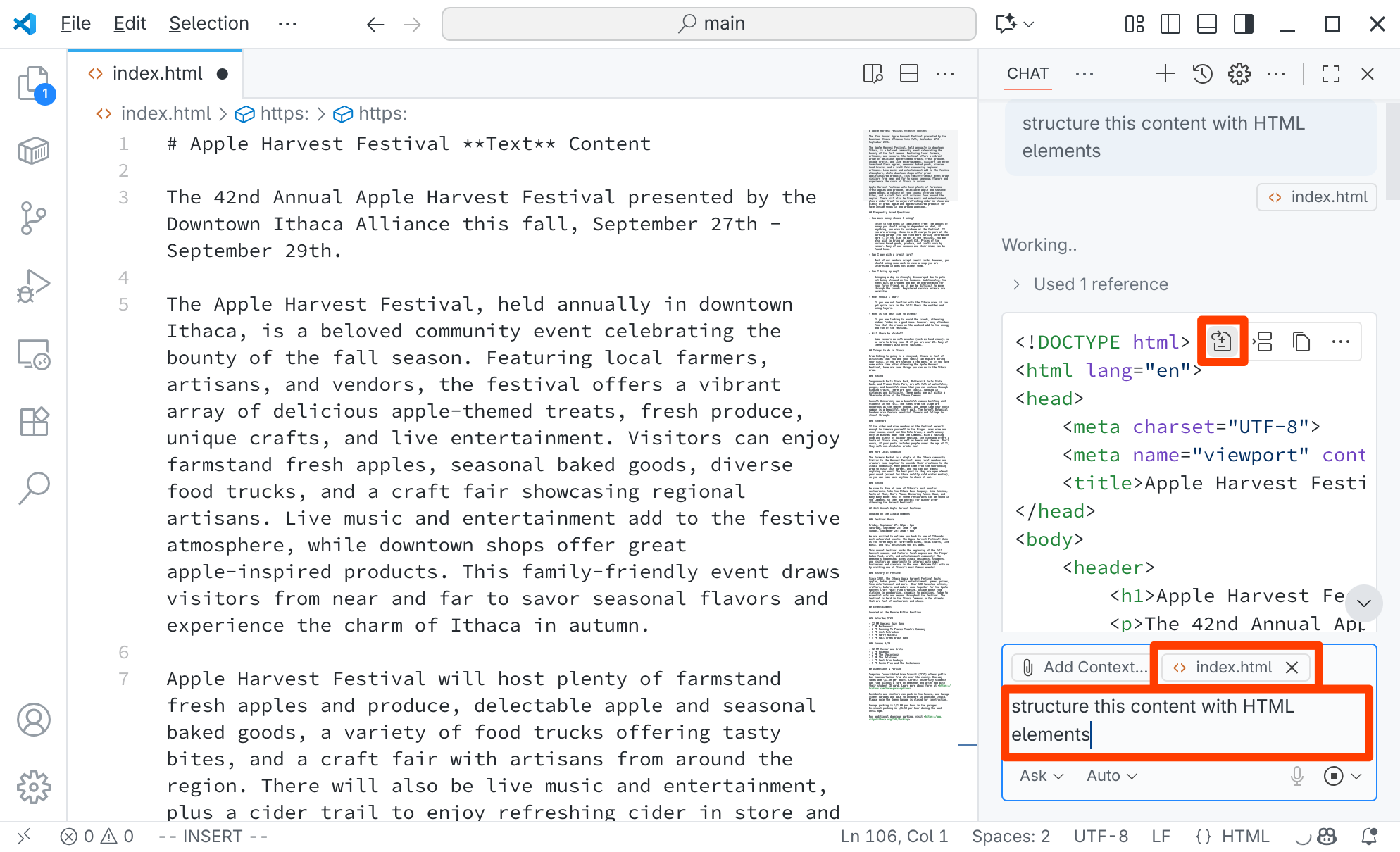
Remember, do not use
<div>or<span>elements to structure your content!Ensure all media files are linked correctly from your HTML files.
-
Implement the remaining HTML to implement your design. (i.e. header, navigation, footer, etc.)
dangerDo not implement any interactivity. Do not code any JavaScript. You will receive a 0 for this milestone if you include any JavaScript.
-
Cite all content according to the course citation policy.
Style the Website
With the content structured, it's time to start styling your website.
-
Create a new CSS file:
styles/site.css. -
With your CSS file active in Codespaces, prompt GitHub Copilot to generate CSS to style your website.
Precisely prompt Copilot by describing the general theme or look and feel you wish to achieve for your website. Include your prompt in a CSS comment at the top of your CSS file.
tipYou may get better results by adding the index.html file as context for Copilot.
-
Substantially revise the generated CSS to create a professionally styled website for mobile devices that meets the milestone requirements.
dangerDouble check that the CSS only includes techniques and methods covered in this class.
Like industry, you are responsible for all the code you submit, even if it was produced by AI. You will receive a 0 for this milestone if your CSS includes any methods not covered in class.
-
Do not program any responsive design features in this milestone. Only style your website for narrow screens (i.e. mobile devices).
Design Journal Reflection
Complete the design journal for Milestone 2: design-plan/milestone-2.md
Check your Work
Review the milestone requirements and check that your milestone submission adheres to these requirements.
Double check that your HTML and CSS validate.
Everything in your design journal must be visible in the Markdown preview when using "Markdown: Open Preview" for credit. Not visible = no credit.
Remember that part of developing your professional skills is learning to check your work against requirements. You will not be provided a rubric in industry and I want you to be prepared.
Submission
Stage, commit and push all changed files in your Git repository to the GitHub server. (All commits should reside on the main branch.)
Complete the submission form for project-m2 to submit the assignment.
The submission form asks you to check your submission. Checking your work will ensure you receive credit for this assignment. We ask you to check your submission because this is where some students lose points. It's easy to forget something and checking your work prevents the heartache of getting a 0 because your submission wasn't submitted in a way that we can access and grade it.
Contributors
Copyright © 2017 - 2026:
- Kyle Harms