Class 3: JavaScript Objects & Modules
- Review: Last Class
- JSX Components ⭢ JavaScript Objects
- JavaScript Objects
- Components as Objects
- JavaScript Modules
- Relative Path Operators
Review: Single-Page Application
- A single HTML document (
index.html) bootstraps loading the application. - The HTML document is minimal.
- No HTML content.
- May include link to CSS file(s).
- Includes a
<script>to load JavaScript code.
- JavaScript code dynamically updates the content of the page.
Review: JSX Components
A self-contained, often reusable, piece of code that describes a portion of a user interface.
src/components/ComponentName.jsx
export default function ComponentName() {
  return (
    <TODO_HTML_TAG>
    </TODO_HTML_TAG>
  );
}
import ComponentName from "./ComponentName";
<ComponentName />
Review: Troubleshooting
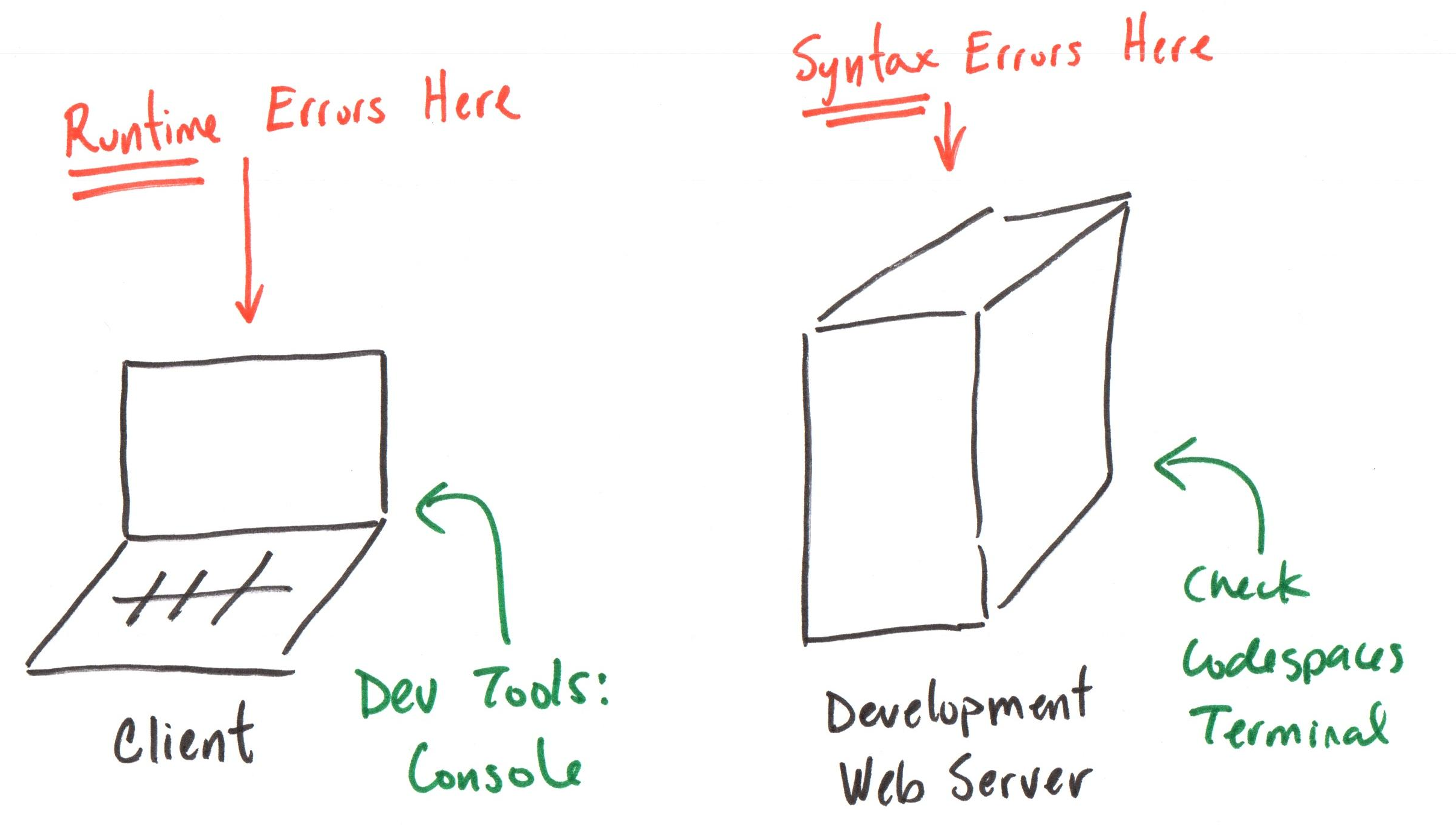
JSX Components ⭢ JavaScript Objects
Understanding JSX Components
Declare a component using a function that returns an object:
export default function ComponentName() {
  return <div>Hello</div>
}
<div> looks like HTML, but it's not! It's a JavaScript object!
Gotcha: Browsers do not understand JSX
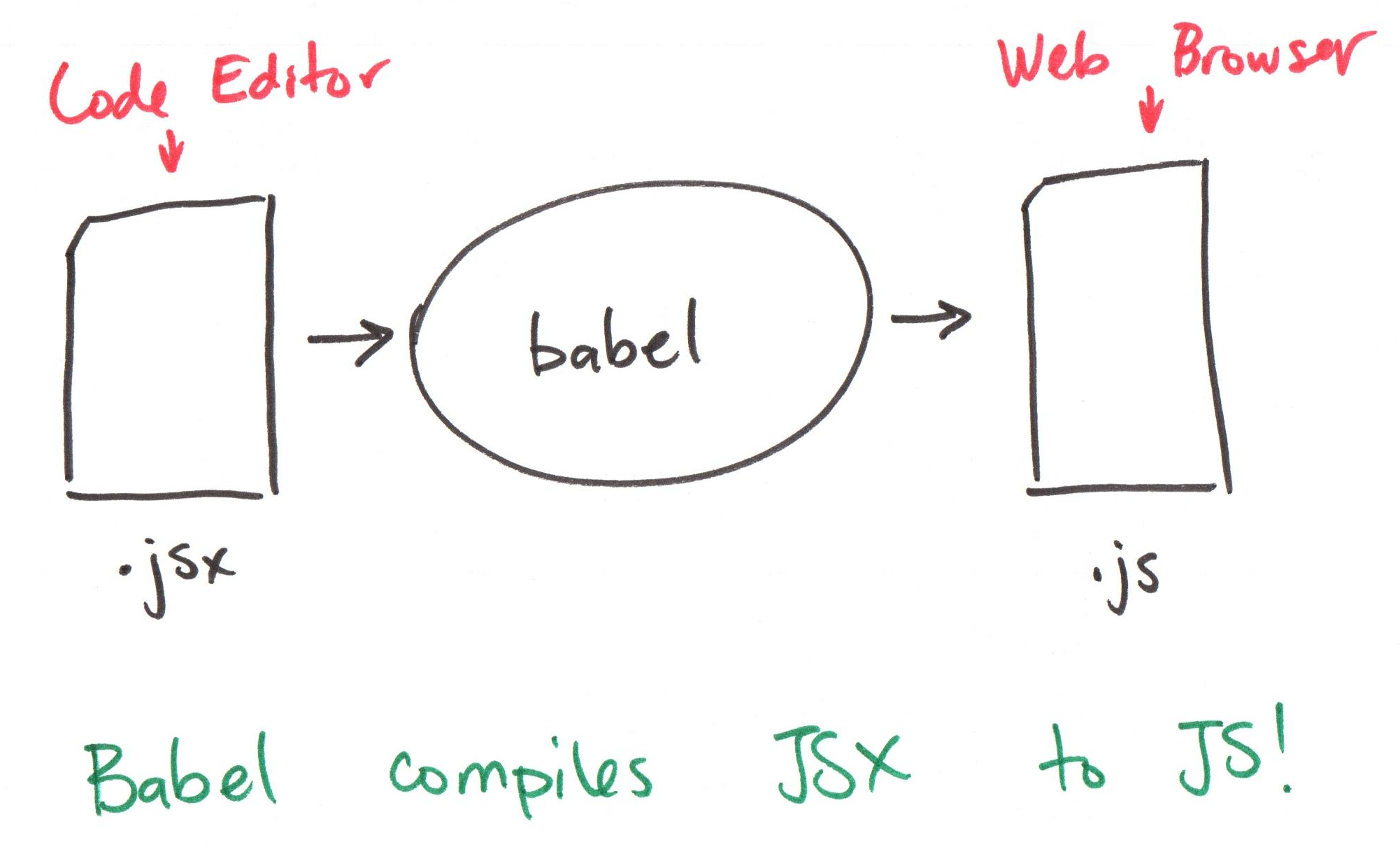
JSX ⭢ JavaScript
export default function ComponentName() {
  return <div>Hello</div>
}
In JSX, the HTML-like elements are transpiled into JavaScript function calls to React.createElement:
export default function ComponentName() {
  return React.createElement('div', null, 'Hello')
}
createElement Returns an Object
React.createElement('div', null, 'Hello')
React.createElement creates and returns a JavaScript object:
{
  type: 'div',
  props: { children: 'Hello' },
  // ...
}
JavaScript Objects
JavaScript Objects
Declare on object using object literal syntax:
{
  type: 'div',
  props: { children: 'Hello' },
}
{} declares an object literal.
The object has properties (key-value pairs): propertyName: propertyValue,
type,props, andchildrenare property names.'div',{ children: 'Hello' }, and'Hello'are property values.
Activity: Declare a "Style" Object
We can style an HTML element as follows:
<div style="color: red; font-size: 20px; font-weight: bold;">Hello</div>
However, JavaScript doesn't understand CSS. We need to represent the style as a JavaScript object.
Activity: Working with your peers (2-4) at the board, declare a JavaScript object that represents only the CSS (no HTML) of the above <div> element.
Gotcha: JavaScript Identifiers
A function, variable, or property must be a valid JS identifier:
- Letters (a-z, A-Z), digits (0-9), underscore (
_), and$only. - No spaces.
- No hyphens (
-). - Cannot start with a number.
- Cannot be a reserved word (e.g.,
return,function,class, etc.)
Solution: Style Object
<div style="color: red; font-size: 20px; font-weight: bold;">Hello</div>
font-size and font-weight are not valid JS identifiers (they contain hyphens). Use camelCase instead:
{
  color: 'red',
  fontSize: '20px',
  fontWeight: 'bold',
}
Components as Objects
Components are Objects
export default function ComponentName() {
  return <div>Hello</div>
}
Calling ComponentName() returns a JavaScript object:
{
  type: 'div',
  props: { children: 'Hello' },
  // ...
}
JSX Component Invocation
<ComponentName />
<ComponentName /> is transpiled into a JS function call:
ComponentName()
When your SPA is rendering <ComponentName />, it calls the function ComponentName() to get the object that describes what to render.
JavaScript Modules
JavaScript Modules
A JavaScript module is a file that contains JavaScript code.
- Each module has its own scope.
- Variables, functions, and classes declared in a module are not visible outside the module unless explicitly exported.
- Modules can import code from other modules.
src/components/ComponentName.jsx
export default function ComponentName() {
  return (
    <div>Hello</div>
  )
}
Exporting from a Module
Exporting a function makes it available for import in other modules.
src/components/ComponentName.jsx
export default function ComponentName() {
  return <div>Hello</div>
}
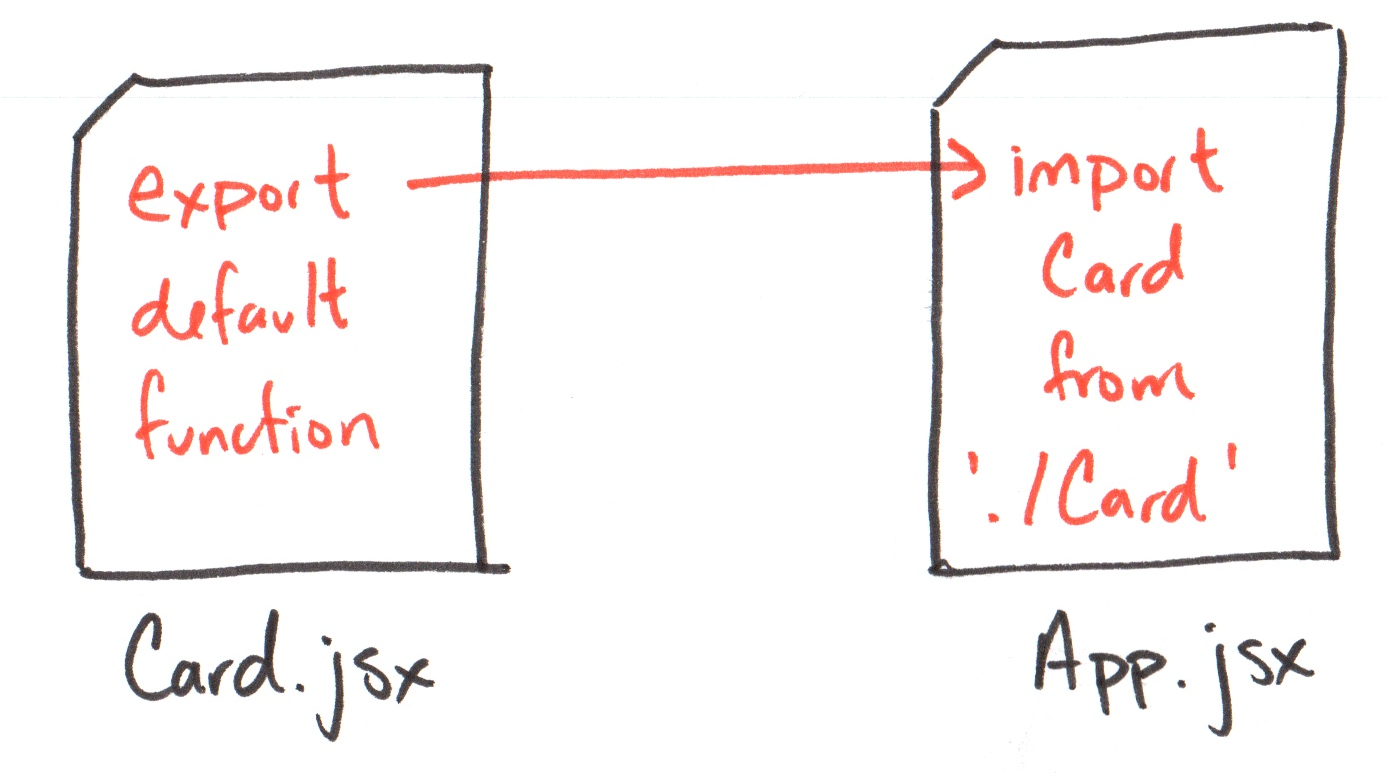
Importing into a Module
Importing a function makes it available for use in the current module.
Omit the file extension when importing modules (.js or .jsx):
import ComponentName from "./ComponentName";
Module Paths
Review: Absolute vs. Relative Paths
Absolute Paths
- Always begins with
/. - From the root of the file system (or web server).
Examples:
/etc/passwd/home/user/Downloads/ticket.pdf
Gotcha: Absolute paths are not used in JavaScript module imports!
Relative Paths
Relative to the current module (or current directory).
Examples from src/:
components/ComponentName.jsx./components/ComponentName.jsx
Example from src/components/:
../App.jsx
Relative Path Operator: ./ (Current Directory)
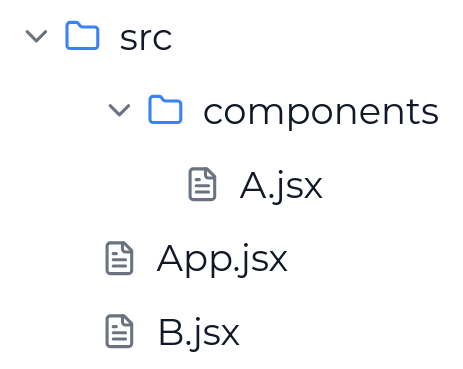
App.jsx:
import A from './components/A'
import B from './B'
Relative Path Operator: ../ (Parent Directory)
A.jsx:
import B from '../B'
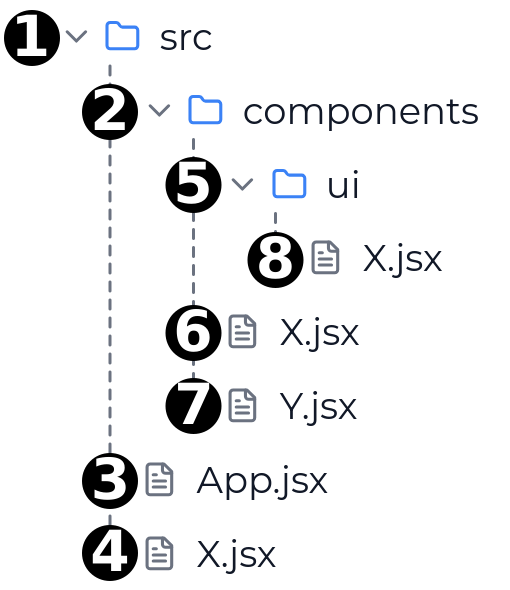
Activity: Module Path Practice
Complete the handout with your peers (2-4).
App.jsx:
import A from './components/A'
import B from './B'
A.jsx:
import B from '../B'
Summary
- JSX components are functions that return JavaScript objects.
- JavaScript objects are collections of key-value pairs (properties).
- JavaScript modules are files that contain JavaScript code.
- Modules can export and import code to share functionality.
- Relative paths use
./for the current directory and../for the parent directory.
What's Next
Due Sunday: Class 4 Preparation
Due Monday: Project 1, Milestone 1
Important! Nothing from today's lecture is required for Milestone 1. (Though it may be helpful.)