Class 6: Event Handling
- Review: Last Class
- Handling Events
- JavaScript Functions
- Arrow Functions
- Inline Event Handlers
- Summary
Review: Rendering with a Conditional Statement
export default function DarkModeSwitch({ isDarkMode }) {
  if (!!isDarkMode) {
    return <button>
             <img src="light-mode.svg" />
           </button>
  } else {
    return <button>
             <img src="dark-mode.svg" />
           </button>
  }
}
Review: Rendering with the Ternary Operator
export default function DarkModeSwitch({ isDarkMode }) {
  return <button>{!!isDarkMode ? (
    <img src="light-mode.svg" />
  ) : (
    <img src="dark-mode.svg" />
  )}</button>
}
export default function DarkModeSwitch({ isDarkMode }) {
  return <button>
    <img src={!!isDarkMode ? "light-mode.svg" : "dark-mode.svg"} />
  </button>
}
Review: Rendering with the Logical AND Operator
export default function DarkModeSwitch({ isDarkMode }) {
  return (
    <button>
      {!!isDarkMode && <img src="light-mode.svg" />}
      {!isDarkMode && <img src="dark-mode.svg" />}
    </button>
  )
}
Review: Truth and Falsy
Falsy
nullundefinedfalseNaN0-00n""or''document.all
Events
Events
Responding to an action, like a mouse click or finger tap.
Idea: Execute some code when something happens.
Demo: Flip Card Event
function flipCard() {
  alert("TODO: flip card");
}
<button onClick={flipCard}>
Handling Events
-
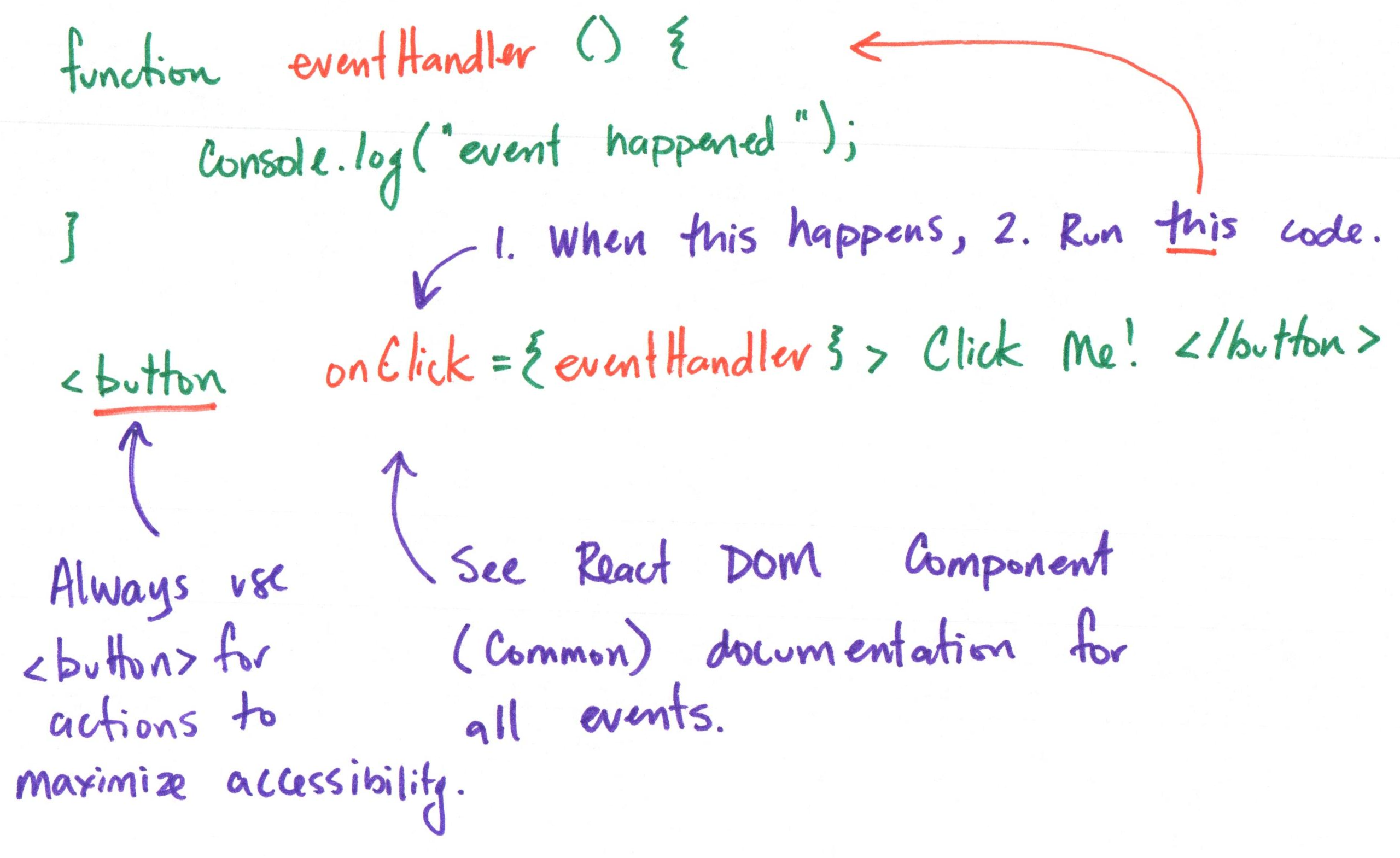
Event handler: A function that is called when the event occurs.
function eventHandler() {
  alert("Event occurred!");
} -
An event listener that listens for a specific event and calls the event handler when the event occurs.
<button onClick={eventHandler}>
  Click me!
</button>
JavaScript Functions
Functions
Declaration
function greet(name) {
  return `Hello, ${name}!`;
}
Function Call
greet("Alice"); // "Hello, Alice!"
Gotcha: Function Call vs. Function Reference
functionName() is a function call that executes the function and returns its result. functionName is a function reference that refers to the function itself without executing it.
function greet(name) {
  return `Hello, ${name}!`;
}

greet("Alice"); // "Hello, Alice!" (function call)

greet; // function reference (the function itself, not called)
Function Callback (Handler)
function greet(name, callback) {
  console.log("Hello " + name);
  callback(); // the passed function is called
}

function sayGoodbye() {
  console.log("Goodbye!");
}

greet("Alice", sayGoodbye); // passing sayGoodbye as a callback
Demo: Bake Cake
function turnOnOven(thenDo) {
  console.log("oven on")
  if (thenDo) {
    thenDo()
  }
}

function bakeCake() {
  console.log('baking cake')
}

turnOnOven(bakeCake);
Arrow Functions
Arrow Functions
An arrow function is a concise way to write a function expression in JavaScript.
(name) => `Hello, ${name}!`
When called, it returns the result of the expression on the right-hand side of the arrow (=>). (e.g. "Hello, Alice!")
Arrow Functions with Multiple Statements
An arrow function can also contain multiple statements, but in that case, you must use curly braces ({}) and explicitly return a value.
Statements
(name) => {
  const greeting = `Hello, ${name}!`;
  return greeting;
}
Expression
(name) => `Hello, ${name}!`
Gotcha: Parentheses in Arrow Functions
When an arrow function has a single parameter, you can omit the parentheses around the parameter. However, if there are zero or more than one parameters, you must include the parentheses.
() => "Hello!" // valid (no parameters)

// Single parameter (parentheses optional)
name => `Hello, ${name}!` // valid

(name) => `Hello, ${name}!` // also valid
Demo: Bake Cake
function turnOnOven(thenDo) {
  console.log("oven on")
  if (thenDo) {
    thenDo()
  }
}

turnOnOven(() => console.log('baking cake'));
Calling an Arrow Function
(name) => `Hello, ${name}!`("Alice"); // "Hello, Alice!"
(name) => `Hello, ${name}!` is an arrow function that takes a parameter name and returns a greeting string.
Call this function by appending () with the argument "Alice" to the arrow function.
Function Expressions
Declaring a function and assigning it to a variable.
const greet = function(name) {
  return `Hello, ${name}!`;
};
const greet = (name) => `Hello, ${name}!`;
Calling the function:
greet("Alice"); // "Hello, Alice!"
Activity: Frog's Functions
Frog can eat(), drink(), chat(), hop(), and sleep(), but they must think (frogThinkThenDo()) before they take each of take these actions.
Working with your peers (2-4), complete the hand out.
Activity: Frog's Functions - Part II
-
Open a terminal in your activity codespace.
-
Run
frog-functions.jsoutside the browser using Node.js:node frog-functions.js
Tip: Use up arrow key to access previous commands in the terminal.
Inline Event Handlers
Inline Event Handlers
Use an arrow function or anonymous function directly in the event listener.
<button onClick={() => alert("Event occurred!")}>
  Click me!
</button>
<button onClick={function() { alert("Event occurred!"); }}>
  Click me!
</button>
Demo: Flip Card Event
<button onClick={() => alert("TODO: flip card")}>
Inline or Declared Event Handlers?
Do you need to call the same event handler from multiple places? If so, declare it as a function and reference it in the event listener.
Declared Event Handler
function eventHandler() {
  alert("Event occurred!");
}
<button onClick={eventHandler}>Button 1</button>

<button onClick={eventHandler}>Button 2</button>
Inline Event Handler
<button onClick={
  () => alert("Event occurred!")}>
  Click me!
</button>
Activity: Event Handler Practice
-
Create a new
Alertcomponent with an<h3>and a<button>.<div className="alert" role="alert">
<h3>{message}</h3>
<button type="button" ariaLabel="dismiss alert">
✕
</button>
</div> -
When the button is clicked, display an alert with the message "TODO: dismiss alert".
Event Accessibility
Always use a <button> element for clickable actions, and provide an aria-label for screen readers if the button's content is not text.
<button type="button" ariaLabel="dismiss alert">
Never use a non-interactive element (like <div> or <span>) with an onClick handler, as this is not accessible to keyboard users and screen readers.
<div onClick={() => alert("Event occurred!")}>
Summary
- Event handlers are functions that are called when an event occurs.
- Event listeners listen for specific events and call the event handler when the event occurs.
- Functions can be declared using function declarations, function expressions, or arrow functions.
- You can use inline event handlers or declare them as functions and reference them in the event listener.
- Always use semantic HTML elements (like
<button>) for interactive content and provide appropriate accessibility attributes.
What's Next
Due Today: Project 1, Milestone 2
Due Tuesday: Class 7 Preparation