Class 18: Node.js, Express.js, & MongoDB
- Review: Last Class
- REST API Design for collections and resources
- MongoDB Node.js Driver
- Express.js Route Parameters
- Using the Debugger
- Route Parameter Validation
- Response Status Codes in Express.js
Review
Review: HTTP
Hypertext Transfer Protocol
An application-layer protocol for transmitting resources between client and web servers.
Review: HTTP Request & Response
Request:
METHOD PATH HTTP/1.1
Example:
GET /index.html HTTP/1.1
Response:
HTTP/1.1 STATUS_CODE STATUS_MESSAGE

PAYLOAD
Example:
HTTP/1.1 200 OK

<html>
  <body>...</body>
</html>
Review: REST (or RESTful) API
An Application Programming Interface that adheres to the constraints of REST architecture to support communication between client and server to exchange resources, like data and media.
A RESTful API supports the creation, retrieval, updating, and deletion of resources (CRUD operations) using HTTP methods.
Review: Express.js
A backend web application framework for building web servers and RESTful APIs in Node.js.
// GET: /api/documents
app.get('/api/documents', async (req, res) => {
  const documents = [
    { name: "Apple", category: "fruit", ... },
    { name: "Banana", category: "fruit", ... }
  ]

  res.status(200).json(documents)
})
Activity: REST Client Review
Test the /api/documents endpoint using httpBook.
Review: MERN Stack
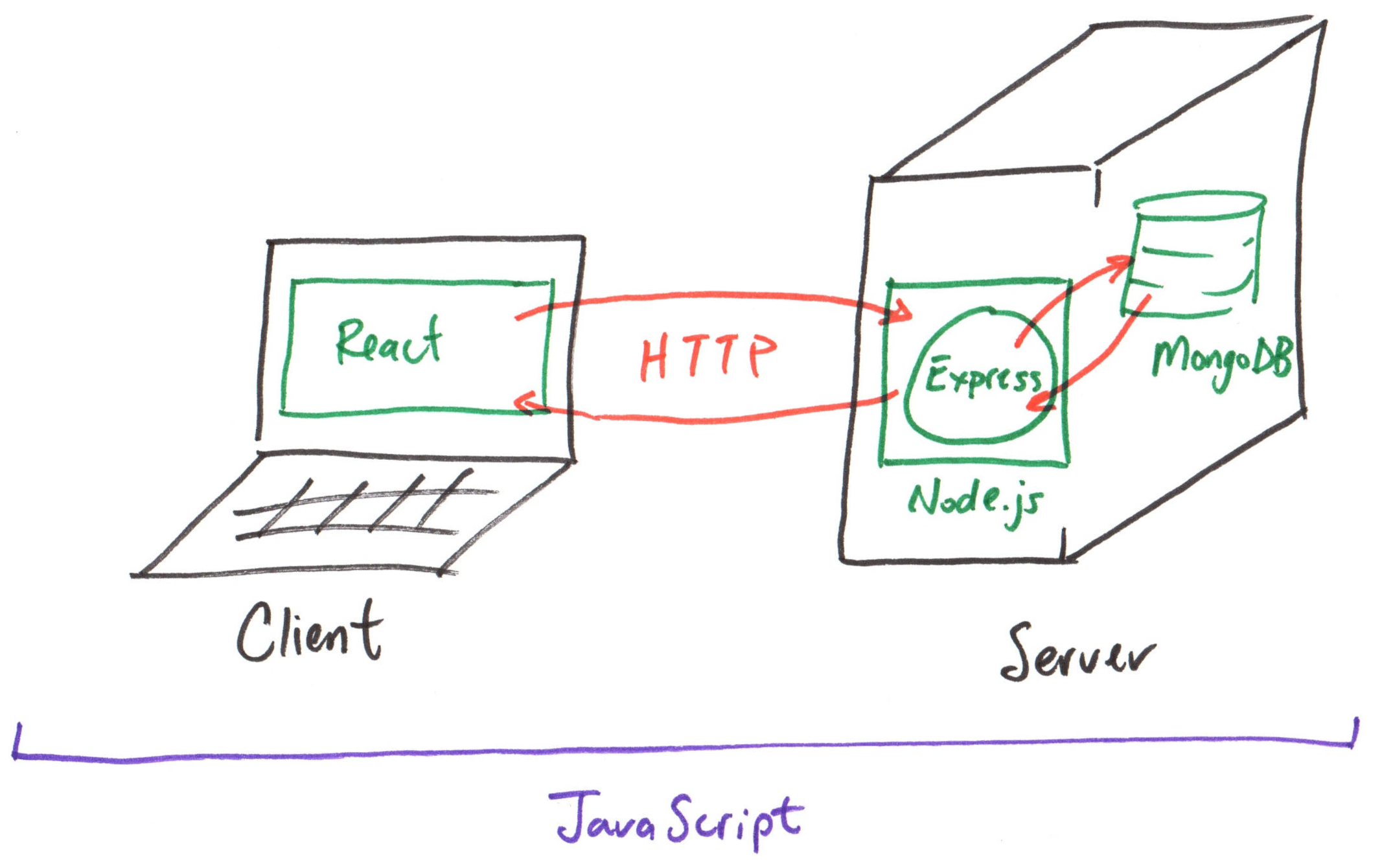
Introduction to REST API Design
REST API Design
Endpoint: A URI that corresponds to a specific resource or collection of resources in a RESTful API.
Collection Endpoint: An endpoint that corresponds to a collection of resources named using a plural noun that describes that resource.
Example: GET /api/documents
Resource Endpoint: An endpoint that corresponds to a specific resource in a collection, identified by a unique identifier path segment appended to the collection endpoint.
Example: GET /api/documents/69c3d6d488562e515a8ce5c5
Activity: REST API Design Critique
Working with your peers (2-4), review the REST API of our Express.js server for design best practices and correct any issues that you find.
Collection Endpoint: An endpoint that corresponds to a collection of resources named using a plural noun that describes that resource.
Example: GET /api/documents
MongoDB Node.js Driver
Express.js + MongoDB
Activity: Connect to MongoDB with Node.js
const client = new MongoClient(process.env.MONGODB_URI)
try {
  const conn = await client.connect()
  // Keep the database reference available for future routes.
  app.locals.db = conn.db('app')
} catch (error) {
  // eslint-disable-next-line no-console
  console.error('failed to connect to mongodb:', error)
  process.exit(1)
}
Activity: Query MongoDB with Node.js
Query the produce collection for all documents and return them as an array.
  const documents = await app.locals.db.collection('produce')
    .find()
    .toArray();
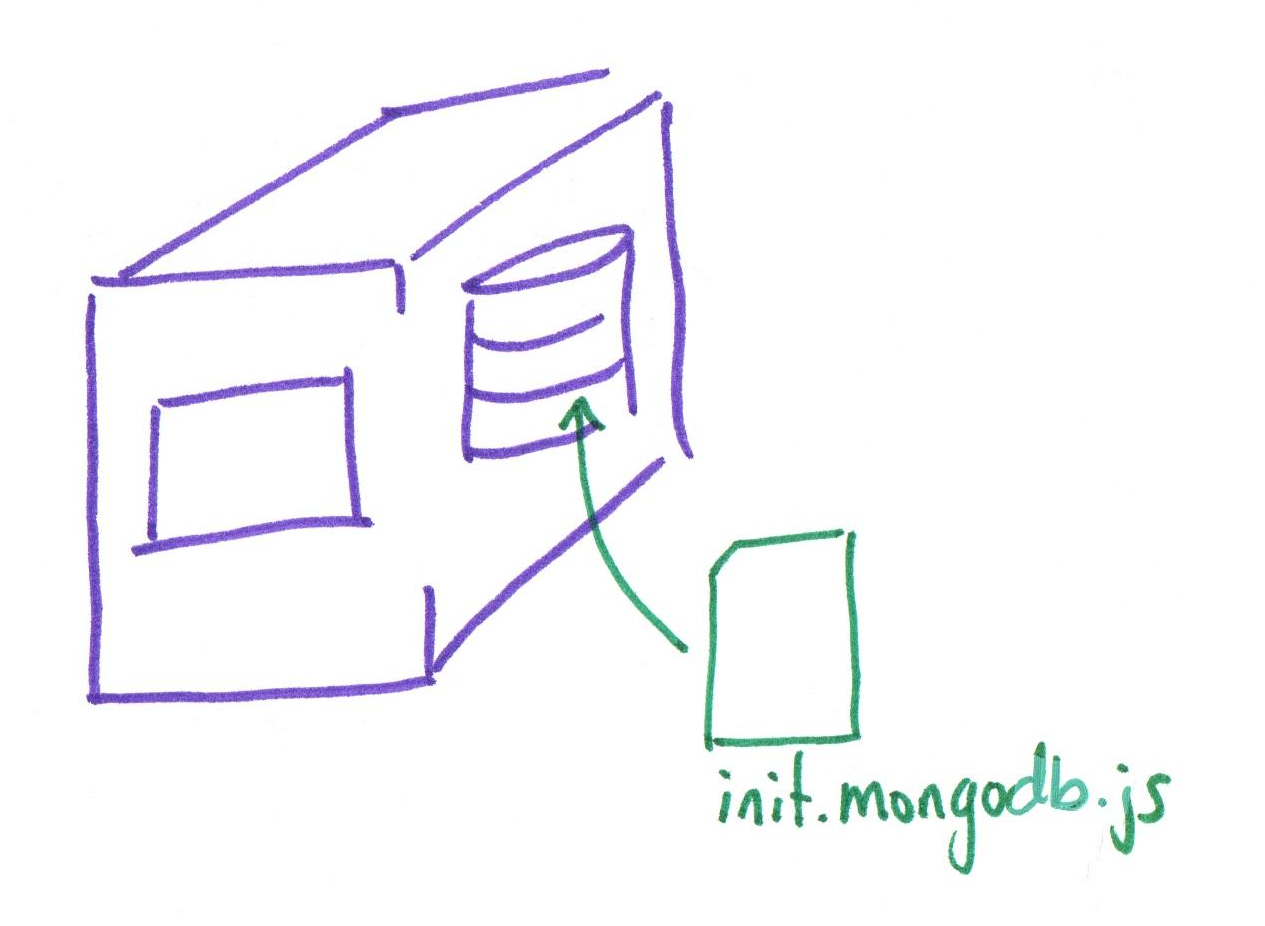
Gotcha: Initializing the Database
We use init.mongodb.js to initialize our database.
Activity: Resource Endpoint Query
Resource Endpoint: An endpoint that corresponds to a specific resource in a collection, identified by a unique identifier path segment appended to the collection endpoint.
Example: GET /api/documents/69c3d6d488562e515a8ce5c5
Working with your peers (2-4), test a query to find a specific document in the produce collection by its _id field.
Test your query using MongoDB Shell (mongosh) and then document your answer on your handout.
Gotcha: MongoDB ObjectIds
_id is not a string!
MongoDB uses the ObjectId type for the _id field of documents.
When querying for a document by its _id, you convert the string representation of the ObjectId into an actual ObjectId type:
const id = "69c3d6d488562e515a8ce5be";
const objectId = ObjectId(id);
Activity: Resource Endpoint Implementation
Working with your peers (2-4), use the Mongo Shell query to retrieve the banana document from the produce collection and implement a resource endpoint in your Express.js server to retrieve that same document by its _id.
Test the endpoint using httpBook to ensure that it returns the correct document.
Gotcha: MongoDB Shell and Node.js Driver Syntax
Mongo Shell and MongoDB Node.js Driver syntax are very similar, but they are not the same!
Refer to the Node.js Driver documentation for the correct syntax when using the MongoDB Node.js Driver in your Express.js server.
MongoDB Shell
db.documents.findOne({
  _id: ObjectId("69c3d6d488562e515a8ce5be")
})
MongoDB Node.js Driver
await app.locals.db.collection('documents')
  .findOne({
    _id: new ObjectId("69c3d6d488562e515a8ce5be")
  })
Activity: Resource Endpoint Query (Node.js Driver)
Working with your peers (2-4), write the Node.js Driver code to query the produce collection for a single document with the _id of the banana document on your handout. Then update the server code.
MongoDB Shell
db.documents.findOne({
  _id: ObjectId("69c3d6d488562e515a8ce5be")
})
MongoDB Node.js Driver
await app.locals.db.collection('documents')
  .findOne({
    _id: new ObjectId("69c3d6d488562e515a8ce5be")
  })
Route Parameters
Review: REST API Design
Collection Endpoint: An endpoint that corresponds to a collection of resources named using a plural noun that describes that resource.
Example: GET /api/documents
Resource Endpoint: An endpoint that corresponds to a specific resource in a collection, identified by a unique identifier path segment appended to the collection endpoint.
Example: GET /api/documents/69c3d6d488562e515a8ce5c5
Express.js Route Parameters
Express.js supports route parameters to capture dynamic values from the URL path.
Any path segment that starts with a colon (:) in the route definition is treated as a route parameter. Access route parameters using req.params object.
Example: (id parameter)
app.get('/api/documents/:id', async (req, res) => {
  const id = req.params.id
})
Activity: Resource Endpoint with Route Parameter
Working with your peers (2-4), update your resource endpoint implementation to use a route parameter for the document _id instead of hardcoding the banana _id in the query.
Test the endpoint using httpBook with valid and invalid _id values.
Using the Debugger
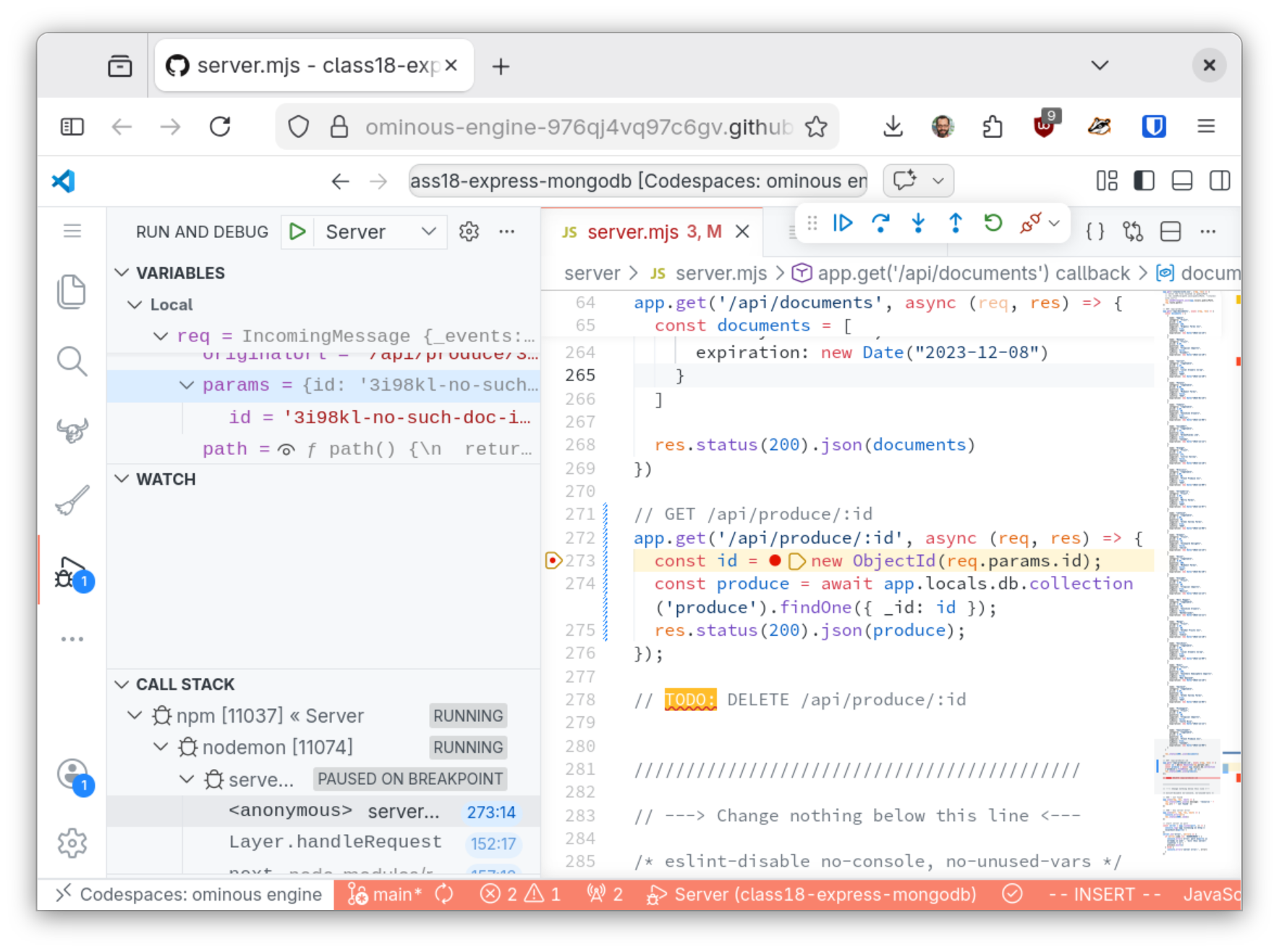
Debugger
Using the debugger you can inspect the state of a running program at a specific point in time to inspect its state (i.e. variable values).
To pause the execution at a line of code, insert a breakpoint at that line by clicking in the gutter.
Then resume execution or step to the next line of code and pause again to inspect the state of the program at that line.
Activity: Debugging a Resource Endpoint
Working with your peers (2-4), use the debugger to inspect the state of the program when using an invalid _id value in the resource endpoint query.
Route Parameter Validation
Gotcha: Invalid Route Parameters
Never trust the value of a route parameter. Always validate the value to ensure it's the correct format, type, or value before using it in your code.
Trusting invalid route parameter values can lead to errors in your code, like exceptions, or even security vulnerabilities.
Activity: Route Parameter Validation
Working with your peers (2-4), Validate the id route parameter in your resource endpoint implementation to ensure that it's a valid ObjectId string before using it in the query.
Tip: The ObjectId.isValid(id) method validates the format of ObjectId strings.
Response Status Codes in Express.js
HTTP Status Codes
Always return the appropriate HTTP status code in your response to indicate the result of the request in your API.
Found Resource
200 OK
The request was successful and the server is returning the requested resource in the response body.
Status Codes in Express.js
Always set the status code before sending the response.
Activity: Status Codes in Resource Endpoint
Working with your peers (2-4), update your resource endpoint implementation to return the appropriate status code for both valid and invalid _id values.
Use the debugger to inspect the response status code and body for both cases.
Summary
Summary
- REST API have collection endpoint and resource endpoints named after the resource.
- MongoDB Shell and MongoDB Node.js Driver have similar but different syntax.
- Express.js route parameters capture dynamic values from the URL path.
- Always validate route parameter values before using them in your code.
- Always return the appropriate HTTP status code in your API responses.
What's Next
Today: Homework 3 Released
Friday: Practice Problem Workshop (Express.js, HTTP, Express.js + MongoDB)
Wednesday, after Break: Homework 3 Due.