Class 19: REST API Design
- Review: Express.js + MongoDB
- Route Parameter Validation
- REST API Design Principles
- REST API Design Gotchas
- Homework 3 Gotchas
Review
Review: MERN Stack
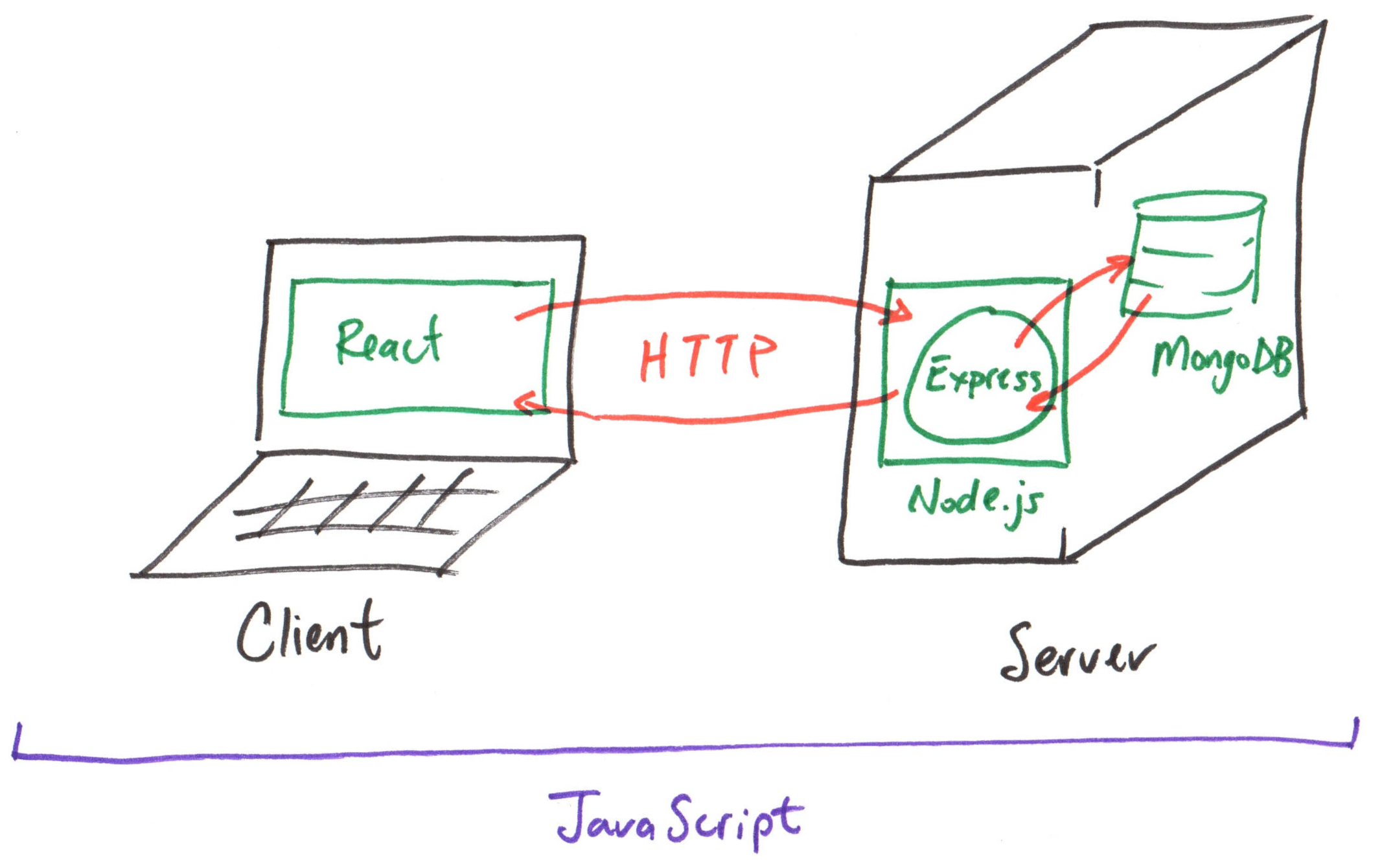
Review: HTTP Request & Response
Request:
METHOD PATH HTTP/1.1
Example:
GET /index.html HTTP/1.1
Response:
HTTP/1.1 STATUS_CODE STATUS_MESSAGE

PAYLOAD
Example:
HTTP/1.1 200 OK

<html>
  <body>...</body>
</html>
Review: MongoDB Node.js Driver
The MongoDB Node.js Driver is a library that provides an interface for connecting to and interacting with a MongoDB database from a Node.js application.
Example:
  const documents = await app.locals.db.collection('produce')
    .find()
    .toArray();
Review: Express.js Route Parameters
Express.js supports route parameters to capture dynamic values from the URL path.
Any path segment that starts with a colon (:) in the route definition is treated as a route parameter. Access route parameters using req.params object.
Example: (id parameter)
app.get('/api/documents/:id', async (req, res) => {
  const id = req.params.id
})
Review: Debugger
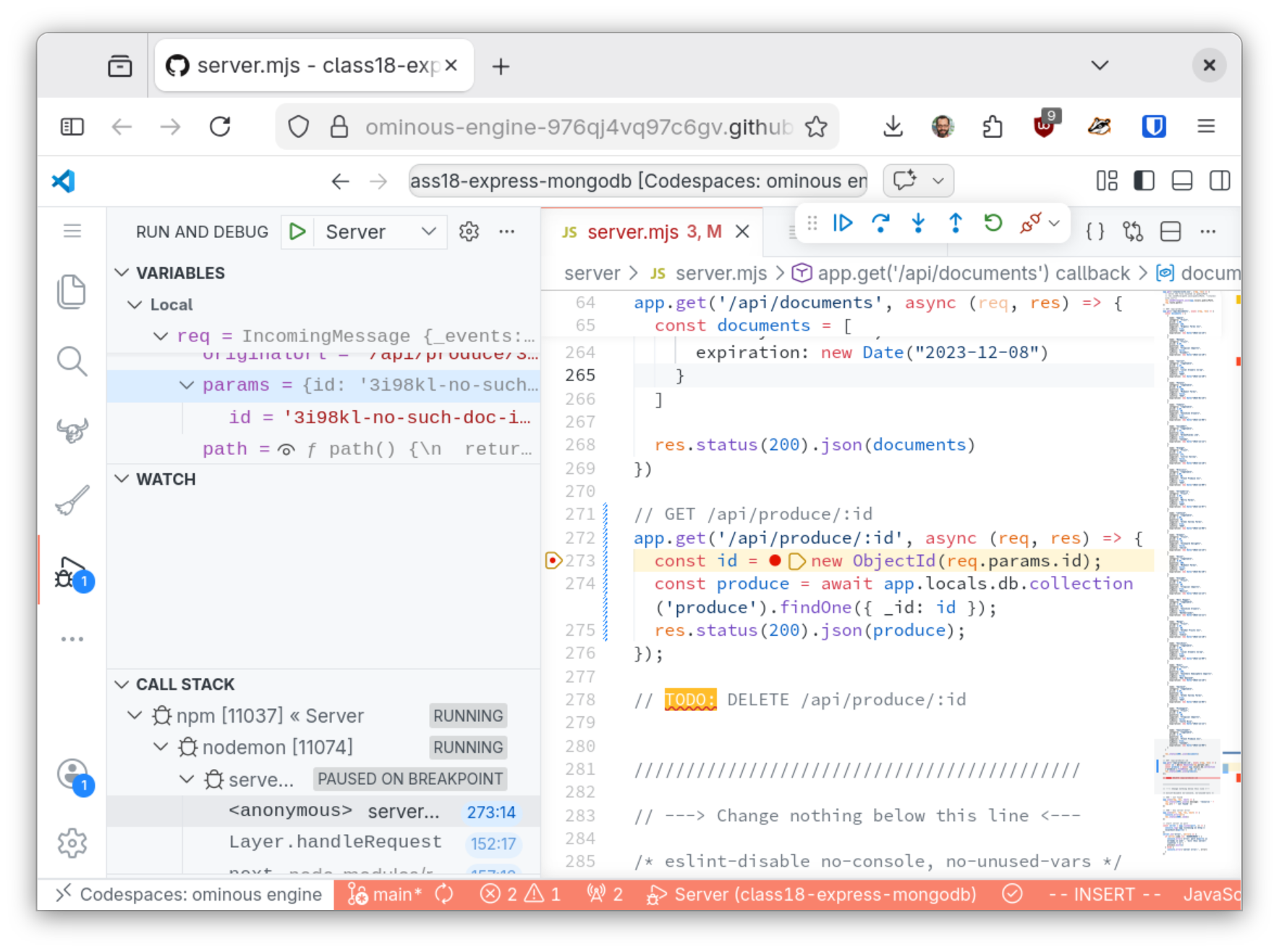
Using the debugger you can inspect the state of a running program at a specific point in time to inspect its state (i.e. variable values).
To pause the execution at a line of code, insert a breakpoint at that line by clicking in the gutter.
Then resume execution or step to the next line of code and pause again to inspect the state of the program at that line.
Route Parameter Validation
Gotcha: Invalid Route Parameters
Never trust the value of a route parameter. Always validate the value to ensure it's the correct format, type, or value before using it in your code.
Trusting invalid route parameter values can lead to errors in your code, like exceptions, or even security vulnerabilities.
Activity: Invalid Route Parameter
Working with your peers (2-4), use the debugger to inspect the state of the program when using an invalid _id value in the resource endpoint query.
Discuss how you might validate the _id route parameter to prevent this error from occurring.
Activity: Route Parameter Validation
Working with your peers (2-4), Validate the id route parameter in your resource endpoint implementation to ensure that it's a valid ObjectId string before using it in the query.
Test your implementation using both valid and invalid _id values using the debugger.
Tip: The ObjectId.isValid(id) method validates the format of ObjectId strings.
Response Status Codes in Express.js
HTTP Status Codes
Always return the appropriate HTTP status code in your response to indicate the result of the request in your API.
Found Resource
200 OK
The request was successful and the server is returning the requested resource in the response body.
Status Codes in Express.js
Always set the status code before sending the response.
Activity: Status Codes in Resource Endpoint
Working with your peers (2-4), update your resource endpoint implementation to return the appropriate status code for both valid and invalid _id values.
REST API Design
API: Application Programming Interface
An Application Programming Interface is a set of rules and protocols that allows different software pieces to communicate and transfer data with each other.

An API is a User Interface
Graphical User Interface

Application Programming Interface
GET /api/documents
GET /api/documents/:id
Designed for End-Users
Designed for Developers
MERN + API
- REST
- GraphQL
- SOAP
- XMLRPC
REST API
Representtation State Transfer API is a type of API that adheres to the constraints of REST architecture to support communication between client and server to exchange resources, like data and media.
A RESTful API supports the creation, retrieval, updating, and deletion of resources (CRUD operations) using HTTP methods.
REST Design Principles
-
ALL CRUD operations are defined by HTTP methods:
POST,GET,PUT,PATCH, andDELETE. -
All resources are accessed using URI endpoints that represent a specific resource or collection of resources.
GET /api/documentsandGET /api/documents/:id -
Every HTTP request to the API is independent of all other requests (i.e. stateless). (The request contains all the information needed to process the request.)
REST API HTTP Methods
| CRUD Operation | HTTP Method |
|---|---|
| Create (document) | POST |
| Read (collection) | GET |
| Read (document) | GET |
| Update (replace document) | PUT |
| Update (modify document) | PATCH |
| Delete (document) | DELETE |
Activity: REST API HTTP Methods
Working with your peers (2-4), identify the appropriate HTTP method for each CRUD operation for designing a REST API for the produce collection.
| CRUD Operation | HTTP Method |
|---|---|
| Create (document) | POST |
| Read (collection) | GET |
| Read (document) | GET |
| Update (replace document) | PUT |
| Update (modify document) | PATCH |
| Delete (document) | DELETE |
Resource and Collection Endpoint URIs
Activity: REST API Endpoint URIs
Working with your peers (2-4), identify the appropriate URI for each CRUD operation for designing a REST API for the produce collection.
REST API Request Body
The request body of a REST API request contains the data needed to create or update a resource. (Think of this as what you're uploading from the client to the server.)
The request body is typically sent in JSON format and must be parsed by the server to access the data.
Some requests, like GET, do not have a request body because they are only retrieving data from the server.
Activity: REST API Request Body
Working with your peers (2-4), identify which CRUD operations require a request body and what data should be included in the request body for designing a REST API for the produce collection.
Response Status Codes
HTTP status codes are standardized codes that indicate the result of an HTTP request. They are categorized into five classes:
- 1xx: Informational
- 2xx: Success
- 3xx: Redirection
- 4xx: Client Error
- 5xx: Server Error
REST API Response Status Codes
| CRUD Operation | Success Code | Error Code |
|---|---|---|
| Create (document) | 201 Created | 400 Bad Request |
| Read (collection) | 200 OK | 404 Not Found |
| Read (document) | 200 OK | 404 Not Found |
| Update (replace document) | 200 OK or 204 No Content | 400 Bad Request |
| Update (modify document) | 200 OK or 204 No Content | 400 Bad Request |
| Delete (document) | 204 No Content | 404 Not Found |
Activity: REST API Response Status Codes
Working with your peers (2-4), identify the appropriate HTTP status code for both success and error cases for each CRUD operation for designing a REST API for the produce collection.
| CRUD Operation | Success Code | Error Code |
|---|---|---|
| Create (document) | 201 Created | 400 Bad Request |
| Read (collection) | 200 OK | 404 Not Found |
| Read (document) | 200 OK | 404 Not Found |
| Update (replace document) | 200 OK or 204 No Content | 400 Bad Request |
| Update (modify document) | 200 OK or 204 No Content | 400 Bad Request |
| Delete (document) | 204 No Content | 404 Not Found |
REST API Response Body
The response body of a REST API response contains the data returned from the server to the client. (Think of this as what you're downloading from the server to the client.)
The response body is typically sent in JSON format and must be parsed by the client to access the data.
Though if there is no data to return, like in a successful DELETE request, the response body can be empty with a status code of 204 No Content.
Activity: REST API Response Body
Working with your peers (2-4), identify which CRUD operations require a response body and what data should be included in the response body for designing a REST API for the produce collection.
Hierarchical Resources
In some cases, resources may have a hierarchical relationship, such as a document resource that belongs to a collection resource. In this case, the URI for the resource endpoint should reflect this hierarchy.
Example:
GET /api/postsGET /api/post/:collectionId/commentsGET /api/post/:collectionId/comments/:commentId
Gotchas: REST API Design
-
URIs are nouns that represent resources, not verbs that represent actions. yes:
POST /api/ordersno:GET /api/create-order -
Avoid file extensions in URIs, like
.jsonor.xml, to allow for flexibility in response formats. yes:GET /api/documents/12345no:GET /api/documents/12345.json -
Resources are plural nouns to represent collections of resources. yes:
GET /api/documentsno:GET /api/document
Homework 3 Gotchas
Homework 3 Gotchas
- Only read operations in MongoDB return document(s); create, update, and delete operations return a result object that contains information about the operation, but not the document(s) itself.
- MongoDB is strictly typed: string ≠ ObjectId
- Express routes define the HTTP verb/method.
- Always use await when making calling the database; otherwise, you'll get a pending promise instead of the result.
Summary
Summary
- Validate route parameters to prevent errors and security vulnerabilities in your API.
- Use the appropriate HTTP status codes in your API responses to indicate the result of the request.
- Design REST APIs using the principles of REST architecture, including using HTTP methods for CRUD operations and using URIs to represent resources and collections of resources.
What's Next
Wednesday:
- Class: Filtering, Text Search, & API Query Parameters
- Homework 3 Due
- Project 2, Milestone 3 Assigned
Friday: Practice Problem Workshop
Next Week: Exam I