Class 23: Asynchronous Client-Side HTTP Requests
- Review: REST API Security Best Practices
- Client-Side HTTP Requests
- Asynchronous Request UX Design Patterns
Review
REST API Security Best Practices
- Keep all Node.js packages up to date (especially Express.js and MongoDB).
- Serve your API over HTTPS (not HTTP) using a TLS certificate.
- Never trust user input. Always validate and sanitize input on the server side.
- Employ HTTP security-related response headers.
- Reduce server software identifying information in HTTP response headers.
- Require authentication for privileged operations or private resources.
- Rate limit API requests to prevent abuse and denial-of-service attacks.
Review: MERN Stack
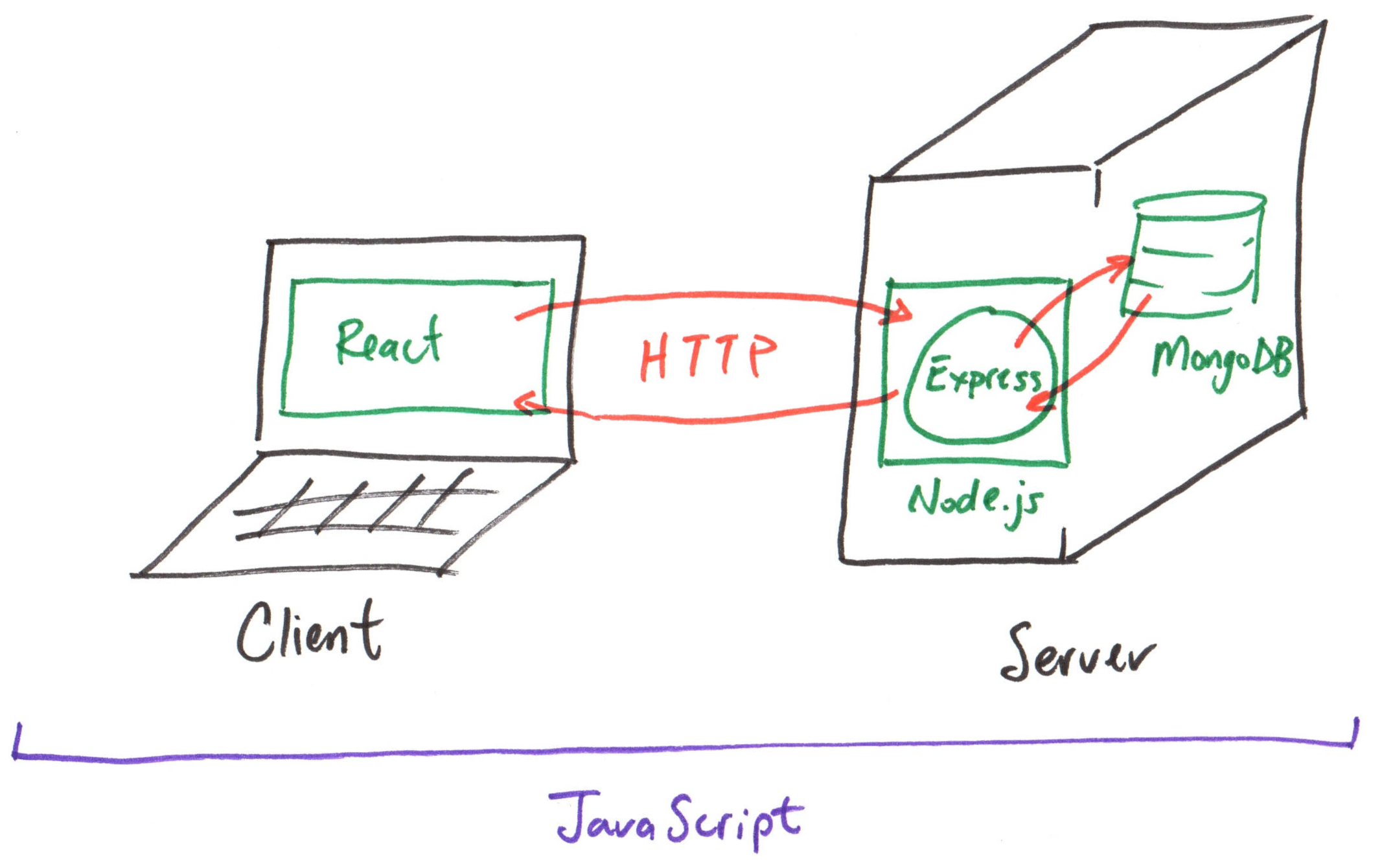
Client-Side HTTP Requests
Asynchronous Client-Side HTTP Requests
The old way:
getXMLHttpRequest("/api/endpoint", (error, data) => {
  if (error) {
    console.error("Error:", error);
  } else {
    console.log(data);
  }
});
Asynchronous Client-Side HTTP Requests
The new way:
fetch("/api/endpoint")
  .then((response) => response.json())
  .then((data) => {
    console.log(data);
  })
  .catch((error) => {
    console.error("Error:", error);
  });
The axios way:
axios.get("/api/endpoint")
  .then((response) => {
    console.log(response.data);
  })
  .catch((error) => {
    console.error("Error:", error);
  });
(Automatically parses JSON response data.)
Axios
A promise-based HTTP client for the browser and Node.js.
Compared to the built-in fetch API, Axios provides:
- Automatic JSON data transformation.
- Intercepting requests and responses.
- Request cancellation.
Activity: Getting Started with Axios
As a class, let's try making some requests with Axios.
-
Install Axios.
-
Create a test script:
client/test-http.mjs -
Define the base URL.
-
Make a GET request:
const response = await axios.get("/api/produce")
console.log(response.data)
Gotcha: React HTTP Requests Cannot await
React does not permit await at the top level of a component.
Instead, you must use a promise fulfillment callback: .then()
No (await)
const response =
  await axios.get("/api/produce")

console.log(response.data)
Yes (.then())
axios.get("/api/produce")
  .then((response) => {
    console.log(response.data);
  })
Promise Fulfillment Callbacks
A promise is an object that represents the eventual completion (or failure) of an asynchronous operation (and its resulting value).
get() returns a promise
axios.get("/api/produce")
  .then((response) => {
    console.log(response.data);
  })
.then() is a method that takes a callback function to handle the resolved value of the promise.
Activity: Async HTTP with Promises
Update your test-http.mjs script to use promise fulfillment callbacks instead of await.
axios.get("/api/produce")
  .then((response) => {
    console.log(response.data);
  })
Error Handling with Axios
axios.get("/api/produce")
  .then((response) => {
    console.log(response.data);
  })
  .catch((error) => {
    console.error("Error:", error);
  })
  .finally(() => {
    console.log("Request completed.");
  })
.then()handles successful responses..catch()handles errors..finally()executes code after the request completes, regardless of success or failure.
Query Parameters with Axios
The config object can include a params property to specify query parameters.
{
  params: {
    category: "fruit"
  }
}
axios.get("/api/produce", {
  params: {
    category: "fruit"
  }
})
  .then((response) => {
  })
  .catch((error) => {
  })
  .finally(() => {
  })
Activity: Query Parameters with Axios
Update your test-http.mjs script to include query parameters in your request.
axios.get("/api/produce", {
  params: {
    category: "fruit"
  }
})
HTTP Requests in React
Gotcha: Rendering Asynchronous Data in React
When making HTTP requests in a React component, you cannot directly use await or .then() in the component body.
No! (await)
export default function App() {
  const response =
    await axios.get("/api/produce");

  ...
}
No! (.then())
export default function App() {
  axios.get("/api/produce")
    .then((response) => {
      console.log(response.data);
    });

  ...
}
Side Effect Hook
A side effect is any operation that interacts with the outside world (e.g., making an HTTP request, manipulating the DOM, setting up a timer).
import { useEffect } from "react"

export default function App() {
  useEffect(() => {
    // Side effect code (e.g., HTTP request) goes here
  }, [])

  ...
}
Activity: HTTP Requests in React
Working with your peers (2-4), update the App component to asynchronously fetch the produce collection data on your handout.
import { useEffect } from "react"

export default function App() {
  useEffect(() => {
    // Side effect code (e.g., HTTP request) goes here
  }, [])

  ...
}
Big Picture: Rendering Asynchronous Data in React
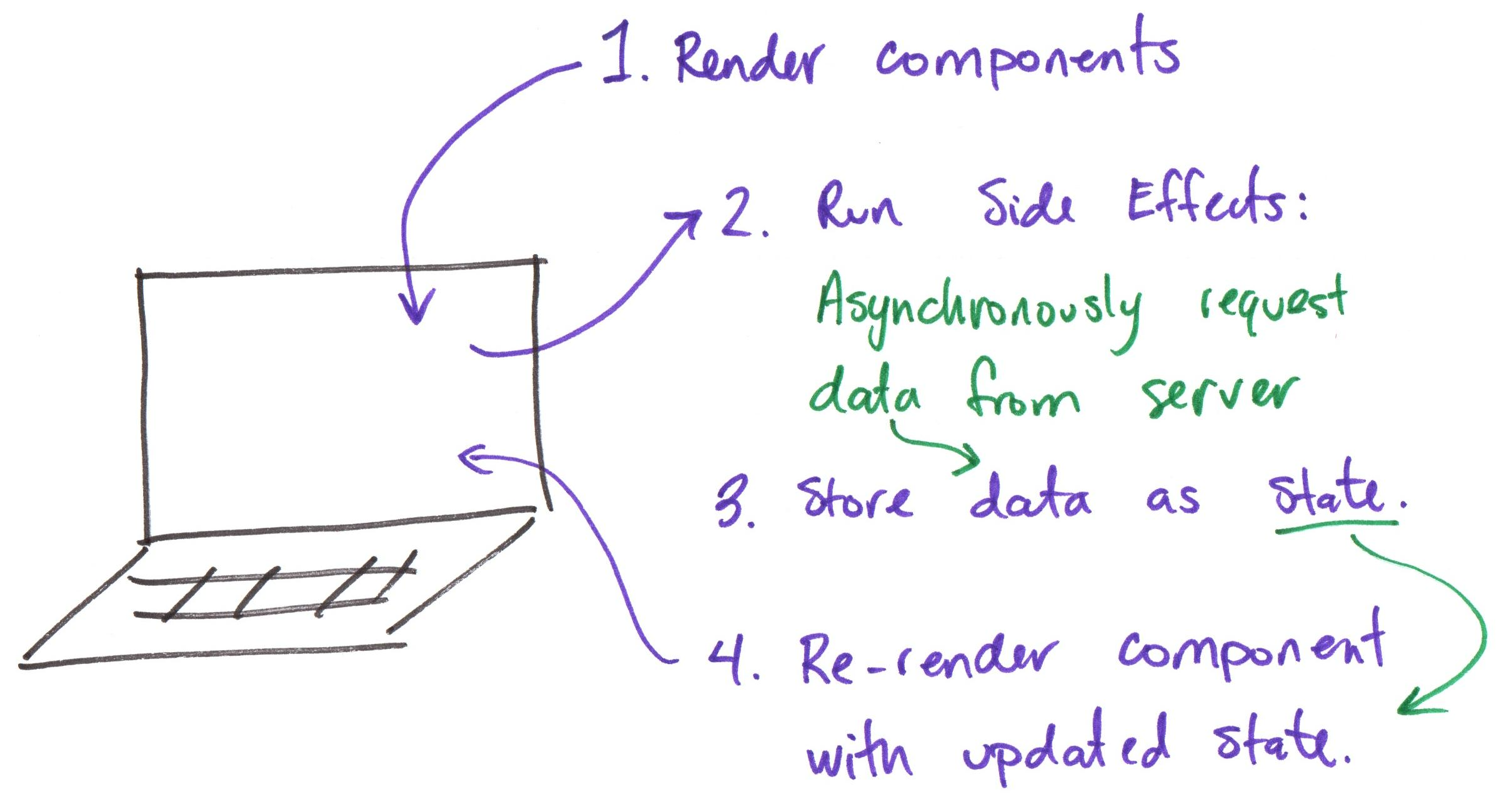
Gotcha: Event Handlers Don't Use Side Effects
Event handlers (e.g., onClick) run outside of React's rendering process. Therefore, you can use .then() directly in an event handler.
<button onClick={() => {
  axios.get("/api/produce")
    .then((response) => {
      console.log(response.data);
    });
}}>
  Fetch Produce
</button>
Asynchronous Request UX Design
Asynchronous Request UX Design
Design considerations:
- What is the user experience when the data is loading? (i.e. pending)
- What is the user experience when the data fails to load? (i.e. rejected)
- What is the user experience when the data successfully loads? (i.e. fulfilled)
Activity: Asynchronous Design Patterns
Working with your peers (2-4), design the user experience for the three states of an asynchronous HTTP request in React at the board:
- What is the user experience when the data is loading? (i.e. pending)
- What is the user experience when the data fails to load? (i.e. rejected)
- What is the user experience when the data successfully loads? (i.e. fulfilled)
Discussion: Asynchronous Design Patterns
-
When data is pending, show a loading indicator.
-
When data is rejected, show an error message with a retry option.
-
When data is fulfilled, show the data in the UI.
Summary
Summary
- Asynchronous HTTP requests can be made using the
fetchAPI or theaxioslibrary. - In React, do not use
awaitor.then()directly in the component body. - The
useEffecthook is used to perform side effects (e.g., HTTP requests) in React components. useEffectis not used for event handlers; you can use.then()directly in an event handler.- Design the user experience for pending, rejected, and fulfilled states of asynchronous requests.
What's Next
Wednesday: Side Effects + Asynchronous UX Design Patterns
Project 2, Final Milestone released