Class 24: Asynchronous Request UX & Debouncing
- Review: Client-Side HTTP Requests
- Asynchronous Request UX Design
- Side Effect Dependencies
- Debouncing
Review
Review: MERN Stack
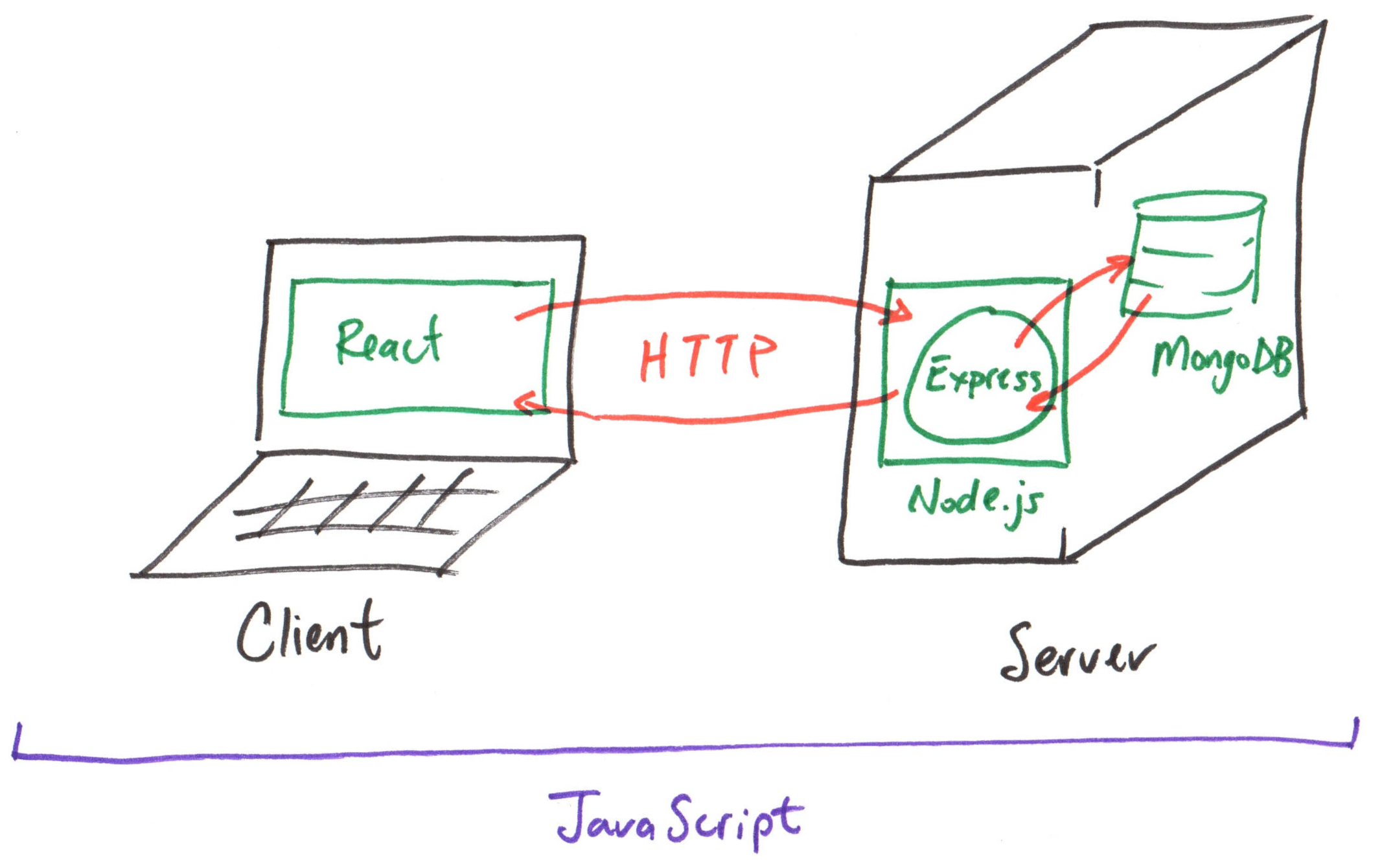
Review: Asynchronous Client-Side HTTP Requests
Axios is a promise-based HTTP client for the browser and Node.js.
When using making HTTP requests at the top level of a React component, use the promise fulfillment callback to receive the response.
axios.get("/api/produce", {
  params: {
    category: "fruit"
  }
})
  .then((response) => {
  })
  .catch((error) => {
  })
  .finally(() => {
  })
Review: Side Effect Hook
A side effect is any operation that interacts with the outside world (e.g., making an HTTP request, manipulating the DOM, setting up a timer).
import { useEffect } from "react"

export default function App() {
  useEffect(() => {
    // Side effect code (e.g., HTTP request) goes here
  }, [])

  ...
}
Big Picture: Rendering Asynchronous Data
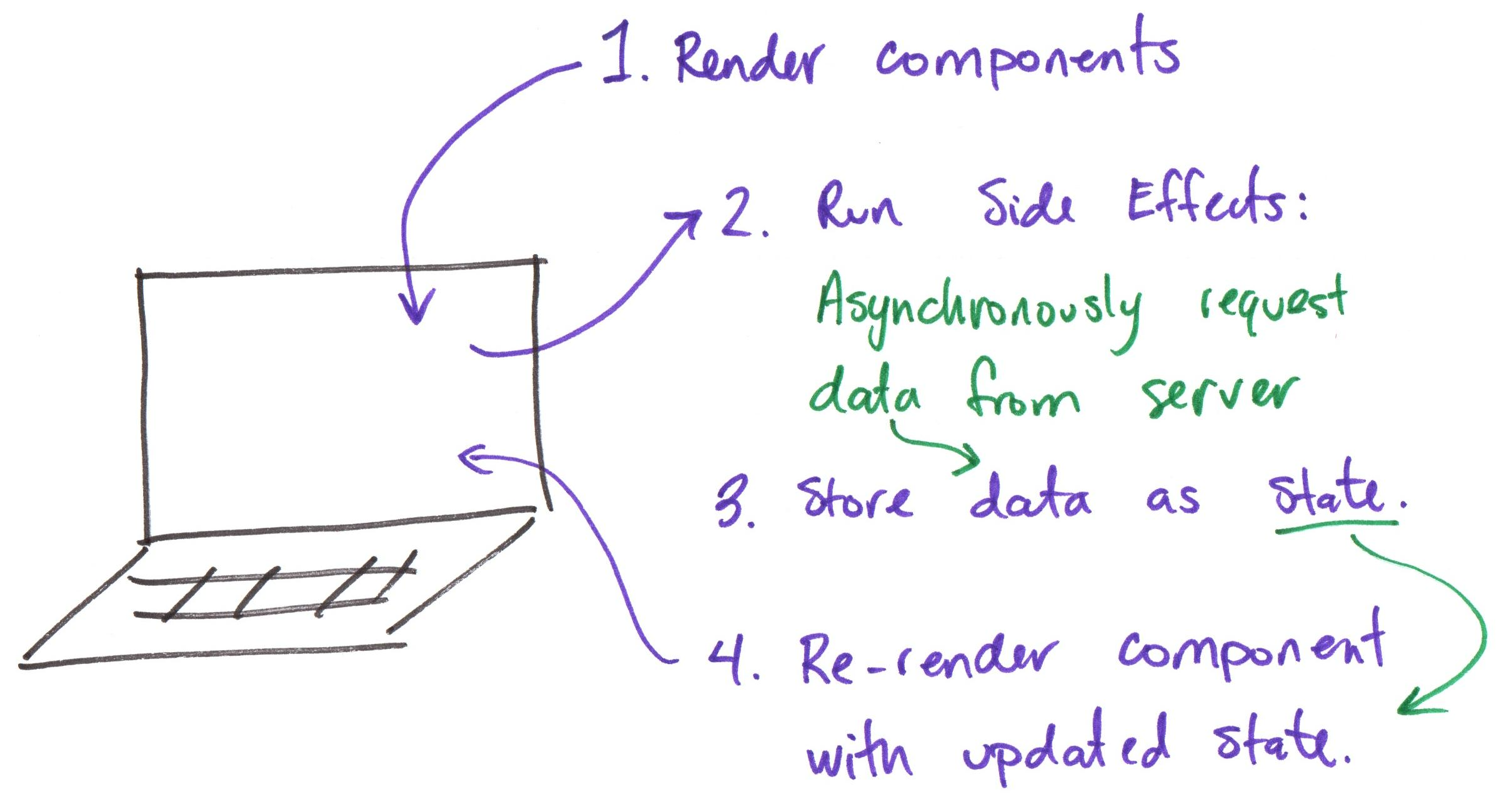
Review: Asynchronous Design Patterns
-
When data is pending, show a loading indicator.
-
When data is rejected, show an error message with a retry option.
-
When data is fulfilled, show the data in the UI.
Asynchronous Request UX Design
Activity: Asynchronous UX Design
Working with your peers (2-4), go to the board and sketch a design that supports loading the produce data (an unordered list) in an SPA with the following states:
- When data is pending, show a loading indicator.
- When data is rejected, show an error message with a retry option.
- When data is fulfilled, show the data in the UI.
Activity: Plan States for Asynchronous UX
Working with your peers (2-4), plan the states needed to support the pending, rejected, and fulfilled states for the asynchronous UX on your handout (Question 1).
Then, plan the code to correctly set each state. (Question 2)
Lastly, your Codespace has an existing design for pending, rejected, and fulfilled states. (We don't have time to implement your design during class.) Implement your planned code from the handout in the Codespace. (Only implement the states, not the design.)
Review: Event Handlers Don't Use Side Effects
Event handlers (e.g., onClick) run outside of React's rendering process.
<button onClick={() => {
  axios.get("/api/produce")
    .then((response) => {
      console.log(response.data);
    });
}}>
  Fetch Produce
</button>
Do not use a side effect hook (e.g., useEffect) in an event handler.
Activity: Plan Retry
Working with your peers (2-4), plan the code to implement a retry button that re-attempts to load the produce data when requested by the user on your handout (Question 3).
Side Effect Dependencies
How to Run a Side Effect
A side effect runs outside of React's rendering process.
A side effect will run every time the component is rendered.
useEffect(() => {
  console.log("This runs when the component is rendered.");
})
Re-run a Side Effect
A side effect can be re-run if its dependencies change.
Side Effect Dependencies are React values (i.e. props, state, etc.) that are used by the side effect.
When a dependency's value changes, the side effect will run again.
Side Effect Dependencies
Specify side effect dependencies (i.e. props, state, etc.) in the second argument of useEffect as an array.
export default function App({ prefix }) {
  const [count, setCount] = useState(0);

  useEffect(() => {
    console.log(prefix + "This runs when the component is rendered and when prefix or count changes.");
  }, [prefix, count])
}
[prefix, count] is the dependency array for the side effect.
Side Effect Dependencies
Run side effect every render:
useEffect(() => {})
Run side effect only on initial render:
useEffect(() => {}, [])
Run side effect when prop or state changes (and on initial render):
useEffect(() => {}, [prop1, prop2, state1, state2, ...])
Discussion: Event Filtering & Search
For your final milestone (project 2), you will implement live search and tag filtering.
How might you request filtered event data when a user clicks a tag chip?
How might you render the search results when the user types a query into the search bar?
Debouncing
Live Search
A common interactive design pattern employed in SPAs: as the user types a query into a search bar, the search results are updated in real time.
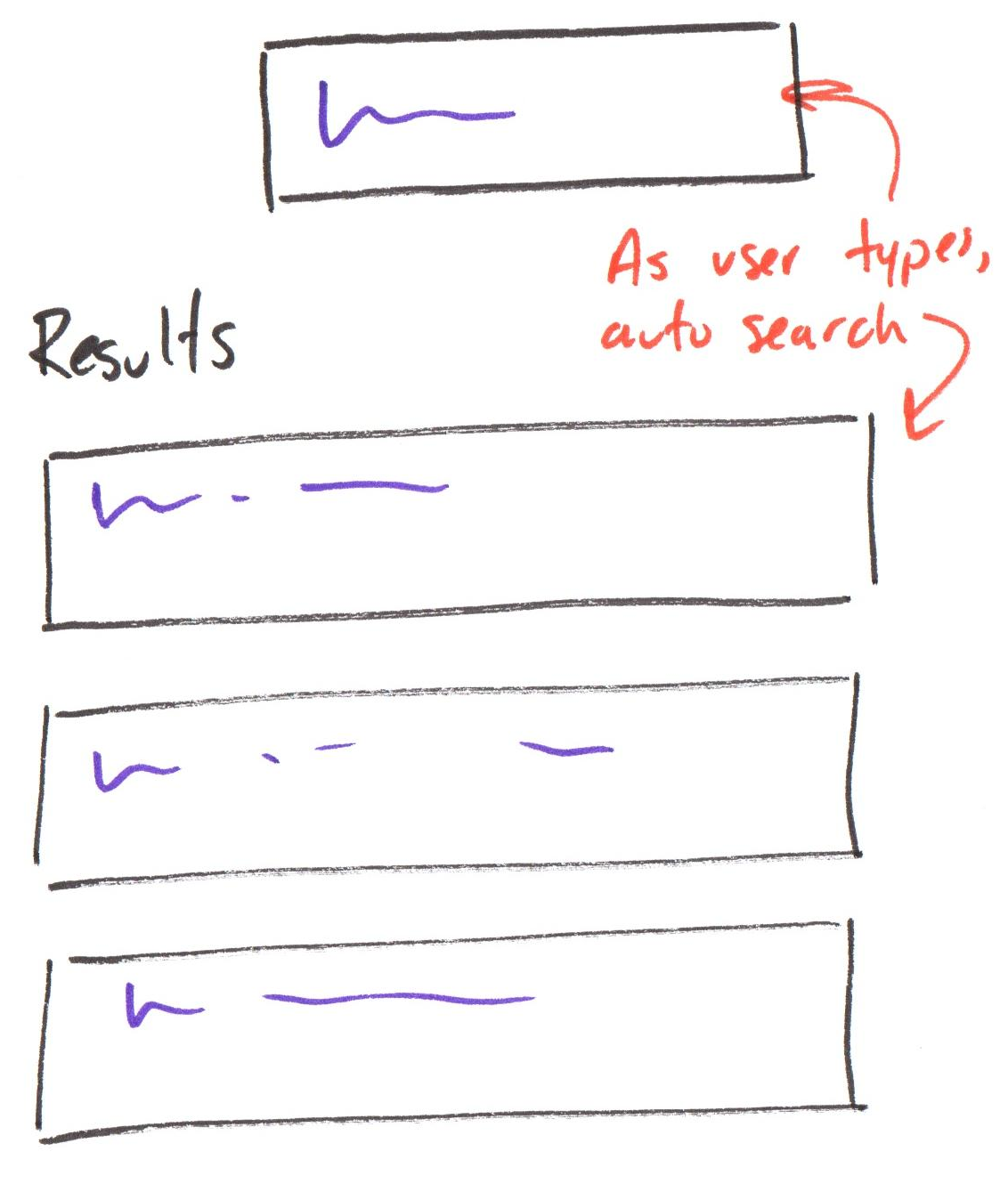
Activity: Live Search HTTP Requests
Working with your peers (2-4), answer question 4 on your handout.
Try the search bar in your Codespace to help you answer the question.
Debouncing
A technique to limit how often a function gets executed.
Debouncing prevents extra activations or slow functions from triggering too often.
Example:
In a live search, limit sending an HTTP request to the server by only sending the request after the user has stopped typing 500 milliseconds.
Debouncing in React
import { useDebounce } from "use-debounce"

...

const [ DEBOUNCED_VALUE ] = useDebounce(VALUE_TO_DEBOUNCE, 500);
DEBOUNCED_VALUE will only update to the latest value of VALUE_TO_DEBOUNCE after VALUE_TO_DEBOUNCE has not changed for 500 milliseconds.
Activity: Plan Search Debouncing
Working with your peers (2-4), plan the code to debounce the search query in the search bar on your handout (Question 5).
Then implement the code in your Codespace and lastly answer questions 6 and 7 on your handout.
Debouncing Best Practices
- Debounce to minimize expensive operations (e.g., HTTP requests, complex calculations, etc.) that are triggered by user input.
- A delay of 500 milliseconds is a common choice for debouncing user input.
- Use the debounced value (not the original value) to trigger side effects (e.g., HTTP requests).
Summary
Summary
- Provide good UX for asynchronous requests by handling pending, rejected, and fulfilled states.
- Use side effect dependencies to control when a side effect runs.
- Use debouncing to limit how often a function gets executed in response to user input.
Discussion: Class Next Week
How would you like to use class next week?
What's Next
Wednesday: Project 2, Final Milestone released
Friday: Last practice problem workshop!