Oral Exam I: Mock Technical Interview
For the first oral exam, you will participate in a mock technical interview. In this interview you will demonstrate your ability to quickly prototype components and communicate your understanding of technical concepts in a professional setting.
Scheduling
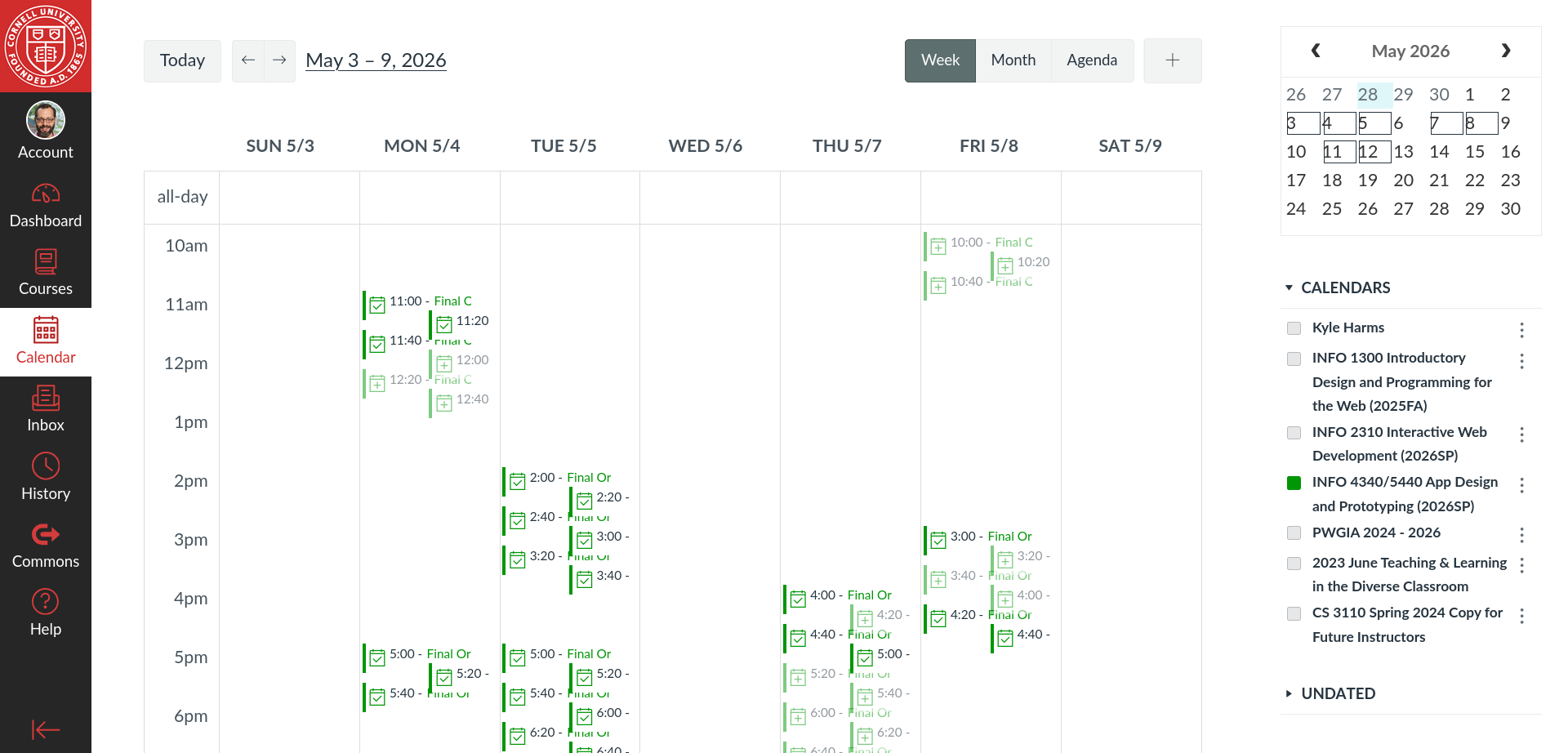
Mock performance reviews will be held from Monday, September 28th to Friday, October 2nd, 2026.
Schedule your interview time slot in Canvas no later than Sunday, September 27th at 11:59pm. The oral exam time slots are on a first-come, first-served basis. If you do not sign up for an oral exam time slot by the deadline, you will receive a 0 for the exam.
Professionalism is important. Not showing up to your scheduled appointment or canceling within 24 hours of your scheduled appointment will result in 0 credit for the exam. No exceptions.
To schedule in Canvas, select the Calendar tab in the left sidebar, then show only the INFO 4340/5440 calendar. Then pick a time slot that works for you and click on it to sign up.
Format
The mock technical interview will last a maximum of 15 minutes. (You may finish early, but there is a hard stop at 15 minutes.) A timer will be present during the interview to help you manage your time.
You will be provided an exam repository with a partially implemented app. You should have the repository open as a Codespace (or Dev Container in Docker) before the interview begins. Your repository and codespace should be unmodified at the start of the exam. Any modifications made to the repository or codespace before the exam begins is considered a violation of the Code of Academic Integrity.
At the start of your interview, you will be randomly assigned an issue to modify the existing interface prototype in the exam repository. All issues will require that you create a new component and integrate it into the existing app (like Homework 3 and the oral exam in-class preparation activity.) You should be able to demonstrate the following skills during the interview as part of completing the assigned issue:
- creating components
- passing props
- using reactive variables
- interpolating reactive variables into the template
- binding props to reactive variables
- handling events
- emitting events
- conditionally rendering using
v-if - conditionally styling elements using
:classbindings - using the
v-fordirective to render lists of elements - employing watchers to react to changes in reactive variables
- binding inputs to reactive variables with
v-model
(No TailwindCSS or DaisyUI skills will be evaluated during the exam.)
During the interview, you will be asked to think aloud and explain your reasoning as you work through the problem.
You will be provided with a syntax guide and scratch paper. You may additional access the following resources during the exam without penalty: Mozilla Developer Network (MDN), Vue.js Documentation, TailwindCSS Documentation, and DaisyUI Documentation. You may not use any other resources, including your notes, the internet, or AI tools like GitHub Copilot.
Your responses will be evaluated for clarity and how effectively you communicated your understanding of the content you've learned in this course.
Grading
Your oral exam will be evaluated on the following criteria:
- Communication: How effectively you communicated your understanding of the technical concepts and your problem-solving process.
- Problem-Solving: How effectively you demonstrated understanding of the problem, approaching it systematically, and incrementally solving it using the skills you've learned in this course.
- Technical Competency: How effectively you applied the technical skills you've learned in this course to solve the problem.
- Professionalism: How effectively you demonstrated professionalism during the interview, including being on time, being prepared, and communicating respectfully.
Communication (25%)
| Grade | |
|---|---|
| Pass (Full) | Thinks aloud throughout the interview without constant prompting. Clearly explains what they are doing and why, using correct Vue.js vocabulary (component, prop, emit, reactive variable, v-model, etc.). Answers to follow-up questions are accurate and specific. Asks clarifying questions when the issue is ambiguous. |
| Incomplete (Half) | Thinks aloud some of the time, but often needs prompting. Explains what is being typed, but the why is vague or missing. Vue.js vocabulary is sometimes missing or used incorrectly (e.g. calls a prop a "variable"). Answers to follow-up questions are general. |
| Fail (None) | Mostly silent, even with prompting. Explanations are minimal, inaccurate, or just read the code aloud. Unable to explain what their code does or why. |
Problem-Solving (25%)
| Grade | |
|---|---|
| Pass (Full) | Identifies what the issue needs before coding (new component, which component owns the data, how data moves between parent and child). Works incrementally: creates the component, adds it to the app, checks it in the browser, then adds the next piece. Debugs systematically (reads the error, checks the browser). Needs little guidance and corrects course quickly when nudged. |
| Incomplete (Half) | Generally understands the issue, but the approach is somewhat unorganized (e.g. writes a lot of code before testing it). Debugging is mostly trial-and-error. Needs several nudges to stay on track. |
| Fail (None) | Does not understand what the issue is asking for. No clear approach; jumps around or guesses. Unable to make progress or debug problems, even with guidance. |
Technical Competency (25%)
| Grade | |
|---|---|
| Pass (Full) | Creates the component and integrates it into the app. Correctly applies the techniques from class (props, emits, reactive variables, v-model, v-if, v-for, :class, etc.) to get data into and out of the component. All or nearly all acceptance criteria are met. Minor syntax errors are fixed independently. |
| Incomplete (Half) | Creates the component, but integration is incomplete or only partly working. Some techniques are misapplied or need significant help (e.g. unsure how to get data into or out of the component). Some acceptance criteria are met. |
| Fail (None) | Unable to create a working component or integrate it into the app, even with guidance. Techniques from class are missing or used incorrectly. Few or no acceptance criteria are met. |
Professionalism (25%)
| Grade | |
|---|---|
| Pass (Full) | On time and prepared: Codespace open, running, and unmodified (git status clean; no Copilot). Appropriately dressed (not formal, but not sweatpants and flip-flops). Communicates respectfully and stays composed and engaged, even when stuck. Uses only the allowed references. |
| Incomplete (Half) | Slightly late or not fully prepared (e.g. Codespace not running or needs to be reset). Generally respectful, but disengaged or visibly flustered at times. |
| Fail (None) | Significantly late or unprepared. Unprofessional or disrespectful conduct, or does not follow the exam rules (e.g. uses notes or other resources). |
Preparation
The exam will use the same format as the in-class mock technical interview preparation activity. Additionally, homework 3 is nearly identical in format to the exam (e.g. each issue is about creating a component and integrating it into an existing app).
Prepare by practicing the Vue.js competencies above by creating a component and integrating it into an existing app. You can use your Homework 3 repository (after you submit your sprint 2) or the in-class activity repository for practice. You will find this easier if you study with a partner. You both can come up with a new "issue" and ask the other person to implement it.
Do not limit yourself to a calculator. You can make up issues that don't make much sense for a calculator app, but will let you practice the Vue.js competencies. For example add a checkbox to the app and then use conditional rendering to show or hide some other components. (This is not a design exercise. This is about demonstrating that you can take an issue, understand it, and create components, get data into and out of them, and communicate your understanding of the technical concepts to someone else.)
Before the Interview
You need not wear formal dress nor business casual for this mock interview, but also don't show up in sweatpants and flip-flops.
Open your exam repository as a Codespace and have it up and running before the exam starts. Make no changes to the repository or Codespace.
Wait until called before entering the examination room (Mallot 301D).
The exam timer starts exactly at your scheduled time, even if you are not present or your Codespace is not running. If you arrive late, you will have less time to answer the questions.