Class 3: Learning Vue.js Independently
Agenda
- Review: Last Class
- Vue.js Components
- Vue.js Exploration
- Troubleshooting Vue.js Apps
Review: Last Class
Review: App
App, short for application, is an interactive program for computational devices (i.e. phones) typically designed to support users with tasks.
Apps are Expensive!
- ~$100,000 to $250,000
- ~3 months to 12 months
Review: Prototype
A user interface prototype is a hypothesis — a candidate design solution that you consider for a specific design problem.
Source: NN/Group
Prototyping Methods
- Low-Fidelity (Sketches, Wireframes, Paper Prototypes)
- Medium-Fidelity (Digital Wireframes, Clickable Prototypes)
- High-Fidelity (Visual Designs, Functional Prototypes)
Review: Vue.js
Vue.js is an approachable, performant and versatile framework for building web user interfaces.
Source: https://vuejs.org/
Review: Primary Course Learning Objective
Learn how to independently approach problems and technologies that are new to you.
- Tutorials
- Examples
- Documentation
- Ask ChatGPT
- Exploration & Experimentation
Vue.js
Discussion: What did you learn about Vue.js?
For today's class preparation, you independently explored Vue.js using your Homework 1 repository.
Single Page Applications (SPAs)
A Vue.js app is a Single Page Application (SPA).
An SPA (Single-page application) is a web app implementation that loads only a single web document (i.e. HTML), and then updates the body content of that single document via JavaScript […]
Source: https://developer.mozilla.org/en-US/docs/Glossary/SPA
Components -- .vue Files
- Each
.vuefile is a component. - Each component has:
<template>: HTML structure<script>: JavaScript logic<style>: CSS styling
ButtonCounter.vue:
<script setup>
import { ref } from 'vue'
const count = ref(0)
</script>

<template>
  <button @click="count++">{{ count }}</button>
</template>

<style scoped>
button {
  font-size: 1.5em;
  padding: 0.5em 1em;
}
</style>
Component $\approx$ HTML Tag
- Components can be imported and used in other components.
- Using a component is similar to using an HTML tag.
App.vue:
<script setup>
import ButtonCounter from './ButtonCounter.vue'
</script>

<template>
  <h1>Button Counter</h1>
  <ButtonCounter />
</template>
Practice
Tips: Learning Unfamiliar Technology
- Be curious.
- Don't be afraid to break things.
- Explain what the code is doing to yourself (or others).
- Build minimum working examples to try one thing at a time.
Activity: Vue.js SPA Exploration
Working with a peer, answer the following questions on your handout:
- Where does the app "start"? What is the main?
- How does the
<ButtonCounter>component work? - How would you add a second button counter to the app?
- How would you style the app to change the font and center the content?
App.vue:
<script setup>
import ButtonCounter from './ButtonCounter.vue'
</script>

<template>
  <h1>Button Counter</h1>
  <ButtonCounter />
</template>
ButtonCounter.vue:
<script setup>
import { ref } from 'vue'
const count = ref(0)
</script>

<template>
  <button @click="count++">{{ count }}</button>
</template>

<style scoped>
button {
  font-size: 1.5em;
  padding: 0.5em 1em;
}
</style>
Tips: Learning Unfamiliar Technology
- Be curious.
- Don't be afraid to break things.
- Explain what the code is doing to yourself (or others).
- Build minimum working examples to try one thing at a time.
Minimum Working Example
A minimum working example is the smallest amount of code that demonstrates a concept or problem.
Examples:
- A Vue.js component
- Event handling
- Conditional Rendering
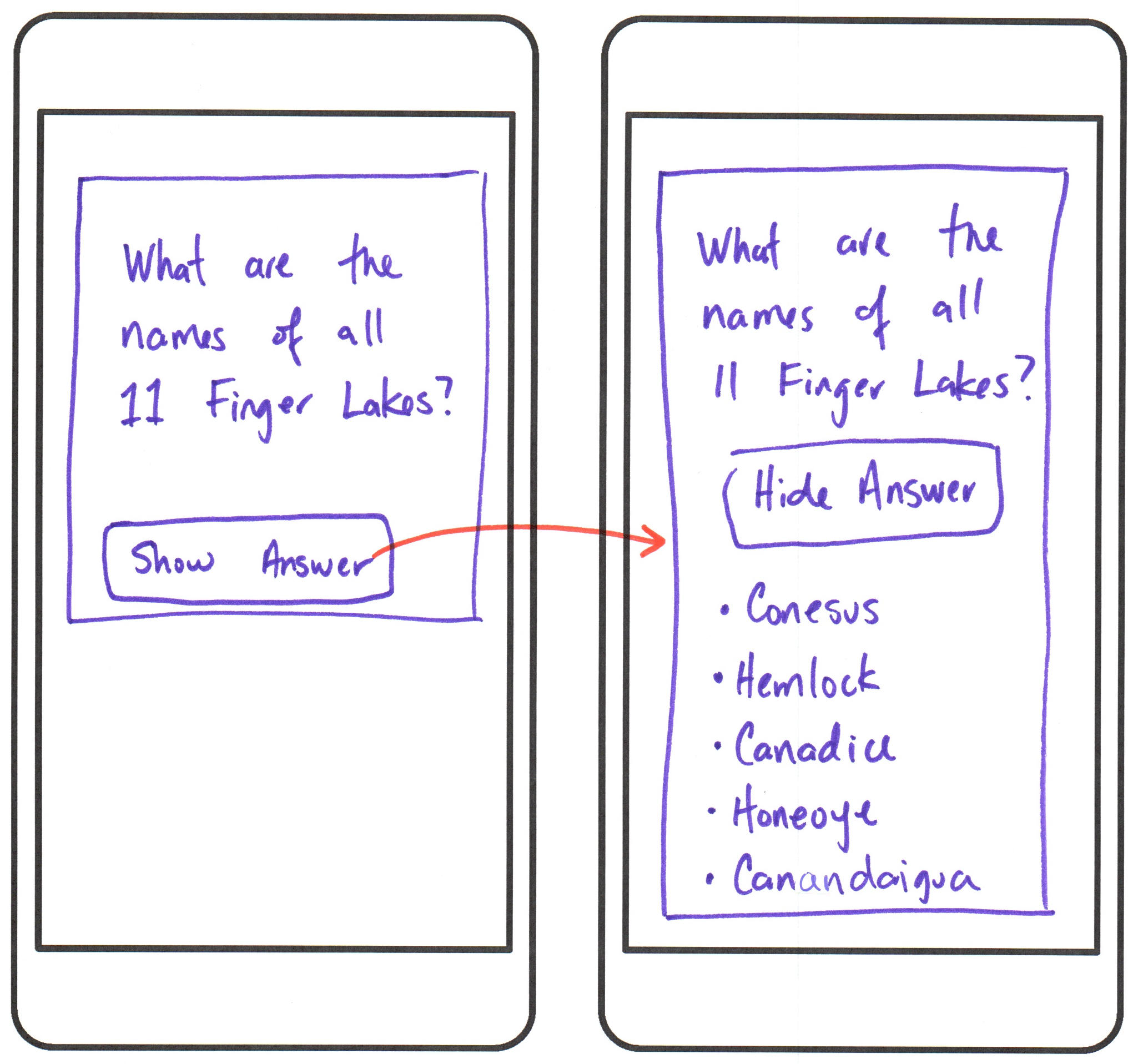
Homework 2: Flashcard Prototype App
Troubleshooting Vue.js Apps
Syntax Errors
Syntax errors are shown in the Debug Console (or Terminal if you launched via npm run dev).
- Vite compiles Vue.js to an SPA.
- Vite runs on the local development server (e.g.,
http://localhost:5173/). - If there is a syntax error, Vite shows the error in the console.
Runtime Errors
Single Page Applications (SPAs) run in the browser.
Where should you check for errors in client-side code?
Browser DevTools Console!
All I see is a blank page!
You have an error in your code.
- Check your Codespace's Debug Console for syntax errors.
- Check your browser's DevTools Console for runtime errors.
Summary
- Vue.js is a framework for building Single Page Applications (SPAs).
- Vue.js apps are made up of components defined in
.vuefiles. - Components can be imported and used in other components.
- Minimum working examples isolate concepts to help you learn unfamiliar technology.
- Troubleshoot syntax errors in the Debug Console and runtime errors in the Browser DevTools Console.
Homework 2, parts I & II due before next class!