Class 11: LLM Model Selection
- Review: Last Class
- Model Specialization
- LLM Energy Consumption
- Model Characteristics and Use Cases
- Prototyping with LLMs
Review: Last Class
Review: LLM Communication
const messages = [
  {
    role: "system",
    content: "You are a helpful AI assistant.
              Your responses should be as short and concise as possible.
              If you don't know the answer to a question, say you don't know."
  },
  {
    role: "user",
    content: "How do I make a homepage?"
  },
];
await llmEngine.sendMessage(messages);
Review: System Prompt Characteristics
- Persona: Defines the model's identity and role (e.g., helpful assistant, expert programmer).
- Safety & Ethics Focus: Includes directives to avoid harmful, biased, or inappropriate content.
- Behavioral Guidance: Instructs on tone (e.g., polite, neutral), helpfulness, and interaction style.
- Capability Awareness: Likely outlines general abilities while acknowledging limitations (e.g., knowledge cutoff).
- Response Formatting: May include instructions on how to format responses (e.g., concise, detailed, with examples).
- Validation & Feedback: Encourages the model to validate user requests and provide feedback, enhancing the conversational experience and guiding users towards better interactions.
Review: Cloud LLMs vs. Local LLMs
Many LLMs are available as cloud services (e.g. OpenAI, Azure, etc.) that you can access via an API or browser/app-based chat user interface.
However, some LLMs can be run locally on your own machine (e.g. LLaMA, Falcon, etc.).
Local LLMs are a useful option for developers who want to use LLMs but have concerns about data privacy, security, cost, latency, or energy consumption associated with cloud LLMs.
Selecting a Model
General Purpose vs. Specialized Models
General purpose models are trained on a wide variety of data and can perform well on a broad range of tasks. ChatGPT is an example of a general purpose model.
Specialized models are trained on specific types of data or for specific tasks. For example, a model trained specifically on medical data may perform better on medical questions than a general purpose model.
Discussion: Model Selection
When creating a prototype app that uses an LLM, should you select a general purpose model or a specialized model? Why?
| General Purpose Models | Specialized Models |
|---|---|
| Trained on a wide variety of data | Trained on specific types of data or for specific tasks |
| Can perform well on a broad range of tasks | May perform better on specific tasks |
| Examples: ChatGPT, GPT-4, etc. | Examples: MedPaLM (medical), CodeLLaMA (programming), etc. |
WebLLM Models for Tasks
| Model | Possible Use Cases (Your milage may vary) |
|---|---|
| TinyLlama | Embedded applications, low-resource environments |
| LLaMA | Instruction-following tasks, summarization, efficient |
| SmolLM | General-purpose applications, real-time performance |
| Mistral | NLP tasks: language translation, code generations |
| Qwen | Multiingual, general-purpose applications |
| Phi | Reasoning and coding tasks |
| Gemma | question answering, embedded AI, and educational agents |
Model Selection and Energy Consumption
- Larger models generally consume more energy than smaller models.
- Models with higher precision (e.g. 32-bit floating point) generally consume more energy than models with reduced precision (e.g. 16-bit floating point, 8-bit integer, etc.).
- Quantization can also help reduce energy consumption by reducing the number of bits required to represent the model's parameters.
Tip: If your user's task doesn't require a high level of accuracy, consider using a smaller model with reduced precision and/or quantization to reduce energy consumption.
Cloud LLMs vs. Local LLMs: Energy Consumption
- Cloud LLMs, like ChatGPT, typically consume significantly more energy.
- However, the energy consumption is not known because the models and infrastructure are proprietary.
- Local LLMs can be more energy efficient, especially if you select a smaller model with reduced precision and/or quantization.
Discussion: If a task can be accomplished with either a cloud LLM or a local LLM, which would you choose and why? (Cloud: microwave > 8 seconds, Local: microwave < 10th of a second)
WebLLM Models
| Model | Parameters | Quantization | Precision |
|---|---|---|---|
| TinyLlama | 1.1B | q4 | f16/32 |
| LLaMA | 70B, 8B, 7B, 1B | q3/4 | f16/32 |
| SmolLM | 135M, 360M, 1.7B | q0/4 | f16/32 |
| Mistral | 7B | q4 | f16/32 |
| Qwen | 0.5B, 0.6B, 1.5B, 1.7B, 3B, 4B, 7B, 8B | q0/4 | f16/32 |
| Phi | 3.8B | q4 | f16/32 |
| Gemma | 2B, 9B | q4 | f16/32 |
Prototyping with LLMs
When creating your prototype, first try using smaller, faster models with reduced precision and/or quantization to see if they meet your needs.
If they do, you can save energy and reduce latency by using those models instead of larger, more computationally intensive models.
If the local LLM does not address your user's needs, prototype with a cloud LLM instead.
Prompt Length
The longer the prompt (system + user), the more computational resources are required to process it, which can increase energy consumption and latency.
When prototyping, try to keep your prompts concise and focused on the specific task or interaction you want to achieve.
Tip: Start with smaller prompts and gradually increase their length and complexity as needed to find the right balance between performance and resource usage.
General LLM Prototype Advice
- Start with a clear idea of the user task or interaction you want to prototype.
- Start small and gradually increase complexity as needed (smaller models, shorter prompts, etc.)
- Select a model that is appropriate for the task and your resource constraints.
- Design a system prompt that provides clear instructions to the model while keeping it concise.
- Try to minimize the interactions with the LLM. (Only what's necessary.)
- Test your prototype with real users to gather feedback and iterate on the design.
Activity: ChatBot Prototype Refinement
Working with your peers (2-4), refine your chatbot prototype by iterating on your model selection and system prompt design.
Your model should be fast and small (<= ~1B parameters) to ensure that it can run efficiently in the browser.
Reduced precision (e.g. 16-bit floating point, 8-bit integer, etc.) and quantization (e.g. 4-bit, 2-bit, etc.) also reduce the computational resources required to run the model.
Example: SmolLM2-360M-Instruct-q4f16_1-MLC
Model: SmolLM2 Parameters: 360 million Tuning: Instruct Quantization: q4 (4-bit) _1 (uniform quantization) Precision: 16-bit floating point (f16) Formats: MLC format (optimized for WebLLM)
Homework 4 Studio
Next Homework
Homework 5: App Prototype with Embedded LLM
Design and implement a prototype app that uses an LLM to support a user with a task. The LLM use should feel natural and be seamless to the user.
This is an opportunity to explore how LLMs can be used to support users with their tasks beyond chatbots. Use your creativity to come up with a novel and interesting way to support users with a task.
Examples: mood setting, to-do lists, recipes, simple games (e.g. trivia, word games, etc.), etc.
Prohibited: No chatbots!
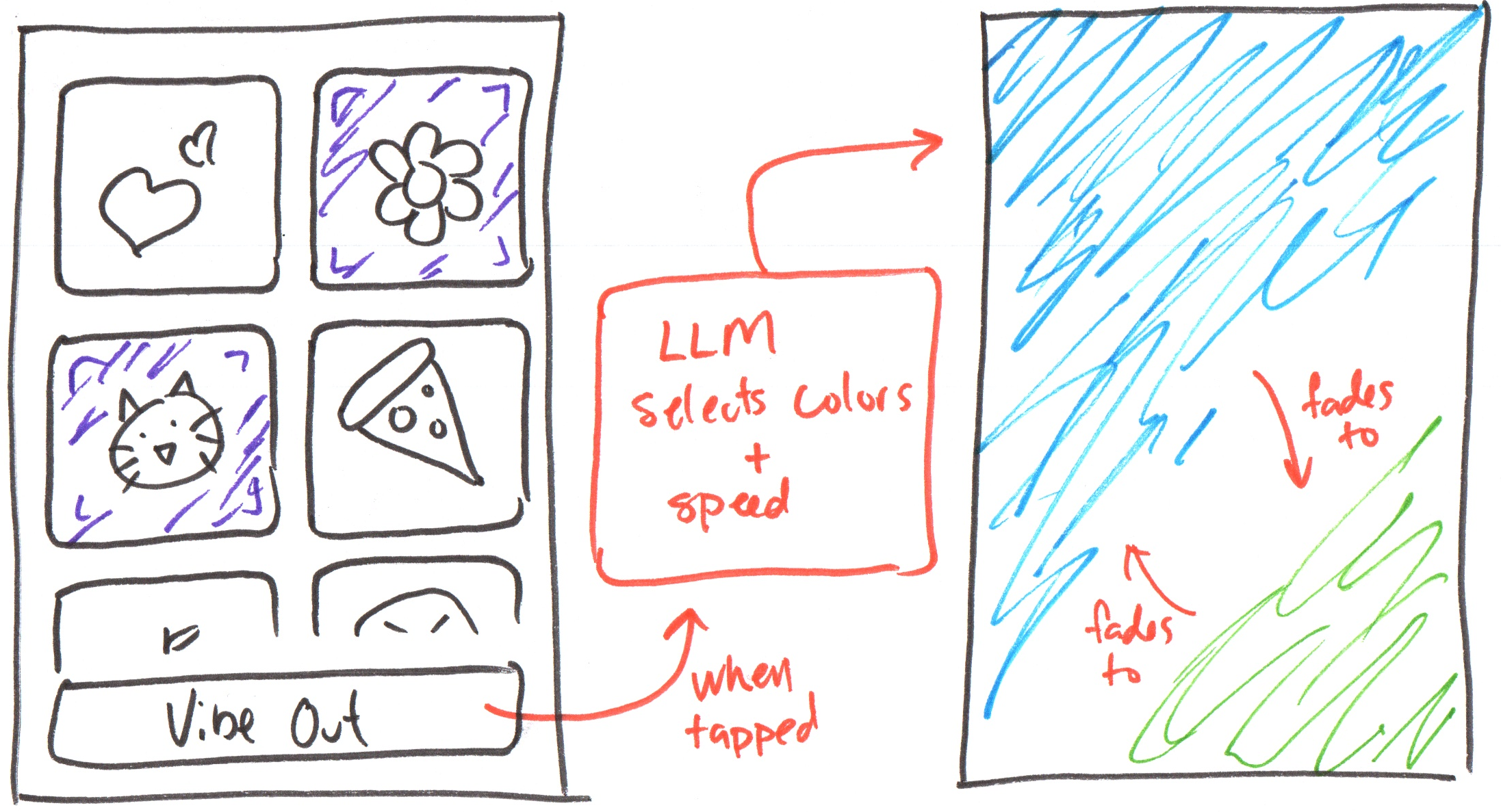
Example: Homework 5
You may create the Vibes app from earlier in the semester if you wish!
Summary
- LLMs can be general purpose or specialized.
- Consider energy consumption when selecting a model for your prototype.
- Start with smaller, faster models with reduced precision and/or quantization when prototyping.
- Keep prompts concise to reduce energy consumption and latency.
- Test your prototype with real users to gather feedback and iterate on the design.
- Use your creativity to come up with novel and interesting ways to support users with their tasks using LLMs!
What's Next?
Homework: Homework 4 (due today)
Next Class Preparation: Brainstorm Homework 5 app ideas.