Homework 2: Flashcard Prototype App
In this homework you'll explore using the unfamiliar framework, Vue.js, to build a simple flash card app.
Learning Objectives
- Learn to learn... Independently approach technical problems and use unfamiliar technology you haven't been directly "taught".
- Be curious... Explore unfamiliar code and technology as a strategy for building high-fidelity working prototypes.
- Don't be afraid to break things... Build confidence in your ability to program prototypes of your user interface designs.
- Collaborate with your peers... Support your peers in learning unfamiliar technology together.
Help & Support Resources
We want you to get the help and support you need. Use the course's support resources for help with this assignment.
Git Repository & Codespace
Each student will submit their homework 2 assignment to a private repository created specifically for them. To submit your homework 2 for credit, please follow these instructions; you must submit your homework 2 to the repository created through landrace.infosci.cornell.edu to receive credit.
-
Create your submission repository.
Visit https://landrace.infosci.cornell.edu/courses/info4340-2026sp/repos/hw2 in your browser.
-
Open your repository in GitHub.
After creating your repository, visit https://landrace.infosci.cornell.edu/courses/info4340-2026sp/repos/hw2 in your browser and follow the link to open the repository on github.com.
-
Open your repository as a codespace.
Overview
You will implement a flash card prototype in Vue.js to practice learning unfamiliar technology independently.
Your flash card prototype should look and work exactly like this reference design:
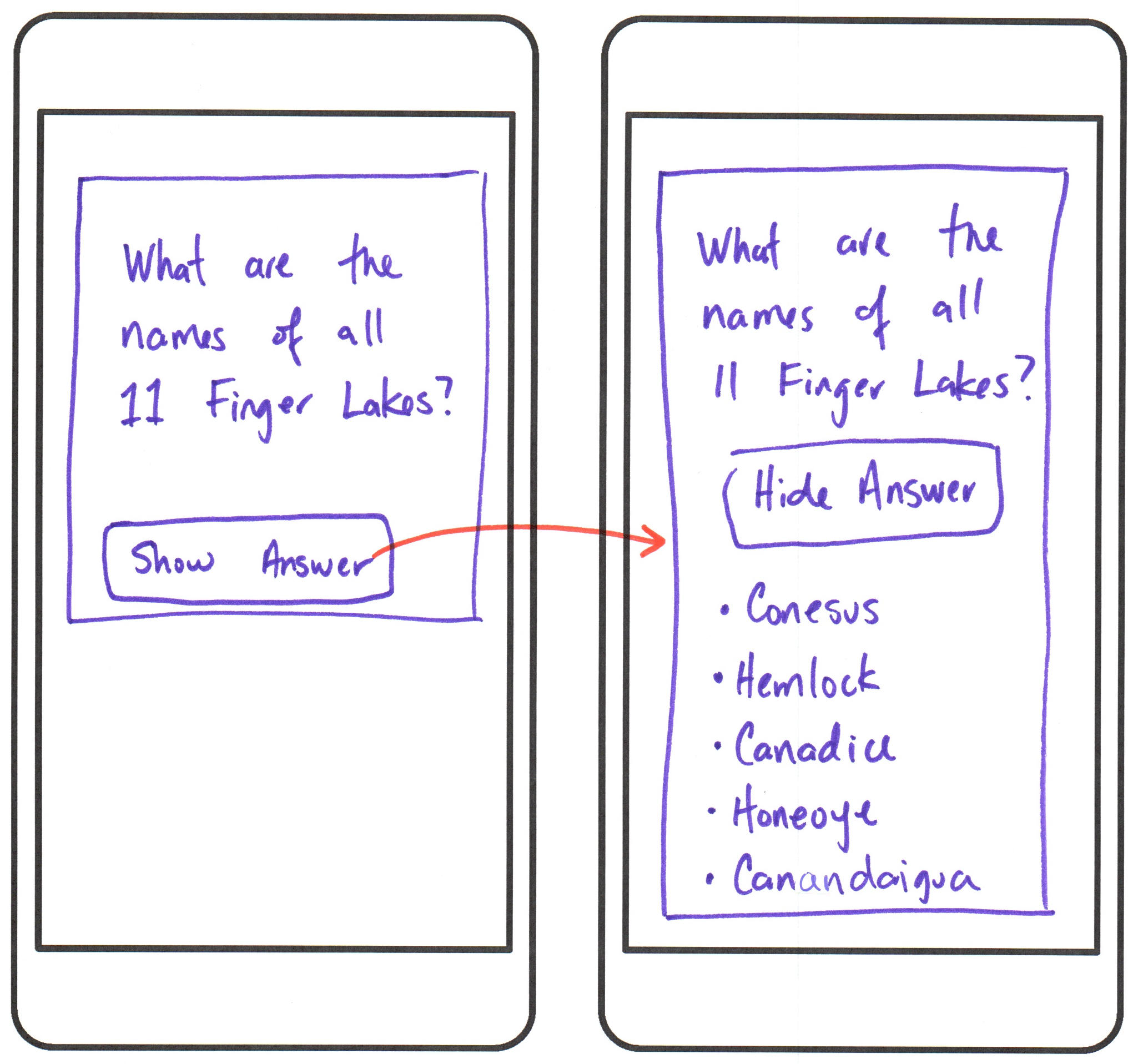
Observe that the flashcard's width fills the entire width of the screen, regardless of the device size. (i.e. the flash card is responsive with relative dimensions.)
Part I: A Flash Card Component
The point of this assignment is to help you develop the skills to learn unfamiliar technology on your own.
While this entire assignment can be completed by ChatGPT, it is unlikely that you will learn how to use Vue.js independently if you rely on ChatGPT to complete the assignment for you.
Credit: 10 points. Completion credit provided for meeting all the requirements below. No partial credit.
Create a FlashCard component that at a minimum includes a question and a button to show the answer in your homework repository. (You need not implement the show answer functionality in this part.)
Hardcode the question inside the component. You may use a question of your choice.
Load the FlashCard component in your App.vue file and only display one flash card. (Display nothing else.)
All FlashCard functionality should be entire contained within the flash card component.
Style the flash card to look like the reference design above. Tailwind CSS is available for your use in your repository if you wish to use it. Otherwise, you may write your own CSS. Exact spacing, colors, and fonts are not required for full credit. (You may take some liberties with the design so long as the overall look and feel is similar to the reference design.)
Your app prototype should be responsive. (No credit is provided for coding a "phone sized box" on your page and centering the flash card in this box.)
Part II: A Working Flash Card Component
Yes, it's true that ChatGPT can do this part for you, and you'll likely get full credit.
However, you should pretend that there will be a pop quiz on Vue.js in the next class, and you will need to code this on your own for credit without ChatGPT's help.
Credit: 10 points. Completion credit provided for meeting all the requirements below. No partial credit.
Using only Vue.js (no jQuery, no vanilla JavaScript, etc.), implement the show answer functionality for your flash card component.
When the button is clicked, the answer should be shown below the question.
Hardcode the answer inside the component. You may use an answer of your choice.
Use Vue.js's event handling and conditional rendering directives to implement this functionality.
Using any other methods will result in no credit, including using the .hidden class method from INFO 1300. No exceptions.
Optional: Implement a toggle button that shows the answer when it's not rendered, and hides the answer when it is rendered.
Part III: A Reusable Flash Card Component - Props
Credit: 10 points. Completion credit provided for meeting all the requirements below. No partial credit.
At this point you should have a working flash card prototype in App.vue. However, the question and answer are hard-coded.
In this part, you'll create a reusable FlashCard component that can be used in multiple places with different questions (but not yet answers).
Using Vue.js props, create a reusable FlashCard component that accepts a question prop.
Then, output the value of the question prop inside the flash card component instead of hardcoding the question using text interpolation.
Lastly, modify your App.vue file to load two FlashCard components with different questions passed as props. (The answer will still be hardcoded inside the component for now.)
Part IV: A Reusable Flash Card Component - Slots
Credit: 10 points. Completion credit provided for meeting all the requirements below. No partial credit.
You're now able to customize the question displayed in your FlashCard component using props. However, the answer is still hardcoded inside the component. Let's fix that.
However, this time instead of using props, you'll use Vue.js slots to make the FlashCard component reusable for both questions and answers.
One advantage of using slots instead of props is that slots can accept any valid HTML content, whereas props can only accept JavaScript data types (strings, numbers, arrays, objects, etc.).
Modify your FlashCard component to accept a slot for the answer content.
Then, modify your App.vue file to load two FlashCard components with different questions and different answers passed as props and slots, respectively. Format the answer content using HTML tags inside the slot.
Part V: Finished Prototype
Credit: 10 points. Completion credit provided for meeting all the requirements below. No partial credit.
Add a third FlashCard component to your App.vue file with a different question and answer. You are required to have three <FlashCard /> tags in your App.vue file. You may not use the v-for directive for this assignment.
Using CSS classes (including Tailwind CSS), style your flash card app to look like the reference design above. Each card should be one on top of the other. It's likely that the user will need to use the vertical scroll bar to view all three flash cards.
Your prototype should be responsive by using all available horizontal screen space.
Lastly, remove all unused .vue files from your repository. (Only App.vue and FlashCard.vue should remain.)
Remove the media queries in the .vue files and base.css / main.css.
Submission
Stage, commit and push all changed files in your Git repository to the GitHub server. (All commits should reside on the main branch.)
Complete the submission form for hw2 to submit the assignment.
Note: The submission form asks you to check your submission. Checking your work will ensure you receive credit for this assignment. We ask you to check your submission because this is where some students lose points. It's easy to forget something and checking your work prevents the heartache of getting a 0 because your submission wasn't submitted in a way that we can access and grade it.
Contributors
The following individuals made contributions to this assignment:
- Kyle Harms
- Constantin Miranda