Homework 2: Motel Dashboard
Use your knowledge of components, conditional rendering, events, and state to implement an SPA to help the 2310 Motel manage cleaning their rooms.
The course material needed to complete this assignment was covered in classes 2 through 7.
Overview
The 2310 Motel has hired you to create a client-side rendered single-page application to help them manage cleaning their rooms.
Use your knowledge of components, conditional rendering, events, and state to implement the interactive single-page application.
This is not a design assignment; you will not be evaluated on your design. You will be evaluated on your ability to demonstrate the learning objectives for this assignment.
Learning Objectives
- Implement a client-side rendered single-page application.
- Use components to reuse interface functionality.
- Employ props to pass data into a component.
- Use the
childrenprop to pass components to other components. - Create a memory for components using state.
- Use conditional rendering to create an interactive interface.
- Respond to user interaction using events and event handlers.
- Leverage the documentation and GitHub Copilot as references to help you solve the assignment.
- Troubleshoot and debug your own code.
Help & Support Resources
We want you to get the help and support you need. Use the course's support resources for help with this assignment.
Git Repository & Codespace
-
Create your assignment repository.
Visit https://landrace.infosci.cornell.edu/courses/info2310-2026sp/repos/hw2 in your browser to create your assignment repository.
-
Open your assignment repository in GitHub.
After creating your repository, visit https://landrace.infosci.cornell.edu/courses/info2310-2026sp/repos/hw2 in your browser and follow the link to open the repository on github.com
-
Open your assignment repository as a codespace.
Submission Requirements
Your assignment should meet the following requirements for credit:
-
Submit your own original work (design and code) for this assignment.
No credit is provided for submitting design and/or code that is taken from the course-provided examples.
-
Your code should be original. However, the structure of the code will mirror the class examples.
The structure of your code will align with the class examples. This is to be expected. We are learning web programming and there's only so many ways to structure code to solve its problems.
-
You are required to use the methods and techniques covered in class.
No credit is provided for using methods that are not covered in this class.
You may not use any methods that have not been covered in class prior to the release of this assignment.
-
Your single-page application should be visible in the browser and functional upon launching the development web server Start Debugging from the Run menu.
If your single-page application does not launch using this method or is not visible in the browser after launching the server, we are unable to provide any credit.
-
All files should be in the location specified in this document for credit.
Professionalism is important. Incorrectly placed files will not be graded; no partial credit is provided either.
-
Follow the submission instructions below.
Submit all materials to your GitHub repository's main branch for this assignment. When you're finished stage, commit, and push your submission to GitHub. Then fill-out the submission form to complete your submission.
Failure to complete the submission form will result in 0 credit; no submission form = no submission. No leniency. No exceptions.
Part I: Building & Room Components
The motel has two buildings: the north building and the east building. (The east building has a beautiful view of Cayuaga Lake; the north building has a view of the parking lot.) The north building has 5 rooms. The east building has 3 rooms.
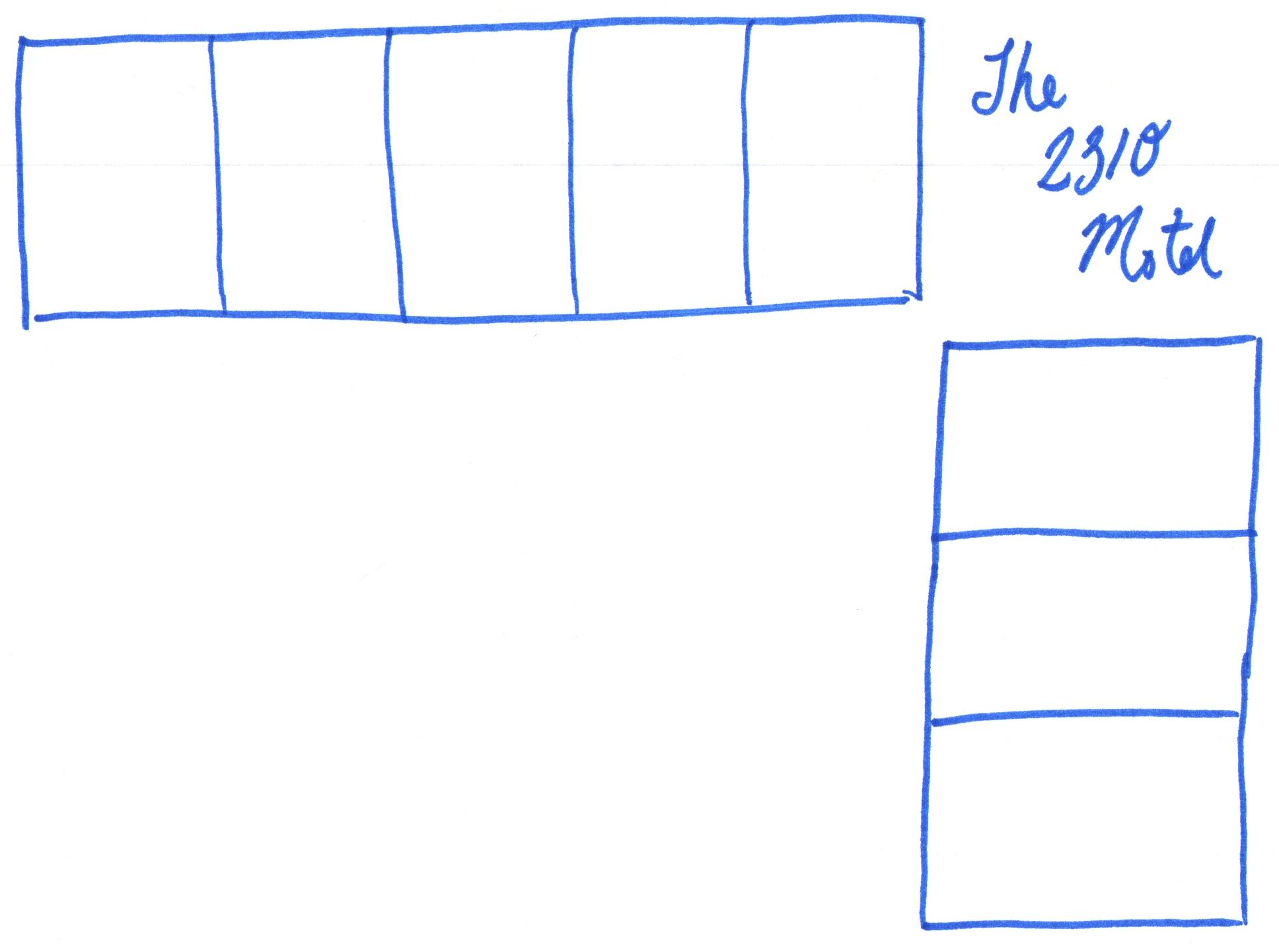
Create a Building and Room component to represent the motel's buildings and rooms.
Requirements & Credit
Credit: ~15 points (Homework)
This part is graded for correctness. Your SPA should meet the following requirements for full credit:
Components:
-
Create a
Buildingcomponent to represent a motel building. -
Create a
Roomcomponent to represent a motel room. -
All components should be located in the
src/componentsdirectory. -
Instantiate two
Buildingcomponents in theAppcomponent. -
Instantiate 5
Roomcomponents aschildrento the firstBuildingcomponent. -
Instantiate 3
Roomcomponents aschildrento the secondBuildingcomponent. -
No credit is provided for
Roomcomponents instantiated in theBuildingcomponent; allRoomcomponents should be instantiated in theAppcomponent.
Props:
- Use the
childrenprop to pass the instantiatedRoomcomponents to aBuildingcomponent. - Render the
childrenprop in theBuildingcomponent using expression placeholders. - Add a prop to the
Buildingcomponent to change its direction using inline styling. - Use flexbox to align rooms side-by-side or on top of one another based on the direction prop.
Style & Layout:
- Layout the
App,Building, andRoomcomponents to match the motel's blueprint. - The style need not match exactly for credit, but it should be representative to the blueprint.
- Feel free to adjust paddings, margins, color, etc. to make the style your own.
Instructions
-
Create a
Buildingcomponent.Your building component should draw a black border around it.
-
Create a
Roomcomponent.Your room component should draw a black border around it.
For now, change it's background color to a light gray.
-
Add a single building component to the
Appcomponent.Test that you see an empty black bordered box in the browser.
-
Add a single room component between the start and end tags of the
Buildingcomponent in theAppcomponent.You will not yet see the room rendered in the browser.
Do not import the
Roomcomponent into theBuildingcomponent. -
Add a prop named exactly
childrento theBuildingcomponent.Use the
childrenprop to render theRoomcomponent in theBuildingcomponent; using expression placeholders render thechildrenprop in theBuildingcomponent.If you're stuck, use the reference documentation to understand how the
childrenprop works. (Yes, it's true we did not cover this in class. One of the learning objectives of this assignment includes using the reference documentation to solve problems on your own.)You should now see the room rendered in the browser as a light gray box with a black border.
Do not import the
Roomcomponent into theBuildingcomponent. -
In the
Appcomponent, add 4 moreRoomcomponents between theBuilding's open and close tags.You should now see 5 rooms rendered in the browser as light gray boxes with black borders.
-
Add a second building component to the
Appcomponent and add 3Roomcomponents to the second building component.You should now see two buildings: one with 5 rooms and one with 3 rooms.
-
Add a prop to the
Buildingcomponent to change its direction.The north building is aligned east to west. The east building is aligned north to south.
Use the direction prop to render the buildings rooms side-by-side or stacked on top of one another. Use flexbox to align the rooms correctly.
infoUnderstanding CSS and Flexbox are prerequisites for this course. You should know how to use flexbox to align elements in a row or column from INFO 1300.
We do not have the resources to provide tutoring on 1300 material; the TAs cannot help you with 1300 material. Refer to your INFO 1300 in-class notes if you need help.
-
Layout the
App,Building, andRoomcomponents to match the motel's blueprint.Use your INFO 1300 CSS and Flexbox knowledge to lay out the components to match the motel's blueprint:
You will need to add additional
<div>elements to theAppcomponent to create the layout.Your styled layout needs to be representative of the blueprint for full credit. You may also adjust paddings, margins, color, etc. to make the style your own. (Though no credit is provided for making it your own.) This is your motel "dashboard" and you should feel free to put your own spin on the design.
Tip:
min-andmax-properties are your friends. -
Check your work.
Review this part's requirements and check each step to ensure that you've successfully completed this part.
Submission
Stage, commit and push all changed files in your Git repository to the GitHub server. (All commits should reside on the main branch.)
Do not complete the submission form.
Part II: Room Component Rendering
Customize each room's rendering based using props.
Requirements & Credit
Credit: ~15 points (Homework)
This part is graded for correctness. Your implementation should meet the following requirements for full credit:
Room Component Rendering:
-
The room component should render the following information:
- The room number.
- The number of beds in the room.
- The room's current status: occupied, dirty, cleaning in progress, or clean.
-
All room data should be passed to the
Roomcomponent using props. -
Each piece of data (i.e. number, beds, status) should have its own prop as a primitive value (i.e. string, number, boolean, etc.).
-
No credit is provided for props with objects.
-
The entire room's background color should reflect the room's current status.
- Occupied: lighter blue
- Dirty: lighter red
- Cleaning in progress: lighter yellow
- Clean: lighter green
-
Include sample data for each room in the
Appcomponent.- At least two rooms should have 2 beds.
- At least two rooms should have 1 bed.
- At least one room should be occupied.
- At least three rooms should be dirty.
- At least one room should be clean.
- At least one room should be cleaning in progress.
-
You may only use props, CSS classes, and inline styles for this part. You may not use state or any other methods; you may not use jQuery or
getElementById.
Instructions
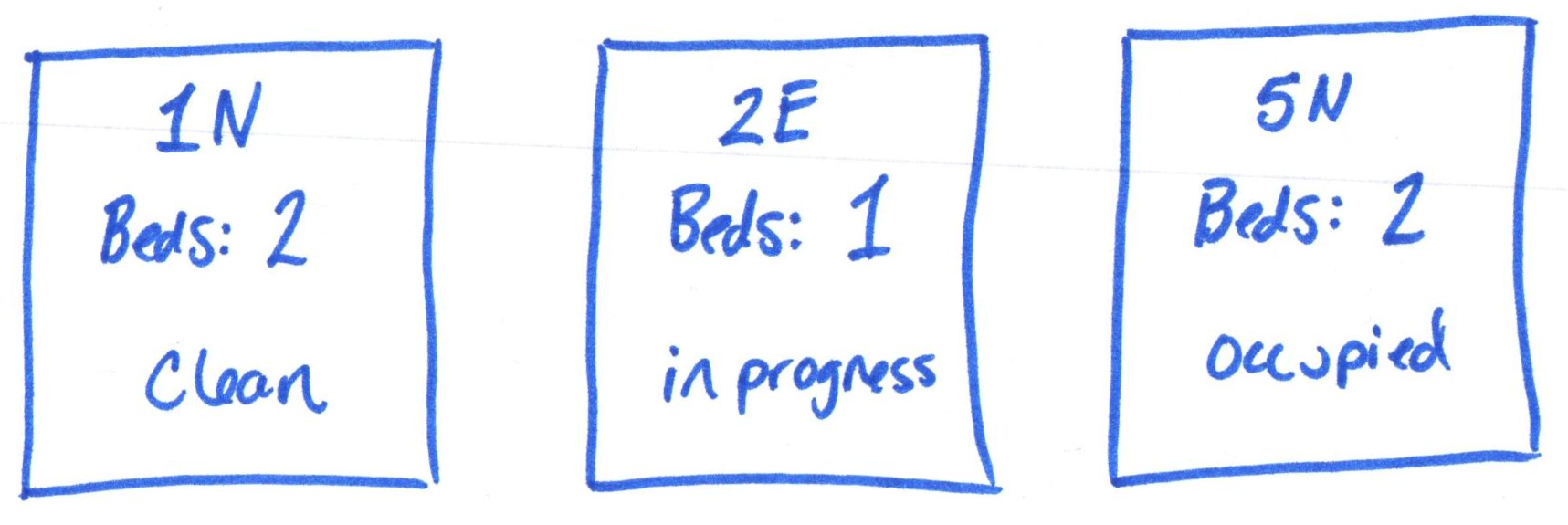
-
Each room should display the following information:
- The room number.
- The number of beds in the room.
- The room's current status: occupied, dirty, cleaning in progress, or clean.
Pass this information to the
Roomcomponent using props and render it in theRoomcomponent.All that is required for full credit is to render this information as text. However, if you wish to make this design your own, you may. For example, instead of rendering the number of beds, you might render one or two bed icons. Or maybe your render a person icon if it's occupied.
-
Update all instances of the
Roomcomponent in theAppcomponent to pass the room number, number of beds, and room status as props.The room numbers are as follows: 1N, 2N, 3N, 4N, and 5N for the north building; 1E, 2E, and 3E for the east building.
At least two rooms should have 2 beds. At least two rooms should have 1 bed. You may decide which rooms have 1 or 2 beds.
At least one room should be occupied. At least three rooms should be dirty. At least one room should be clean. And at least 1 room should be cleaning in progress. You may decide which rooms have which statuses.
-
Test that each room's status is correctly rendered.
In the browser, check that each room displays the correct room number, number of beds, and status.
-
Change the background color of the entire room based on the current room's status.
- Occupied: lighter blue
- Dirty: lighter red
- Cleaning in progress: lighter yellow
- Clean: lighter green
-
Test each room's status background color.
In the browser, check that each room's background color reflects the room's status.
-
Check your work.
Review this part's requirements and check each step to ensure that you've successfully completed this part.
Submission
Stage, commit and push all changed files in your Git repository to the GitHub server. (All commits should reside on the main branch.)
Do not complete the submission form.
Part III: Room Status Conditional Rendering
The motel staff may only clean a room if it's unoccupied. Using conditional rendering, display an action to start cleaning the room if the room is dirty. Once cleaning has started, display an action to mark the room as clean.
Requirements & Credit
Credit: ~15 points (Homework)
This part is graded for correctness. Your implementation should meet the following requirements for full credit:
Conditional Rendering:
-
If a room is dirty, the custodian can mark the room as "cleaning in progress".
- You may implement this feature any way you like.
- A button to "Start Cleaning" is likely a good choice.
-
Once a room is "cleaning in progress," the custodian can mark the room as clean.
- You may implement this feature any way you like.
- A button to mark the room as "Clean" is likely a good choice.
-
Do not present any actions to the user if the room is occupied or clean.
- The custodian cannot clean occupied or clean rooms.
- Do not present any actions to the user in these states.
- Once a room becomes unoccupied the front desk will mark the room as dirty.
- This feature is not part of your SPA.
-
Use the conditional rendering methods we practiced in class.
- You may not "hide" the actions. You should not render them at all.
- You may not use jQuery or
getElementById. - Do not use state or any other methods for this part.
Instructions
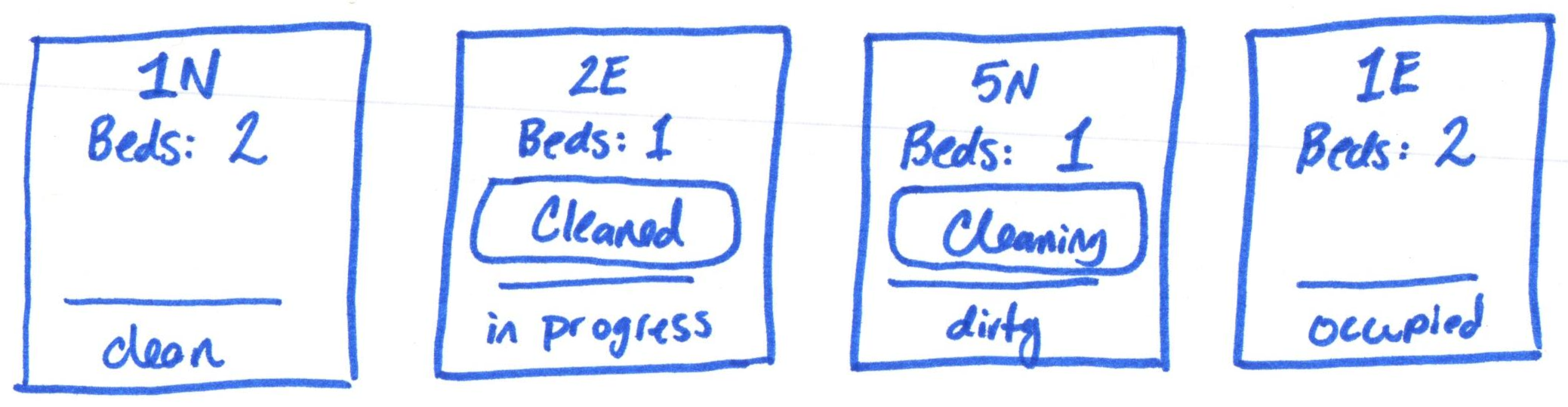
-
Conditionally render an action to start cleaning the room if the room's status is dirty.
Do implement any events yet. Simply display the user action to clean the room if the room is dirty.
-
Conditionally render an action to mark the room as clean if the room's status is cleaning in progress.
Again, don't worry about implementing events yet.
-
Do not render any actions if the room is occupied or clean.
The custodian cannot clean occupied or clean rooms.
-
Check your work.
Review this part's requirements and check each step to ensure that you've successfully completed this part.
Submission
Stage, commit and push all changed files in your Git repository to the GitHub server. (All commits should reside on the main branch.)
Do not complete the submission form.
Part IV: Room Status Event & State
The room component should remember its current status and respond to user interaction to change its status.
Requirements & Credit
Credit: ~15 points (Homework)
This part is graded for correctness. Your interactive web application should meet the following requirements for full credit:
Event & State Requirements:
- Use exactly one state to remember the room's current status in the
Roomcomponent. - The initial room status state should be initialized using a prop.
- Use events to respond to the "start cleaning" and mark as "clean" actions.
- All actions should be accessible as practiced in class.
Instructions
-
Add a state to the
Roomcomponent to remember the room's current status.The initial value of the room's status state should be set using the room's status prop.
-
Update the component's conditional rendering code to use the room status state.
Conditionally rendering should be done using the state, not a prop.
-
Add an event handler for each user action (start cleaning, mark as clean).
In the event handler, change the room's status state to the correct status.
-
Test the event handlers.
Test the start cleaning action. Initiate the action on a dirty room and verify the that the room status changes to cleaning in progress.
Test the mark as clean action. Initiate the mark as clean action on a cleaning in progress room and verify the that the room status changes to clean.
-
Check your work.
Review this part's requirements and check each step to ensure that you've successfully completed this part.
Congratulations, your room component should be fully functional. Let's get cleaning!
Submission
Stage, commit and push all changed files in your Git repository to the GitHub server. (All commits should reside on the main branch.)
Complete the submission form for hw2 to submit the assignment.
Note: The submission form asks you to check your submission. Checking your work will ensure you receive credit for this assignment. We ask you to check your submission because this is where some students lose points. It's easy to forget something and checking your work prevents the heartache of getting a 0 because your submission wasn't submitted in a way that we can access and grade it.
Contributors
Copyright © 2024 - 2026:
- Kyle Harms
- Chris Gyumolcs