Homework 3: Animal REST API
In this homework you will implement a REST API to create, read, update, and delete items in a MongoDB database.
This assignment is designed to be started the Wednesday prior to the start of break on Saturday and finished starting on the Monday coming back from break.
No work is required nor expected on this assignment during break!
The course material needed to complete this assignment was covered in classes 13, 14, 17, and 18.
Overview
The 2310 Barnyard is somewhat like a virtual pet game: the animals in the barnyard need to be fed, and when they've been fed enough, they multiply!
You'll only program the server-side of this application; the client-side has been entirely provided for you.
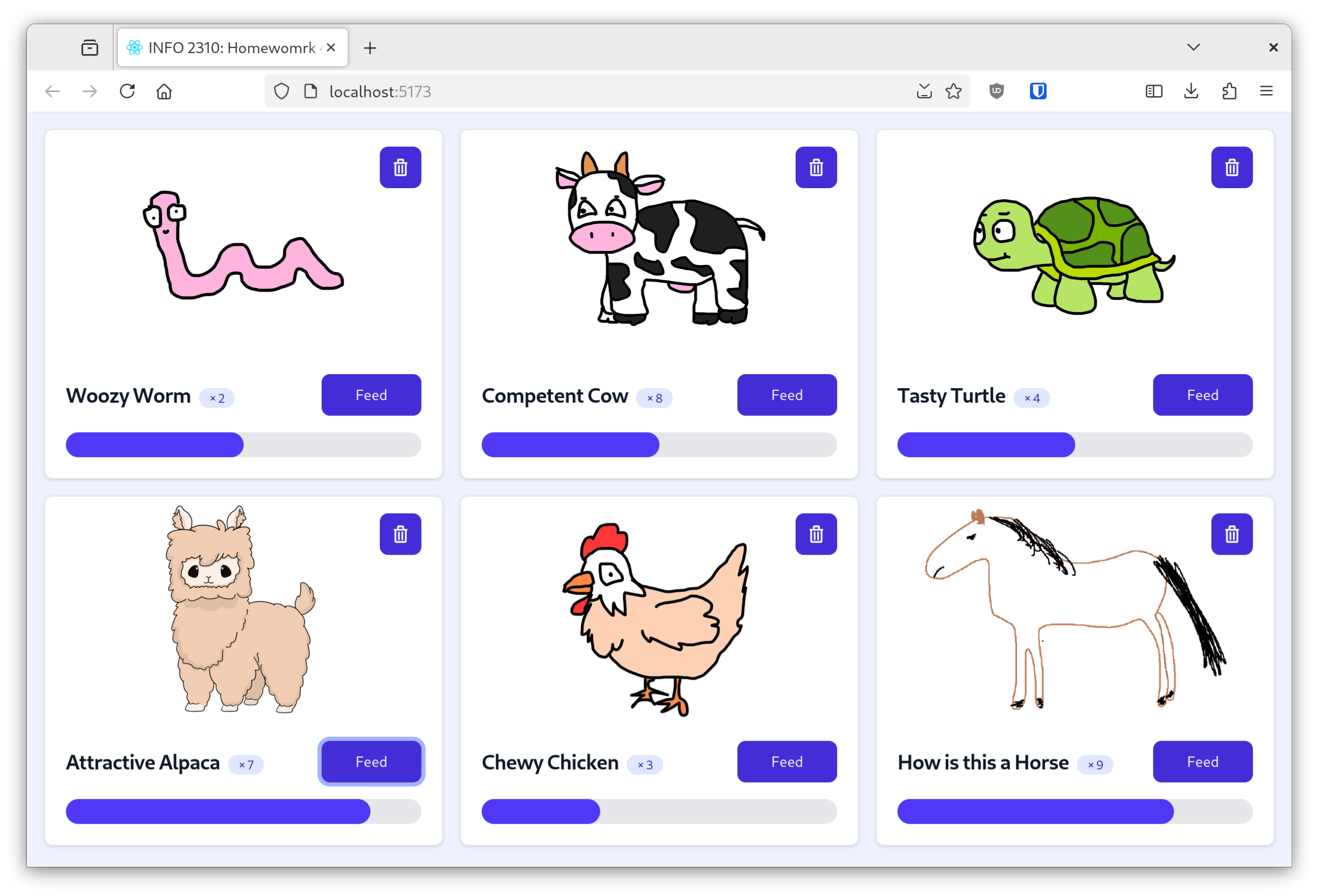
The client-side SPA is fully functional and correct. Your job is to implement the server-side code so that the client is functional.
Learning Objectives
- Initialize a MongoDB database using a MongoDB Shell initialization script.
- Execute CRUD operations against a MongoDB database using the Node.js MongoDB driver.
- Define Express API routes with different HTTP methods.
- Respond to an HTTP request returning JSON data and correct HTTP status code.
- Test REST API routes using a REST client (
httpBook). - Leverage the documentation and GitHub Copilot as references to help you solve the assignment.
- Troubleshoot and debug your own code.
Help & Support Resources
We want you to get the help and support you need. Use the course's support resources for help with this assignment.
Git Repository & Codespace
-
Create your assignment repository.
Visit https://landrace.infosci.cornell.edu/courses/info2310-2026sp/repos/hw3 in your browser to create your assignment repository.
-
Open your assignment repository in GitHub.
After creating your repository, visit https://landrace.infosci.cornell.edu/courses/info2310-2026sp/repos/hw3 in your browser and follow the link to open the repository on github.com
-
Open your assignment repository as a codespace.
Submission Requirements
Your assignment should meet the following requirements for credit:
-
Submit your own original work (design and code) for this assignment.
No credit is provided for submitting design and/or code that is taken from the course-provided examples.
-
Your code should be original. However, the structure of the code will mirror the class examples.
The structure of your code will align with the class examples. This is to be expected. We are learning web programming and there's only so many ways to structure code to solve its problems.
-
You are required to use the methods and techniques covered in class.
No credit is provided for using methods that are not covered in this class.
You may not use any methods that have not been covered in class prior to the release of this assignment.
-
Your REST API server should be functional upon launching it via the Server configuration from the Run and Debug tab in Codespace.
If your server does not launch using this method or is not functional after launching it, we are unable to provide any credit.
-
All files should be in the location specified in this document for credit.
Professionalism is important. Incorrectly placed files will not be graded; no partial credit is provided either.
-
Follow the submission instructions below.
Submit all materials to your GitHub repository's main branch for this assignment. When you're finished stage, commit, and push your submission to GitHub. Then fill-out the submission form to complete your submission.
Failure to complete the submission form will result in 0 credit; no submission form = no submission. No leniency. No exceptions.
Part I: Read the Animals from the Database
Implement the API route in your server.mjs to read all the animals from the database and send the data to the client.
Requirements & Credit
Credit: ~10 points (Homework)
This part is graded for correctness. Your web server should meet the following requirements for full credit:
- Implement the
GET /api/animalsroute to query the database for all the animals inserver/server.mjs. - Query the
appdatabase for all the animals and return it to the client as an array of JSON objects. - Explicitly return a 200 status code with the JSON response.
- In the
test.httpfile, successfully test theGET /api/animalsroute.
No Credit:
- You may not modify the database initialization script (
init.mongodb.js). No credit is provided for hard-coded data. - You may only change code within the specified comments in
server.mjs. No credit is provided if code outside the specified comments is modified. - No credit is provided for alternative route URLs; the route must be exactly
/api/animals. - No credit is provided for using any methods that were not practiced during the in-class activities.
Professionalism:
Professionalism means meeting the client's requirements. Not doing less and not do more. Your submission should meet the requirements specified for this part and no more.
You are required to implement your project using the methods taught in class prior to the release of this milestone.
If any functionality exists not covered in class up to this point, 0 credit is provided for this part.
Instructions
-
Initialize the database.
mongosh init.mongodb.jsRe-run this script whenever you want to reset the database. This will drop the existing database and re-create it with the initial data.
-
Implement the
GET /api/animalsroute inserver.mjs.Implement an Express API route to read all animals documents from the database and return them as a JSON array with a 200 status code.
Note:
.statusmust be called before.json()in the response. -
Test the
GET /api/animalsroute intest.http.Open the
test.httpfile in the REST client. Test that theGET /api/animalsroute returns the array of JSON animal documents and the correct status code.If the test does not return an array of JSON animal document, stop and check your work. Go no further.
-
Run the client and verify that it displays all animals from the database.
-
Open the client in your browser.
-
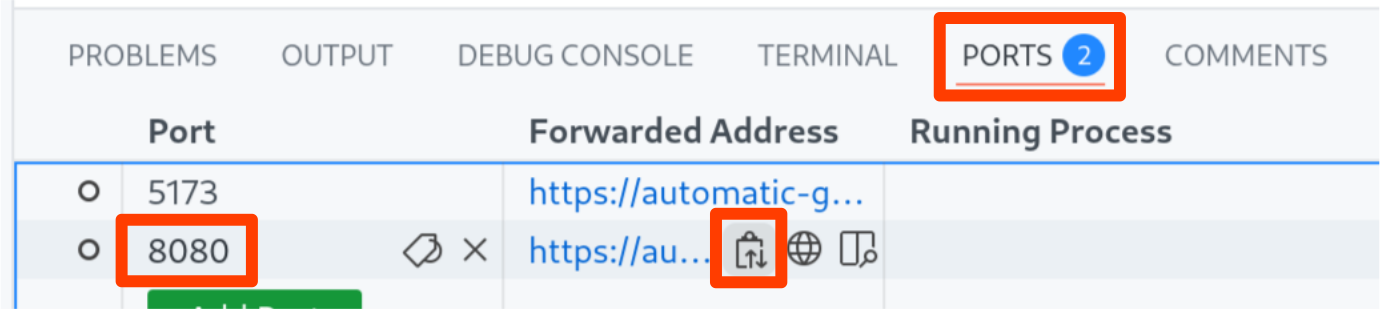
Copy the URL of the API server from the ports tab in Codespace:
-
Paste the URL into the client's server URL field and press Reload Web Application:
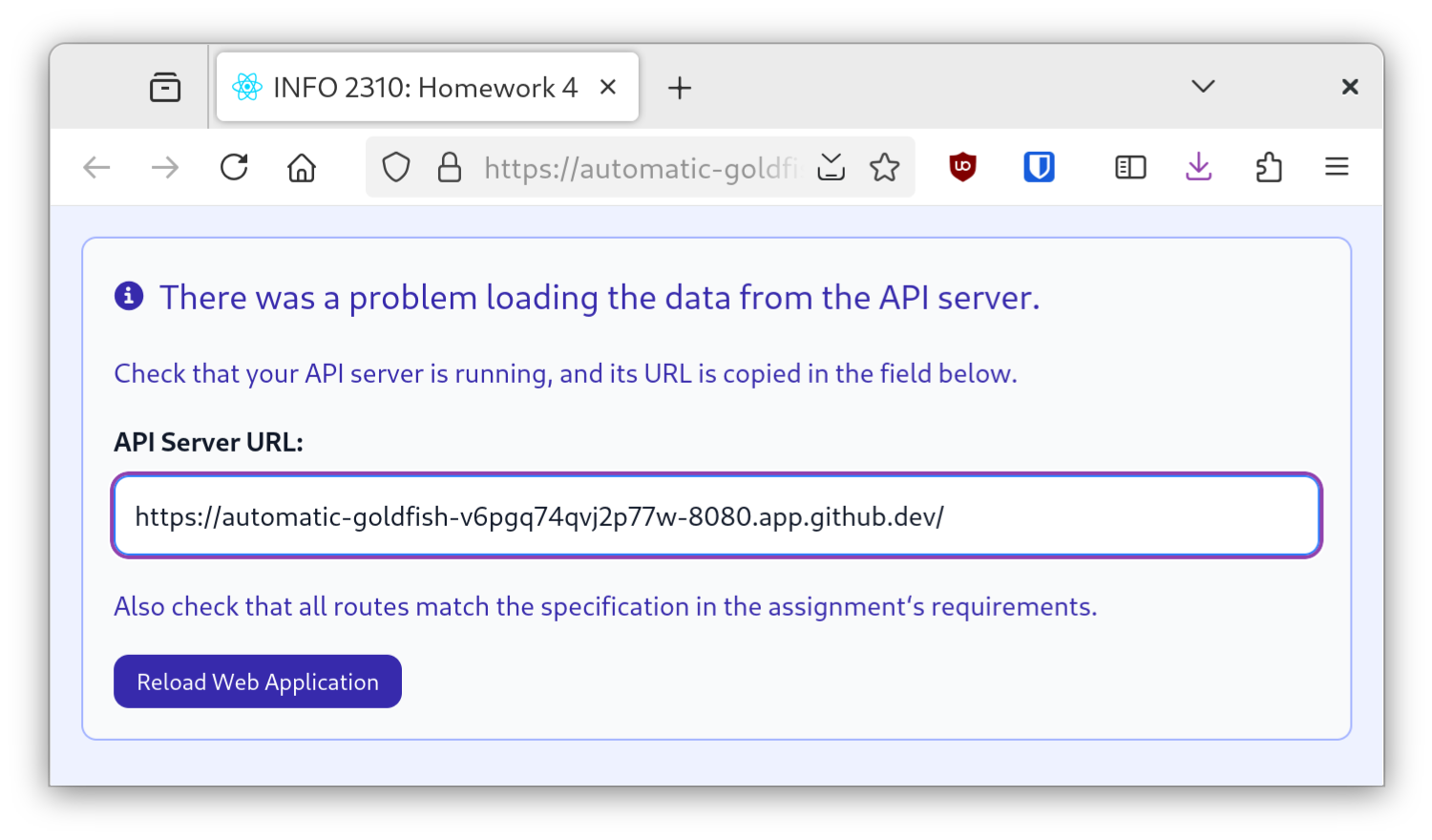
If you have followed the above steps, the client should now display all the animals from the database. (Though, feeding and deleting won't yet work.)
tipSometimes, your Codespace may not initialize correctly. When this happens the client will not be able to connect to the server. If you're having trouble getting the client to connect to the server, try setting the server's port (8080) to public in the ports tab:

Occasionally, even though it's set to public, the port isn't accessible. If this happens, toggle to private and then back to public.
If the client does not show the animals rendered as cards, stop and go no further.
-
Submission
Stage, commit and push all changed files in your Git repository to the GitHub server. (All commits should reside on the main branch.)
Do not complete the submission form.
Part II: Update & Create an Animal
Whenever an animal is fed enough times (see each animal document's "feedMultiplier" field), the animal duplicates itself. In this part, you will implement the database queries to feed an animal (update an existing animal document) and duplicate an animal when fed enough times (create a new animal document).
Requirements & Credit
Credit: ~30 points (Homework)
This part is graded for correctness. Your web server should meet the following requirements for full credit:
Routes:
The routes must be implemented exactly as specified below in server.mjs. No credit is provided for alternative route URLs.
GET /api/animals/ANIMAL_ID- Returns a single animal JSON object from the database and a 200 status code.
- If the animal is not found, return only a 404 status code and no JSON response.
POST /api/animals/ANIMAL_ID/feed- Increments the
feedCountof the animal specified in the route parameter by 1. - If the animal is successfully updated (but not duplicated), return only a 204 status code with no response.
- If the animal's
feedCountis a multiple of thefeedMultiplier, duplicate the animal. - If the animal is successfully duplicated, return a 201 status code with only the new animal's
_idin a JSON response. - If the animal is not found, return only a 404 status code.
- Increments the
- All routes use Express route parameters. (Query string parameters are prohibited.)
MongoDB Queries:
- All operations are precise to the documents being manipulated.
- i.e. If you only need to find one document, don't find many documents.
- Update operations are performed using only the
$incoperator.- No credit is provided for
findinga document and manually summing itsfeedCountproperty and$setting it.
- No credit is provided for
- The result of update operations are checked to ensure the operation was successful.
modifiedCountis checked for update operations
- When creating a new animal, only the
name,avatar, andfeedMultiplierproperties are copied from the original animal.- The new animal's
feedCountis set to0. - The new animal's
parentproperty is set to the original animal's_id. - The new animal's
_idis not set; it will be automatically generated by MongoDB.
- The new animal's
- The result of create operations are checked to ensure the operation was successful (e.g., by returning the
insertedIdfrom the result).
API Testing:
- All routes are successfully tested in
test.http. - You may add additional tests if you like.
No Credit:
- You may not modify the database initialization script (
init.mongodb.js). No credit is provided for hard-coded data. - You may only change code within the specified comments in
server.mjs. No credit is provided if code outside the specified comments is modified. - No credit is provided for alternative route URLs.
- No credit is provided for using any methods that were not practiced during the in-class activities.
Professionalism:
Professionalism means meeting the client's requirements. Not doing less and not do more. Your submission should meet the requirements specified for this part and no more.
You are required to implement your project using the methods taught in class prior to the release of this milestone.
If any functionality exists not covered in class up to this point, 0 credit is provided for this part.
Instructions
-
Update your API test file to include a test for getting a single animal document using its
_id.Create a test to get one animal in
test.http:GET /api/animals/ANIMAL_IDDon't run the test yet. Just create it so that it's ready for when you implement the query.
-
Add a route to
server.mjsto return a single animal JSON object when provided with its ID as part of the URL.Your route must be exactly:
GET /api/animals/ANIMAL_IDIf the animal is located in the database, return a status code of 200 and the JSON object of the animal document.
If the animal is not located in the database, return only a status code of 404. You can return only a status code by calling:
.status(STATUS_CODE).send(). -
Test your new route in
test.http.Run the test you created earlier.
If a single JSON object is returned with a 200 status code, you can move on to the next step. Otherwise, stop and check your work. Go no further.
-
Implement the feed route.
infoA primary learning objective of this course is learning to use the reference documentation. We did not explicitly cover using the
updateoperations in MongoDB Node driver in class. To complete this part you will need to use the reference documentation. Remember to refer to the MongoDB Node driver documentation, not the MongoDB shell documentation.Follow the above instructions for adding a new route: create the test, implement the route, and test it.
The route must be exactly:
POST /api/animals/ANIMAL_ID/feed.Use the MongoDB
$incoperator to increment thefeedCountby 1 for the animal that was specified in the route parameter. (Refer to the MongoDB documentation for how to use the$incoperator.)If the update is successful (i.e.
modifiedCount > 0), return only a 204 status code and no JSON response.If the update is not successful or the animal is not found, return only a 404 status code and no JSON response.
-
Test your get one animal and feed one animal routes in the client.
Launch the client and try feeding an animal. If your routes and implementation are correct, after you click feed, the animal's feed count should increment by 1. (The animals will not multiply yet. You will implement that next.)
Observe the server's Debug Console to see the request the client is making to the server. You should observe that a successful feed request is followed by the get one animal request to get the updated feedCount.
-
Implement duplicating an animal if it's been fed enough.
In your feed route, check if an animal should multiply be checking the remainder of dividing the
feedCountby thefeedMultiplierof the updated animal document. If the remainder is0, then duplicate the animal:const animal = TODO_QUERY_UPDATED_ANIMAL;
if ((animal.feedCount % animal.feedMultiplier) === 0) {
// TODO: duplicate the animal
}If the animal should duplicate, create a new animal document with the same
name,avatar, andfeedMultiplieras the original animal. However, set the new animal'sfeedCountto0and itsparentto the original animal's_id. Do not set the_idfield; it will be automatically generated by MongoDB.After creating an animal, return a 201 (Created) status code with a JSON object with only the
_idof the new animal:{
"_id": ANIMAL_ID
} -
Test your feed route in
test.http.When the feed count is a multiple of the feed multiplier, the animal should duplicate: the status code should be 201 and the response should be a JSON object with the
_idof the new animal. When it does not duplicate, the status code should be 204 and no JSON response. -
Test your feed route in the client.
Launch the client and try feeding an animal. If your routes and implementation are correct, after you click feed, the animal's feed count should increment by 1. If the animal duplicates, a new animal should be created in the barnyard. (The new animal will show at the bottom of the list.)
Submission
Stage, commit and push all changed files in your Git repository to the GitHub server. (All commits should reside on the main branch.)
Do not complete the submission form.
Part III: Delete an Animal
So far you have created, read, and updated documents in MongoDB from Express.js. In this last part, you'll delete an animal from the database in your REST API.
Requirements & Credit
Credit: ~10 points (Homework)
This part is graded for correctness. Your web server should meet the following requirements for full credit:
Routes:
The routes must be implemented exactly as specified below in server.mjs. No credit is provided for alternative route URLs.
DELETE /api/animals/ANIMAL_ID- Deletes the animal specified in the route parameter from the database.
- If the animal is successfully deleted, return a 204 status code with no response.
- If the animal is not found or not deleted, return only a 404 status code and no response.
MongoDB Queries:
- All operations are precise to the documents being manipulated.
- i.e. If you only need to find one document, don't find many documents.
- The result of delete operations are checked to ensure the operation was successful.
deletedCountis checked for delete operations.
API Testing:
- All routes are successfully tested in
test.http. - You may add additional tests if you like.
No Credit:
- You may not modify the database initialization script (
init.mongodb.js). No credit is provided for hard-coded data. - You may only change code within the specified comments in
server.mjs. No credit is provided if code outside the specified comments is modified. - No credit is provided for alternative route URLs.
- No credit is provided for using any methods that were not practiced during the in-class activities.
Professionalism:
Professionalism means meeting the client's requirements. Not doing less and not do more. Your submission should meet the requirements specified for this part and no more.
You are required to implement your project using the methods taught in class prior to the release of this milestone.
If any functionality exists not covered in class up to this point, 0 credit is provided for this part.
Instructions
-
Test in
test.httpand implement theDELETE /api/animals/ANIMAL_IDroute.infoA primary learning objective of this course is learning to use the reference documentation. We did not explicitly cover using the
deleteoperation in MongoDB Node driver in class. To complete this part you will need to use the reference documentation.Your route must be exactly:
DELETE /api/animals/ANIMAL_IDIf the animal is successfully deleted (i.e.
deletedCount > 0), return a status code of 204 and no JSON response.If the animal is not successfully deleted, return only a status code of 404.
-
Test deleting animals in the client.
-
Check your work.
Check that the client is fully functional: you can see all animals, feed them, delete them and new ones are added when fed enough.
Submission
Stage, commit and push all changed files in your Git repository to the GitHub server. (All commits should reside on the main branch.)
Complete the submission form for hw3 to submit the assignment.
Note: The submission form asks you to check your submission. Checking your work will ensure you receive credit for this assignment. We ask you to check your submission because this is where some students lose points. It's easy to forget something and checking your work prevents the heartache of getting a 0 because your submission wasn't submitted in a way that we can access and grade it.
Contributors
A special thanks to the first generation of INFO 2310 TAs who helped inspire and then create this assignment. In alphabetical order:
- Alexander Peek
- Chloe Chu
- Chris Gyumolcs
- Carly Hu
- Phyllis Ju
- Laura Gong
- Sung Hung-Han
- Benjamin Perl
The following individuals made direct contributions to this assignment. Copyright © 2024 - 2026:
- Chris Gyumolcs
- Kyle Harms
- Laura Gong
- Chloe Chu
- Alexander Peek
- Zhalae Daneshvari
- Katherine Yee