Project 2, Final Milestone: Asynchronous Client-Side HTTP Requests
In the final milestone you will complete your events SPA. Specifically, you will render event data from your REST API in your SPA, implement filtering by tags, debounced live search, and like an event functionality.
The course material needed to complete this part was covered in classes 23 and 24.
You will not use all your REST API endpoints in the client.
Project Overview
For your second project you will design and implement an interactive community events single-page application using the MERN stack. For this project, you may only use the methods taught in this course.
The idea for this project is to encourage community engagement by providing a platform for community members to discover and participate in local events. However, community engagement is not a strict requirement for this project. You may create an events web application for any type of events you like regardless of whether it promotes community engagement.
Learning Objectives
- Asynchronously request JSON data from a RESTful API from an interactive SPA.
- Design a usable user experience for asynchronously requesting and rendering data from a RESTful API.
- Efficiently request data from a RESTful API as a side effect to React rendering.
- Render data from a RESTful API in React components.
- Implement efficient live search in a React application using debouncing.
- Properly identify and configure React side effect dependencies.
- Implement a usable user experience for live search (not autocomplete).
- Send HTTP requests in response to events in a React application.
- Manage the state of a React application to provide an interactive experience (i.e. filtering).
- Troubleshoot and fix your code independently using a debugger.
- Employ the reference documentation to solve problems independently.
Help & Support Resources
We want you to get the help and support you need. Use the course's support resources for help with this assignment.
Git Repository & Codespace
-
Create your assignment repository.
Visit https://landrace.infosci.cornell.edu/courses/info2310-2026sp/repos/project2 in your browser to create your assignment repository.
-
Open your assignment repository in GitHub.
After creating your repository, visit https://landrace.infosci.cornell.edu/courses/info2310-2026sp/repos/project2 in your browser and follow the link to open the repository on github.com
-
Open your assignment repository as a codespace.
Submission Requirements
Your assignment should meet the following requirements for credit:
-
Submit your own original work (design and code) for this assignment.
No credit is provided for submitting design and/or code that is taken from the course-provided examples.
-
Your code should be original. However, the structure of the code will mirror the class examples.
The structure of your code will align with the class examples. This is to be expected. We are learning web programming and there's only so many ways to structure code to solve its problems.
-
You are required to use the methods and techniques covered in class.
No credit is provided for using methods that are not covered in this class.
-
Your React Client and REST API server should be functional upon launching it via the Client & Server configuration from the Run and Debug tab in Codespace.
If your client and server does not launch using this method or is not functional after launching it, we are unable to provide any credit.
-
All files should be in the location specified in this document for credit.
Professionalism is important. Incorrectly placed files will not be graded; no partial credit is provided either.
-
Follow the submission instructions below.
Submit all materials to your GitHub repository's main branch for this assignment. When you're finished stage, commit, and push your submission to GitHub. Then fill-out the submission form to complete your submission.
Failure to complete the submission form will result in 0 credit; no submission form = no submission. No leniency. No exceptions.
Part I: Synchronize Repository
In this part you will synchronize your repository to obtain this milestone's resources.
Requirements & Credit
Credit: 0 credit
This part is not graded.
Instructions
Synchronize your repository to obtain the final milestone resources.
-
View your project repository on GitHub. Select Sync fork and then Update branch. This will synchronize the milestone resources into your repository.
Do not Discard Commits. This will delete your previous work!
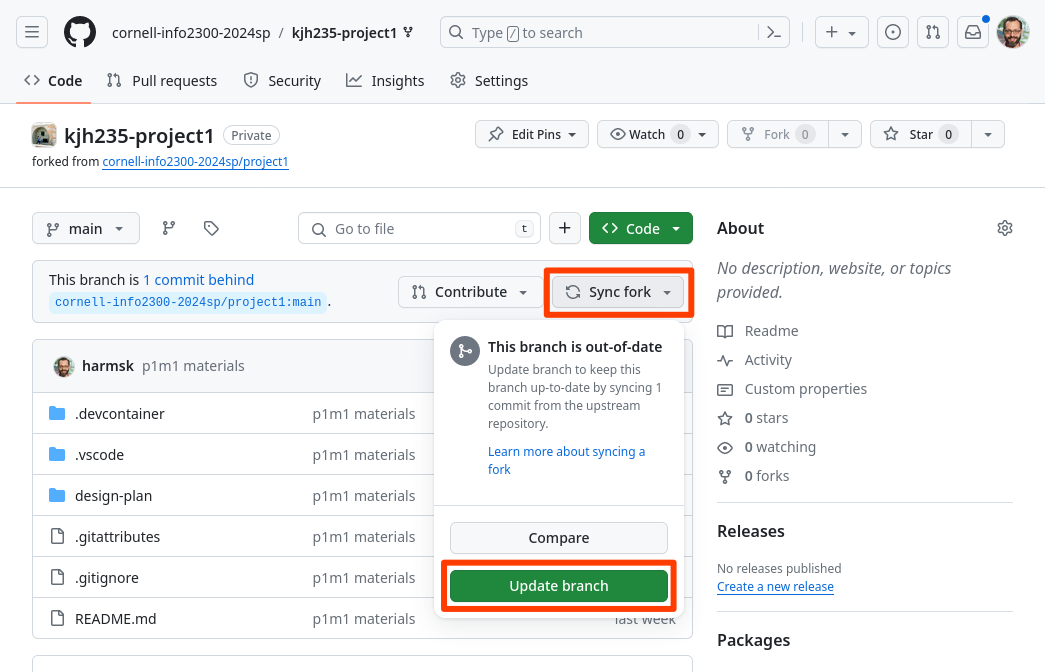
If this doesn't work, you can manually update branch inside your codespace:
-
Open your codespace.
-
Open the command pallet from the View > Command Palette menu, type
fetch from all remotes, and then select the Git: Fetch From All Remotes command.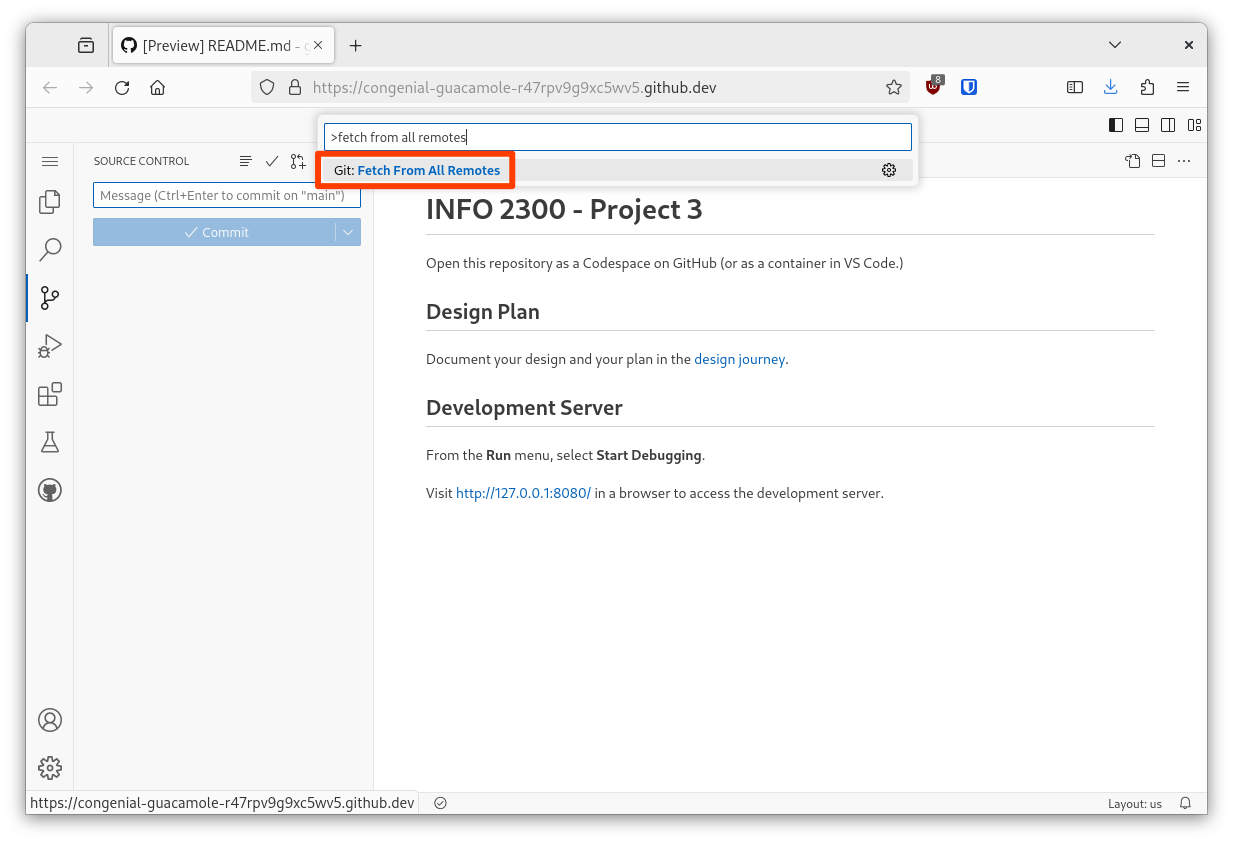
-
Open the command pallet again, type
git mergeand then select the Git: Merge... command.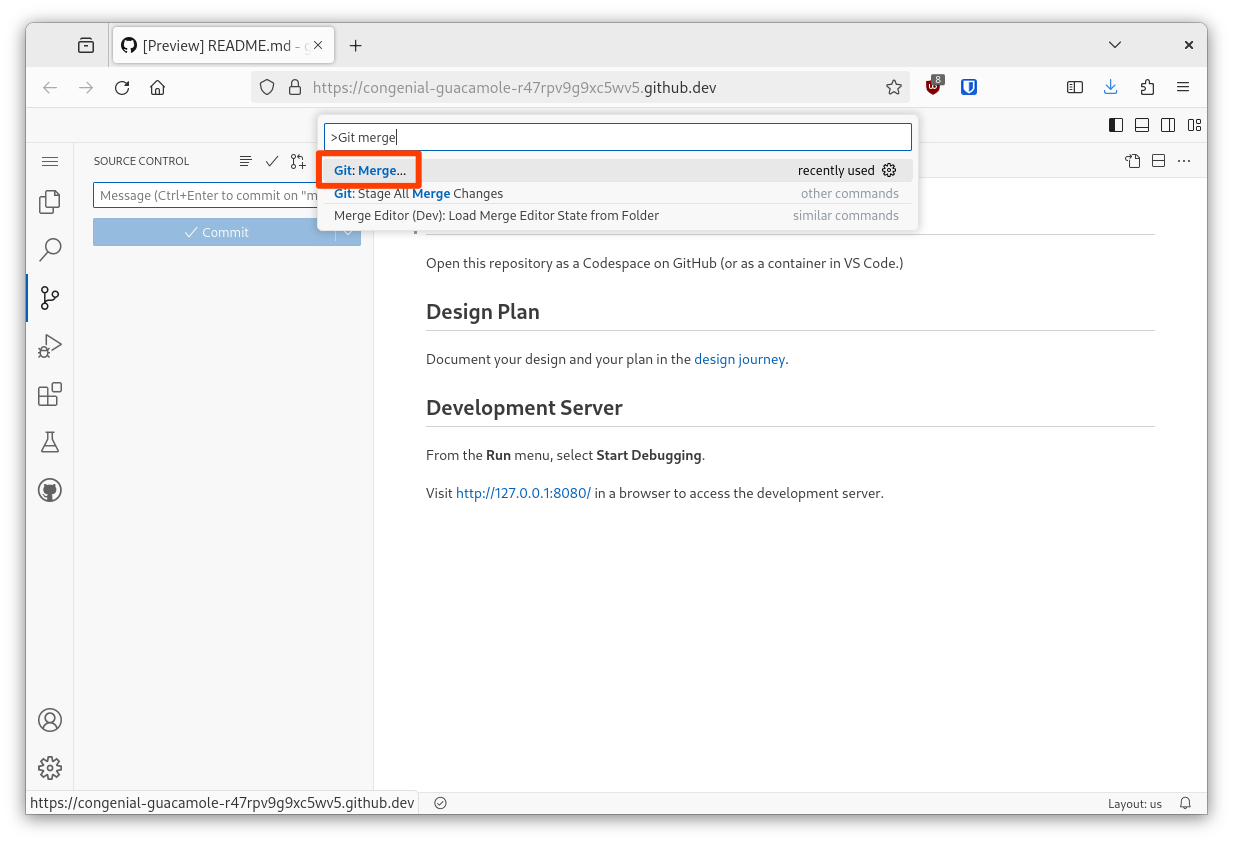
-
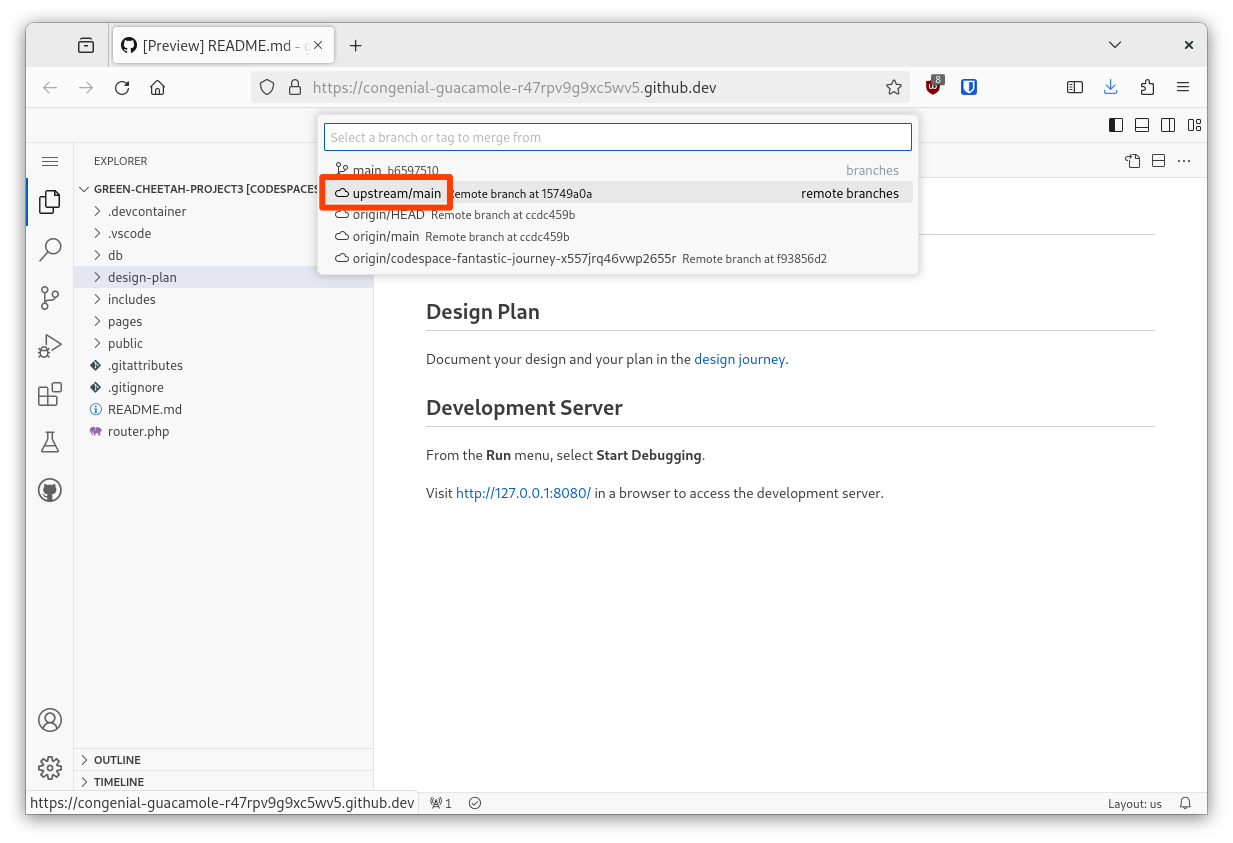
Lastly, select upstream/main from the menu.
-
Check that the server folder is in your repository.
-
Synchronize your repository by pushing your changes to GitHub.
-
-
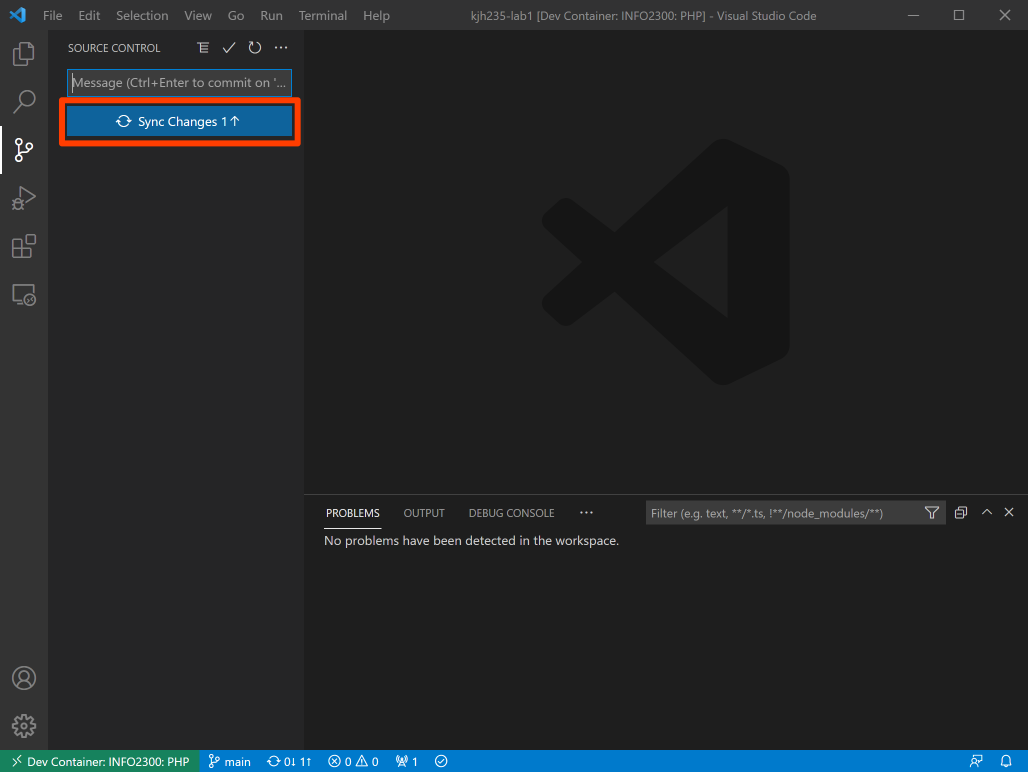
In your codespace, open the Source Control pane from the Activity Bar and click Sync Changes.
-
You should now see the
use-debouncepackage in yourclient/package.jsonin your codespace.If you do not see it, visit office hours. (Do not download a copy of the files and try to manually add it to your repository. You will break our ability to grade your assignment.) Avoid asking for help in the discussion forum for this issue, we rarely can resolve these issues in the forum.
-
When prompted to rebuild codespace, rebuild your codespace.
This will ensure your codespace configuration is ready for this milestone.
NoteIf not prompted to rebuild, force rebuilding your codespace by clicking Codespace in the bottom left corner and select Rebuild container. (A regular rebuild is sufficient.)
Submission
Stage, commit and push all changed files in your Git repository to the GitHub server. (All commits should reside on the main branch.)
Do not complete the submission form.
Part II: Render Event Data Client-Side
In this part, you will implement the client-side code to request and then render the event data from your API server.
Requirements & Credit
Credit: ~15 points
This part is graded for correctness. Meet the following requirements for full credit:
Asynchronous Requests:
- REST API should use the
/apiprefix for all endpoints. - Use only the URI for all server API requests. (No credit is provided for hard-coding the full codespace URL.)
- Using axios, request the entire collection of events from the server API.
- Store the requested data in state.
- Render a component (i.e. card) for each event in the collection.
- Employ best practices for rendering a list of components from an array in React.
- Request the event data exactly once after the component has rendered the first time.
- Use the previously requested data to render the event modal. (No credit for additional requests to the server for the modal data.)
- You may have exactly one API server request in your client code; you may have exactly one call to axios in your code.
- No credit is provided for hard-coded event data (except the image).
Professionalism:
Professionalism means meeting the client's requirements. Not doing less and not do more. Your submission should meet the requirements specified for this part and no more.
You are required to implement your project using the methods taught in class prior to the release of this milestone.
No credit is provided for copying the course provided example code, including the components.
You may not install any additional Node.js packages beyond what is provided in the milestone resources.
If any functionality exists not covered in class up to this point, 0 credit is provided for this part.
Instructions
-
If your API does not use an
/apiprefix, update it now to include one.Because we'd rather not ask the user for the REST API server URL, like homework 3, we will use the
/apiprefix to proxy requests to the REST API server automatically from the client. All you need to do to get this working is add an/apiprefix to all your API endpoints. (I've already configured the proxy for you.)This means that when you make a request to
/api/events, it will be proxied tohttp://localhost:8080/api/eventsautomatically.Update your tests to ensure that your updated API endpoints are still working.
-
From the client's main component, request the event data from the server API and store the data in state.
Do not worry about the loading or error user experience at this time (or filters/search). Simply get the data and store it in a state.
-
Using the retrieved event data, render a component for each event in the collection.
Replace all hard-coded event data (except the image) in your component with the data from the server.
If your event components do not yet contain props to customize their data, add them and pass the event data as props. Do not worry about the event's image for now, simply leave it hard-coded.
When you're finished with this step, when you refresh your web application in the browser, the event data should be retrieved from the server and then rendered in the browser for each event. Though, each event will have the same image for now because it's hard-coded.
NoteIf your design renders date and time separately, do not make 2 separate fields in the database; keep the date and time in the same field. Use
Intl.DateTimeFormatto format a string for just the date or just the time. (Remember, JSON will only store the date and time as a string, so you will need to convert it into a Date object first:new Date(dateString).)GotchaYour API server runs on UTC time. However, your browser runs on EST time. Because
mongosh init.mongodb.jsis run on the server, all dates will be in UTC time when the documents are created unless you specify the time zone. This means that the date and time you will see in the browser will be adjusted to EST time, making them appear to be incorrect. There is no point penalty as this is expected behavior. If you would like to fix this, update yourinit.mongodb.jsscript to use EST time:new Date('Feb 28 2013 19:00:00 EST') -
Update your modal to render the server data.
At this point you should have an SPA with a card for each event that exist in your database. All the data should be loaded from the database (except each event's image.)
Update your modal by replacing the hard-coded data from earlier milestones, with the data from your server API. You may need to add props to your modal. Do not make another request to the server for this data. Use the data you already have in state.
When you're finished with this step, the modal should open and display each event's data (but not image; the image is still hard-coded).
-
Check your work.
Carefully review the requirements and check that your work meets them. Check that the event data is rendered in cards and in the modal.
Submission
Stage, commit and push all changed files in your Git repository to the GitHub server. (All commits should reside on the main branch.)
Do not complete the submission form.
Part III: Asynchronous Requests User Experience
In this part, you will implement the asynchronous request user experience for your SPA.
Requirements & Credit
Credit: ~15 points
This part is graded for correctness. Meet the following requirements for full credit:
Asynchronous Request User Experience:
- Provide a user experience for the pending, rejected, and fulfilled states of the asynchronous request to the server for the event data.
- The user experience for each state should use the common interactive web design patterns we practiced in class.
- The asynchronous request user experience should be usable to a general audience (i.e. not INFO 2310 developers).
- You should have exactly one line of code that makes the API request to the server for the event data.
- No credit is provided for duplicate request code; no credit for copy and pasted code.
Professionalism:
Professionalism means meeting the client's requirements. Not doing less and not do more. Your submission should meet the requirements specified for this part and no more.
You are required to implement your project using the methods taught in class prior to the release of this milestone.
No credit is provided for copying the course provided example code, including the components.
You may not install any additional Node.js packages beyond what is provided in the milestone resources.
If any functionality exists not covered in class up to this point, 0 credit is provided for this part.
Instructions
-
Enhance the user experience of your SPA by implementing pending, rejected, and fulfilled states for the asynchronous request to the server.
tipYou may not copy the loading or failure components from the course provided example. Though, you may use generative AI to generate the loading and failure components.
"tailwindcss" and "component" are good keywords to use in your prompt.
tipYou can test your rejected user experience by inserting a test error into your endpoint that returns a collection of events:
throw new Error("test error")Make sure you delete this error after you've tested the failure user experience.
-
Check your work.
Carefully review the requirements and check that your work meets them.
Submission
Stage, commit and push all changed files in your Git repository to the GitHub server. (All commits should reside on the main branch.)
Do not complete the submission form.
Part IV: Render Event Images
In this part, you will implement a server-side endpoint for the images for your events and then render those images in your SPA.
Requirements & Credit
Credit: ~10 points
This part is graded for correctness. Meet the following requirements for full credit:
Event Images:
- Store an image for every event in server's
public/images/eventsfolder. - Use a different image for each event in your collection.
- Only include web friendly image formats (i.e. no .heic or .heif files).
- Update your database initialization script to include a field for each event that contains the filename of its image file.
Event Image Endpoint:
- Implement the
/api/images/events/:filenameendpoint in your server API to serve the event images.
Event Image Rendering:
- All event cards and modal should render each event's image using the URI from the database and the server endpoint for the images.
Professionalism:
Professionalism means meeting the client's requirements. Not doing less and not do more. Your submission should meet the requirements specified for this part and no more.
You are required to implement your project using the methods taught in class prior to the release of this milestone.
If any functionality exists not covered in class up to this point, 0 credit is provided for this part.
Instructions
-
Add an image for every event in the server's
public/images/eventsfolder. -
Update your database initialization script to include a field for each event that contains the filename of its image file.
-
Add an endpoint to your server API to serve the event images.
app.get('/api/images/events/:filename', (req, res) => {
  const imagesPath = path.resolve(app.locals.publicPath, 'images/events')
  const filename = req.params.filename

  res.sendFile(filename, {
    root: imagesPath,
    dotfiles: 'deny'
  }, (err) => {
    if (err) {
      if (err.statusCode === 404) {
        return res.status(404).send()
      }
      return res.status(400).send()
    }
  })
}) -
Update your event cards and modal to render each event's image using the URI from each event's JSON document.
The URI for an event's image should be
/api/images/events/${filename}wherefilenameis the value of the image filename field in your database for that event. -
Check your work.
Carefully review the requirements and check that your work meets them.
Submission
Stage, commit and push all changed files in your Git repository to the GitHub server. (All commits should reside on the main branch.)
Do not complete the submission form.
Part V: Filter Events by Tag
In this part you will implement the client-side code to filter the events by tag.
Requirements & Credit
Credit: ~15 points
This part is graded for correctness. Meet the following requirements for full credit:
Tag REST API endpoint:
- Implement a REST API endpoint to get all tags from the database:
/api/events/tags - Query the database using the
distinctmethod to get all unique tags across all events and return them as an array of strings. - All existing event REST API endpoints, especially document endpoints, still function correctly.
Render Tag Chips:
- Render a chip/pill for each tag in the database.
- Employ best practices for rendering a list of components from an array of data in React.
Filter User Experience:
- Implement filtering the events by a tag when the user selects a chip/pill.
- When the user clicks/taps on a chip, the chip should be highlighted to indicate that it's the current filter. All other chips should be un-highlighted.
- The event cards should be filtered to only show events that match the selected tag.
- When a user un-selects a chip (click/tap on a highlighted chip), un-filter the event data; when no filter is set, render all events.
- All filter chips should be accessible; filter chips should be keyboard navigable and not identified as a "link" by a screen reader.
Filtering:
- Use a state for remembering the current tag filter.
- Pass the filter query parameter to axios using the config object syntax; no credit for the query string syntax.
- If the filter state is not set, do not include the query parameter in the API request.
- You may have exactly one API server request in your client code for retrieving events.
- Use React side effects to trigger any new HTTP requests to the server when the tag state changes.
Professionalism:
Professionalism means meeting the client's requirements. Not doing less and not do more. Your submission should meet the requirements specified for this part and no more.
You are required to implement your project using the methods taught in class prior to the release of this milestone.
No credit for hard-coded tags in the client-code.
All event data filtering must be performed server-side. No credit is provided for client-side filtering.
No credit for duplicate lines code that request event data (i.e. axios.get('/api/events')).
If any functionality exists not covered in class up to this point, 0 credit is provided for this part.
Instructions
-
Implement a REST API endpoint to get all tags from the database.
The endpoint must exist before your document endpoints.
Assuming each event has a
tagsfield containing an array of strings:[
{
"name": "Event 1",
"tags": ["tag1", "tag2"]
},
{
"name": "Event 2",
"tags": ["tag2", "tag3"]
}
]Use the MongoDB distinct method to query the database for all unique tags across all events and return them as an array of strings.
-
Add a second API request in your client code to get the tags from the server and render a chip/pill for each tag in the database.
When you're finished with this step, you should see a chip for each tag in your database rendered somewhere in your SPA.
-
Implement a state for remembering the current tag filter.
When the user clicks/taps on a chip, set the state to the tag of the chip. When the user un-selects a chip, set the state back to nothing (i.e.
undefined). -
Implement highlighting the current chip if its filter is active.
If a chip is currently selected, render the chip with a different style to indicate that it is the current filter. If the chip is not selected, render the chip with the default style.
tipGenerative AI is usually pretty good at creating a "highlighted" or "active" style for chips. Though, you will want to remember to prompt it to use "tailwindcss".
-
Next, any time the filter state changes, re-run the API request to get the events from the server.
Do not worry about filtering the data yet. Simply test that any time your filter state changes, the API request from the first part in this milestone is re-run.
-
Update the API request to include the filter state as a query parameter.
When the filter state is set, include the filter state in the API request to the server as a query parameter. When the filter state is not set, do not include the query parameter in the API request.
Use the axios config object syntax for the query parameter: (Do not manually create a query string URL, like in the first example.)
-
Check your work.
Carefully review the requirements and check that your work meets them.
Check that the chips highlight when selected and un-highlight when un-selected. Check that the events are filtered when a chip is selected. Check that all events are shown when no chips are selected.
Submission
Stage, commit and push all changed files in your Git repository to the GitHub server. (All commits should reside on the main branch.)
Do not complete the submission form.
Part VI: Debounced Text Search
In this part you'll implement a live search feature for your events collection.
Requirements & Credit
Credit: ~15 points
This part is graded for correctness. Meet the following requirements for full credit:
Live Search Design:
- Your interactive web application should support users searching for events as the user types their search query.
- The live search should display the results in real-time as the user types their search.
- Search results should be displayed in the same format/design as when the entire collection is displayed. (No credit is provided for an autocomplete style search popover/modal/dropdown.)
- No credit is provided if a user must click a "search" button to trigger a search. (Search must be live for credit.)
- The search should return all events that match the search query and the current tag filter.
- The search should provide an appropriate pending user experience.
Client-Side Live Search:
- You may have exactly one API server request in your client code to retrieve events; use the same HTTP request code to get all events, filter events, search events, and filter and search events.
- Debounce search HTTP requests to the server by 500ms to 1 second. (No credit is provided for live search if a request is sent to the server for every character typed.)
- Implement debouncing using only the
useDebouncehook from theuse-debouncepackage. - Use React side effects to trigger any new HTTP requests to the server when the search query changes.
Professionalism:
Professionalism means meeting the client's requirements. Not doing less and not do more. Your submission should meet the requirements specified for this part and no more.
You are required to implement your project using the methods taught in class prior to the release of this milestone.
All event search must be performed server-side. No credit is provided for client-side searching.
No credit for duplicate lines code that request event data (i.e. axios.get('/api/events')).
No credit for installing additional Node.js packages.
If any functionality exists not covered in class up to this point, 0 credit is provided for this part.
Instructions
-
Implement live search in your client web application.
When a user types in the search field, perform a live search sending an HTTP request to the API server after the user has stopped typing for 500ms to 1 second.
Use the same API request code from the parts for the request; you may have exactly one HTTP request in your client code to retrieve the
eventscollection. (No credit is provided for duplicate API request calls in your code.) -
Check your work.
Carefully review the requirements and check that your work meets them.
Test that live search works and that a request is only made after the user has stopped typing for 500ms to 1 second. Test that the search results are displayed in real-time as the user types their search query. Test that the search results are displayed in the same format/design as when the entire collection is displayed. Test that the tag filter and search both work simultaneously.
Submission
Stage, commit and push all changed files in your Git repository to the GitHub server. (All commits should reside on the main branch.)
Do not complete the submission form.
Part VII: Like Events
In this final part, you will implement the last remaining feature of your interactive community events SPA: like.
In response to student end-of-semester stress, I have revised the requirements for like/unlike to only require sending a like request.
Not Required:
- The number of likes in the client SPA need not update after liking an event.
- No unlike feature is required.
Requirements & Credit
Credit: ~10 points
This part is graded for correctness. Meet the following requirements for full credit:
Like User Experience:
- For each event, display the option to like an event.
- No "memory" of a user liking an event is required; you need not update the number of likes in the client SPA after a user likes an event.
- No unlike feature is required (requires memory of a user liking an event).
Like API Requests:
- When the user likes an event, send a request to the server to like the event.
- Only send the like API request in response to a user event.
- Send the request directly in the event handler; no credit for side effects.
- You may have exactly one API server request in your client code for liking an event; no credit for duplicate API request calls in your code.
Professionalism:
Professionalism means meeting the client's requirements. Not doing less and not do more. Your submission should meet the requirements specified for this part and no more.
You are required to implement your project using the methods taught in class prior to the release of this milestone.
No credit is provided for modifying the server to remember like status.
If any functionality exists not covered in class up to this point, 0 credit is provided for this part.
Instructions
-
When your user interface's like feature is clicked/tapped, send an API request to your like endpoint.
ImportantWhen finished, you should have a total of 3 axios requests in your client code: 1 for retrieving the events collection, 1 for retrieving the tags, and 1 for liking an event. (No credit is provided for additional requests to the server.)
-
Check your work.
Carefully review the requirements and check that your work meets them.
Check that the like button works and sends a request to the server.
Submission
Stage, commit and push all changed files in your Git repository to the GitHub server. (All commits should reside on the main branch.)
Complete the submission form for p2fin to submit the assignment.
Note: The submission form asks you to check your submission. Checking your work will ensure you receive credit for this assignment. We ask you to check your submission because this is where some students lose points. It's easy to forget something and checking your work prevents the heartache of getting a 0 because your submission wasn't submitted in a way that we can access and grade it.
Contributors
Copyright © 2024 - 2026:
- Kyle Harms