Project 2, Milestone 3: RESTful API
In this milestone you create a RESTful API to access the event data in your database.
You will only work on the server-side for this milestone; you will not work on the client-side.
The course material needed to complete this part was covered in classes 17, 18, 19, and 20.
Project Overview
For your second project you will design and implement an interactive community events single-page application using the MERN stack. For this project, you may only use the methods taught in this course.
The idea for this project to encourage community engagement by providing a platform for community members to discover and participate in local events. However, community engagement is not a strict requirement for this project. You may create an events web application for any type of events you like regardless of whether it promotes community engagement.
Learning Objectives
- Precisely author prompts to instruct a generative AI (GitHub Copilot) to design a RESTful API.
- Evaluate the correctness and quality of generated AI responses.
- Design a usable REST API with query parameters.
- Implement a RESTful API to access data from the client in Express.js.
- Query data from a MongoDB database using the MongoDB Node.js driver.
- Thoroughly test your RESTful API using a REST client (httpyac).
- Implement text search with a text index in MongoDB.
- Troubleshoot and fix your code independently using a debugger.
- Employ the reference documentation to solve problems independently.
Help & Support Resources
We want you to get the help and support you need. Use the course's support resources for help with this assignment.
Git Repository & Codespace
-
Create your assignment repository.
Visit https://landrace.infosci.cornell.edu/courses/info2310-2026sp/repos/project2 in your browser to create your assignment repository.
-
Open your assignment repository in GitHub.
After creating your repository, visit https://landrace.infosci.cornell.edu/courses/info2310-2026sp/repos/project2 in your browser and follow the link to open the repository on github.com
-
Open your assignment repository as a codespace.
Submission Requirements
Your assignment should meet the following requirements for credit:
-
Submit your own original work (design and code) for this assignment.
No credit is provided for submitting design and/or code that is taken from the course-provided examples.
-
Your code should be original. However, the structure of the code will mirror the class examples.
The structure of your code will align with the class examples. This is to be expected. We are learning web programming and there's only so many ways to structure code to solve its problems.
-
You are required to use the methods and techniques covered in class.
No credit is provided for using methods that are not covered in this class.
-
Your REST API server should be functional upon launching it via the Server configuration from the Run and Debug tab in Codespace.
If your server does not launch using this method or is not functional after launching it, we are unable to provide any credit.
-
All files should be in the location specified in this document for credit.
Professionalism is important. Incorrectly placed files will not be graded; no partial credit is provided either.
-
Follow the submission instructions below.
Submit all materials to your GitHub repository's main branch for this assignment. When you're finished stage, commit, and push your submission to GitHub. Then fill-out the submission form to complete your submission.
Failure to complete the submission form will result in 0 credit; no submission form = no submission. No leniency. No exceptions.
Part I: Synchronize Repository
In this part you will synchronize your repository to obtain this milestone's resources.
Requirements & Credit
Credit: 0 credit
This part is not graded.
Instructions
Synchronize your repository to obtain the Milestone 3 resources.
-
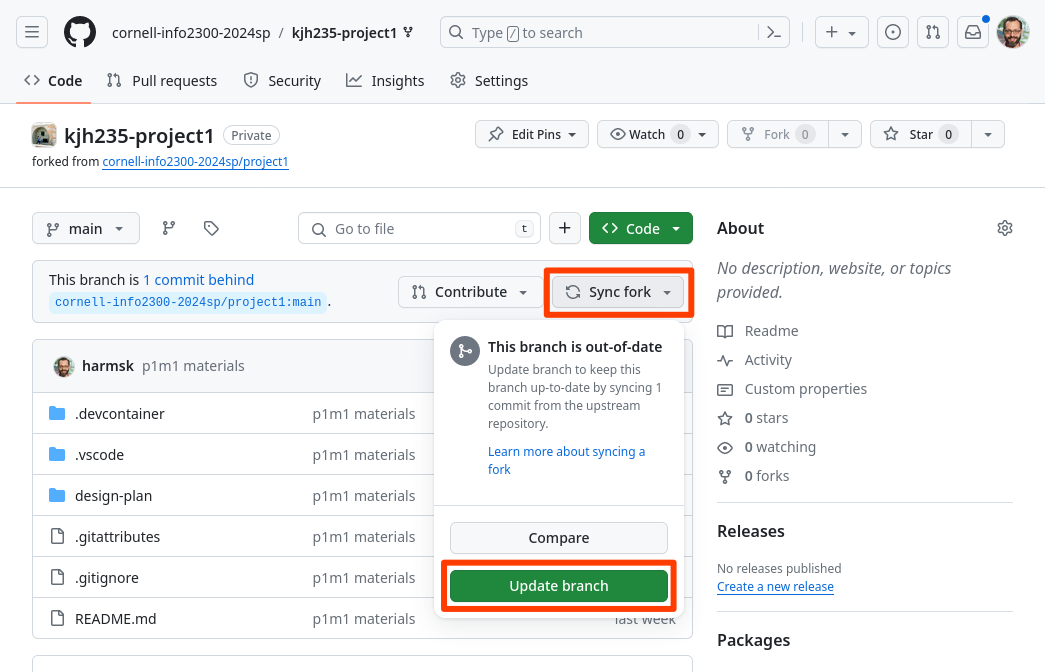
View your project repository on GitHub. Select Sync fork and then Update branch. This will synchronize the milestone resources into your repository.
Do not Discard Commits. This will delete your previous work!
If this doesn't work, you can manually update branch inside your codespace:
-
Open your codespace.
-
Open the command pallet from the View > Command Palette menu, type
fetch from all remotes, and then select the Git: Fetch From All Remotes command.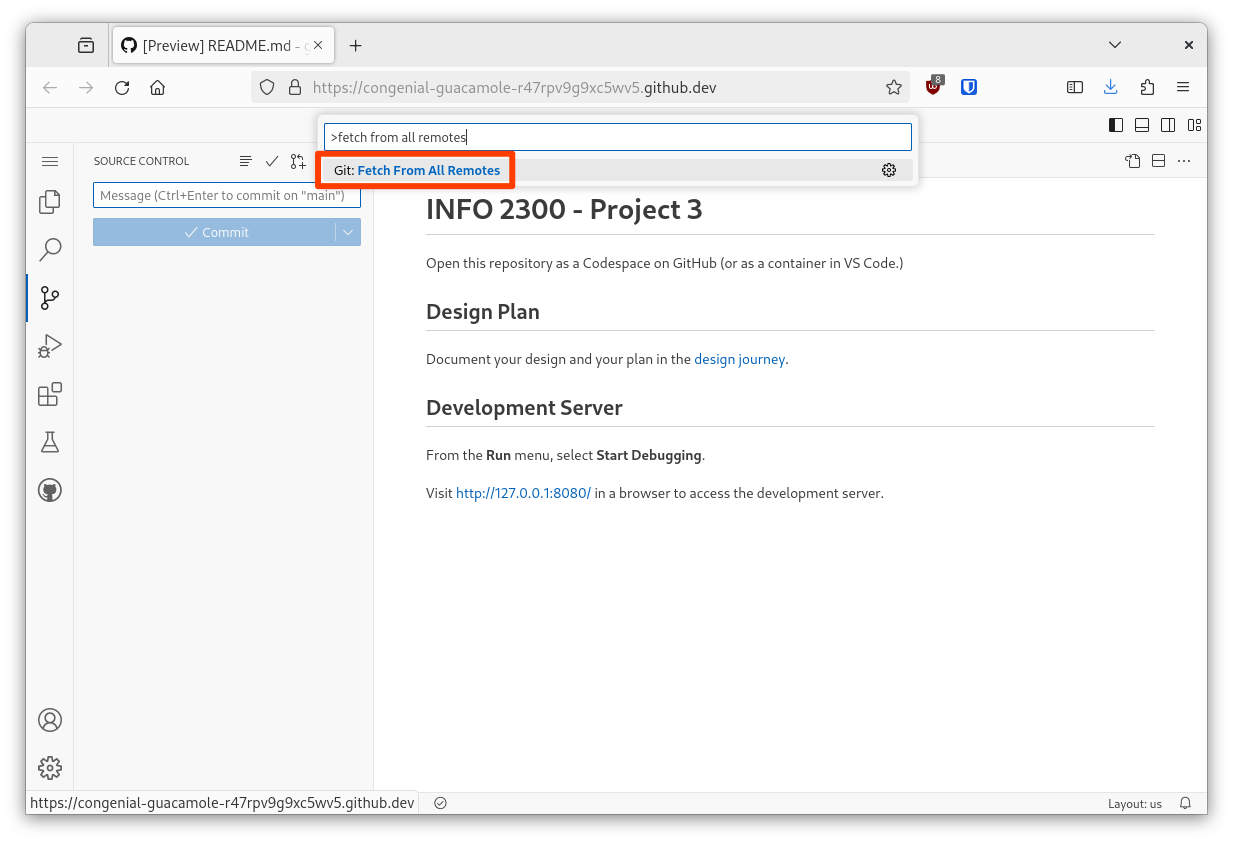
-
Open the command pallet again, type
git mergeand then select the Git: Merge... command.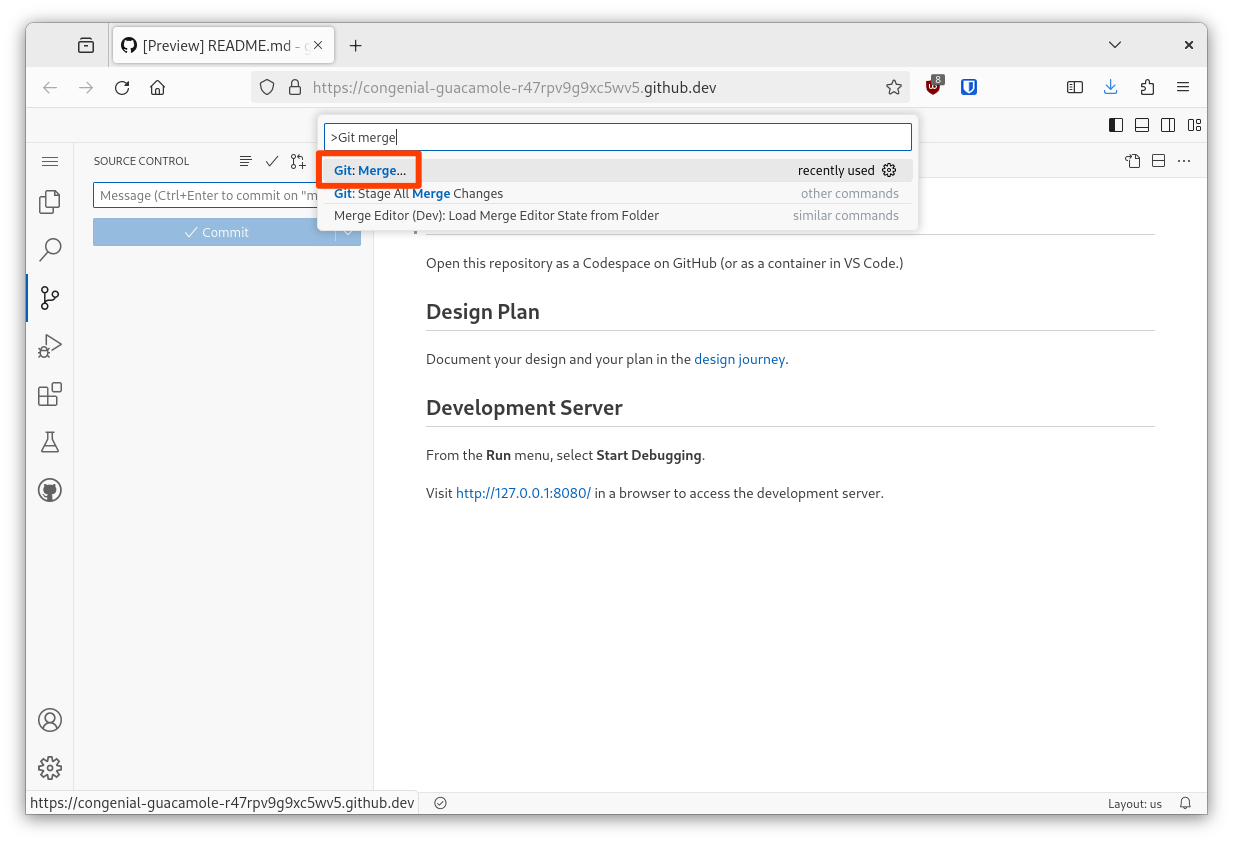
-
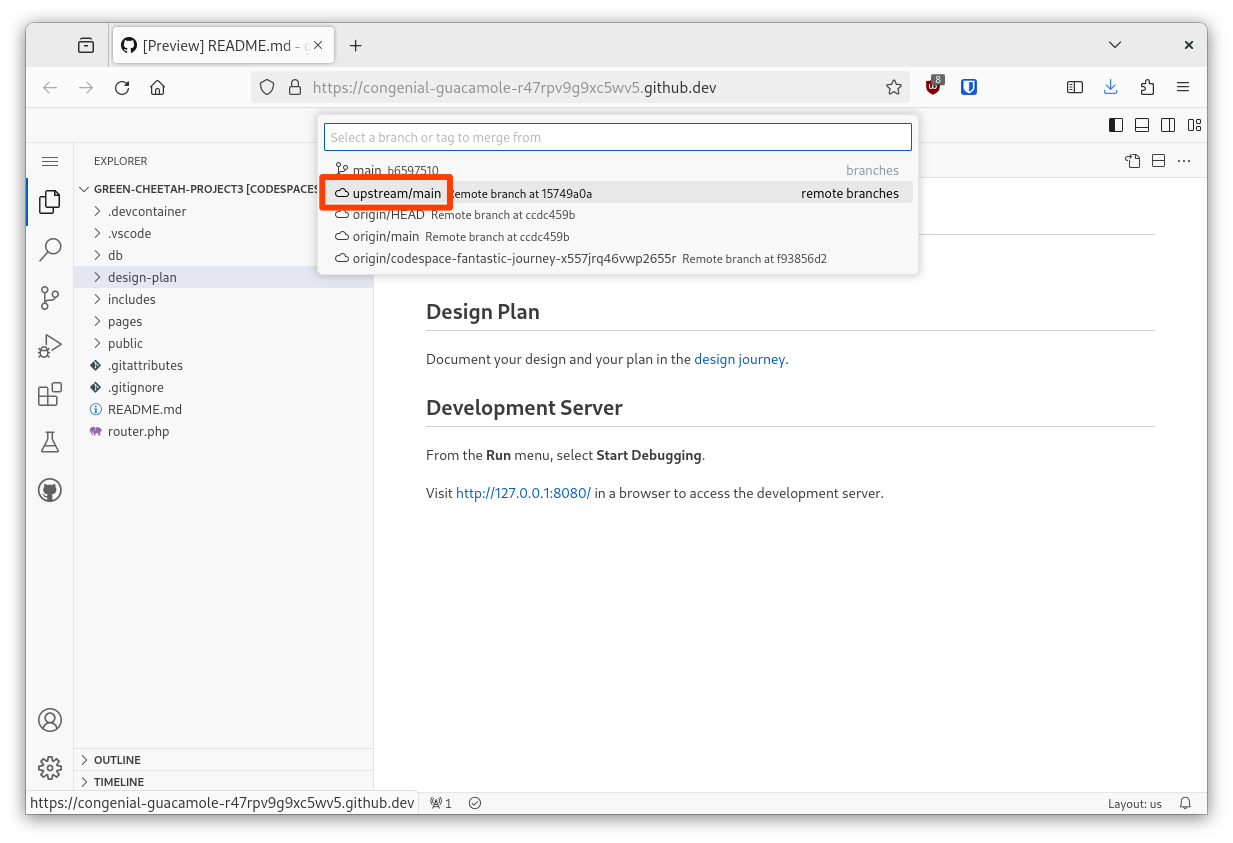
Lastly, select upstream/main from the menu.
-
Check that the server folder is in your repository.
-
Synchronize your repository by pushing your changes to GitHub.
-
-
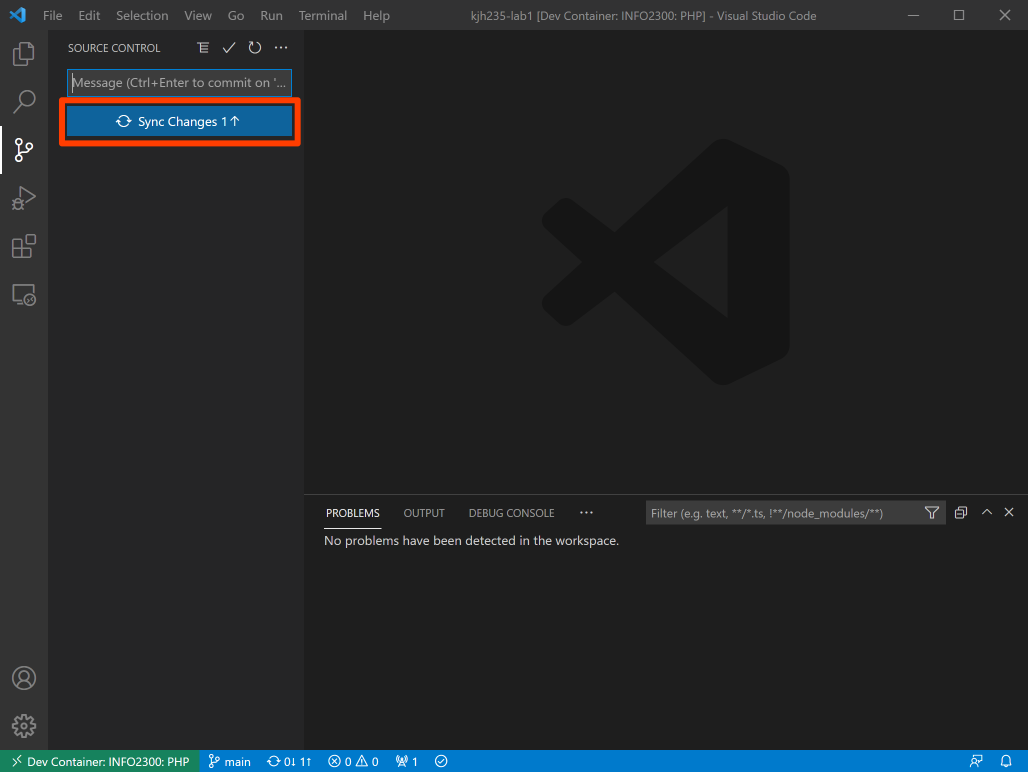
In your codespace, open the Source Control pane from the Activity Bar and click Sync Changes.
-
You should now be able to open the server folder in your codespace.
If you do not see it, visit office hours. (Do not download a copy of the files and try to manually add it to your repository. You will break our ability to grade your assignment.) Avoid asking for help in the discussion forum for this issue, we rarely can resolve these issues in the forum.
-
When prompted to rebuild codespace, rebuild your codespace.
This will ensure your codespace configuration is ready for this milestone.
Submission
Stage, commit and push all changed files in your Git repository to the GitHub server. (All commits should reside on the main branch.)
Do not complete the submission form.
Part II: RESTful API Design
In this part design a RESTful API to access the event data in your database.
Requirements & Credit
Credit: ~20 points
This part is graded for correctness. Meet the following requirements for full credit:
RESTful API:
- Design a complete RESTful API to access the event data in your database.
- Include Create, Read, Update (modify), Update (replace), and Delete operations.
- Include only URIs for collections and specific resources.
- Employ the RESTful API design principles practiced in class.
- Include exactly 2 query parameters to retrieve the event collection by text search and exactly one tag.
- Both parameters should be optional.
- Employ the query parameter design principles practiced in class.
- Employ sub-resource endpoints for likes.
- Employ the sub-resource design principles practiced in class.
- No other endpoints, query parameters, operations, or sub-resources should be included in the design.
Design Process:
- Document your REST API design in a
design-plan/rest-api.mdfile.design-plan/rest-api.mdwill be graded via Codespace'sMarkdown: Open Preview.- This design document should be well-formatted and organized for readability in
Markdown: Open Preview. - If you include images, you may include only PNG, JPG, and WEBP; HEIC files are prohibited and will not be graded.
- Document the design of every API endpoint in
design-plan/rest-api.md.- For each endpoint include all REST API design characteristics (i.e. HTTP method, URI, etc.)
- There is no required format for how you document each endpoint. However, the table format practiced in class is a good choice.
- Each endpoint's documentation should be concise and clearly communicate the design of the endpoint when viewed in
Markdown: Open Preview.
- Design the RESTful API using GitHub Copilot as your design assistant.
- Author your own prompts when instructing GitHub Copilot. 0 credit is provided if you copy and paste any part of these requirements/instructions into Copilot.
- Export your entire the REST API design conversation with GitHub Copilot and save it to
design-plan/rest-api-chat.json. - If you use multiple chats, export all chats and append a number to the file name (e.g.,
rest-api-chat-1.json,rest-api-chat-2.json, etc.)
- Evaluate the generated design and correct any design mistakes.
- Your evaluation must be specific; it should evaluate all aspects of REST API design (e.g., HTTP method, URI, query parameters, etc.)
- Document your evaluation of the generated design and any corrections you made in
design-plan/rest-api.md. - For credit, you must concisely explain why Copilot's design is correct (or incorrect).
Professionalism:
Professionalism means meeting the client's requirements. Not doing less and not do more. Your submission should meet the requirements specified for this part and no more.
Add no additional endpoints, query parameters, operations, or sub-resources beyond what is specified in the requirements. It should be usable and employ the design principles practiced in class.
You are required to implement your project using the methods taught in class prior to the release of this milestone.
Instructions
You will be expected to leverage generative AI in industry. It's a great time saver, but only when used responsibly. To effectively leverage generative AI you will need to practice providing precise prompts to the tool and then evaluating the generated response for quality and correctness. This assignment is designed to help you practice this skill.
-
Precisely instruct GitHub Copilot to design a RESTful API for the
eventscollection you created in the first milestone.You must author all prompts to GitHub Copilot yourself.
dangerYou may not copy and paste any part of these requirements/instructions into Copilot (or any of the course provided materials, including lecture notes).
Write your own prompts from scratch to precisely instruct Copilot to design a RESTful API that employs the design principles we practiced in class.
While it may seem like a waste of time to write your own prompts, rather than simplying copy and pasting these instructions, this is an important skill to learn. In an effort to be transparent about how we grade, I give more requirements than you will often get in industry. That means you need to be able to synthesize requirements and write prompts yourself because you won't always be given thorough grading criteria.
-
Evaluate Copilot's API design in
design-plan/rest-api.md.Carefully evaluate the generated design for correctness and quality.
Write a small paragraph (2-4 sentences) specifically explaining how well the generated API design's meets the REST API design requirements and best practices. Your answer should include what aspects of the design are correct and why they are correct. If there are any mistakes in the design, your answer should include what those mistakes are and how you plan to correct them.
-
Document your events RESTful API using the generated design as a started point in
design-plan/rest-api.md.Correct any mistakes in the design that you identified in the previous step.
-
Check your work.
Carefully review the requirements and check that your design meets them.
-
Export your entire design conversation with GitHub Copilot and save it to
design-plan/rest-api-chat.json.-
From the Command Palette (View > Command Palette), run the Chat: Export Chat command.

-
Save the exported chat JSON file to
design-plan/rest-api-chat.json.
-
Submission
Stage, commit and push all changed files in your Git repository to the GitHub server. (All commits should reside on the main branch.)
Do not complete the submission form.
Part III: RESTful API Server
In this part, implement the RESTful API design you created in the previous part using Express.js and the MongoDB Node.js driver.
Requirements & Credit
Credit: ~60 points
This part is graded for correctness. Meet the following requirements for full credit:
API Endpoints:
- Implement all endpoints in
server.mjs. - Your API should employ all best practices for RESTful API design that we practiced in class.
- However, you need not implement validation for any request body. (You can assume that any JSON uploaded to the server is valid.)
- All event data should be queried from the database; no hard-coded data is permitted.
- Query only the data necessary for each endpoint and nothing more.
- Use the absolute minimum number of MongoDB operations necessary to implement each API endpoint.
- The endpoint for modify should not replace the entire document in the database; it should only modify the specified fields (e.g.
{ name: 'New Event Name' }).
- Implement filtering the collection using exactly 2 query parameters: text search and tag filtering.
- Both parameters should be optional.
- Both parameters should be functional if none, one, or both are provided in a request.
- Use a MongoDB text index to implement text search. No credit for any other methods.
- Implement sub-resource endpoints for likes.
- You may only use a single MongoDB operation when modifying an event's likes.
- Put another way, maintain data integrity by using atomic operations.
- The API should use only JSON for request bodies and response bodies.
- Always return an appropriate HTTP status code.
- Your API should be stateless.
- Use only the methods and techniques practiced in class.
Testing:
- Author a test for each of the endpoints in
test.http.- Test successful and unsuccessful requests for each endpoint.
- Your API will be graded using the tests you write; no credit is provided for endpoints that do not include tests.
Professionalism:
Professionalism means meeting the client's requirements. Not doing less and not do more. Your submission should meet the requirements specified for this part and no more.
You are required to implement your project using the methods taught in class prior to the release of this milestone.
You may not install any additional Node.js packages beyond what is provided in the milestone resources. No credit is provided for installing additional packages.
If any functionality exists not covered in class up to this point, 0 credit is provided for this part.
Instructions
As is always the case, you may use GitHub Copilot as your coding partner. However, you will be expected to produce similar code on the exams. If you do not write the code yourself while completing this assignment, you will likely not be able to write the code you'll need for the exams.
-
Start with your read (collection) endpoint.
-
Write (success and failure) tests in
test.httpfor your endpoint. -
Implement the code for endpoint in
server.mjs.tipReview your MongoDB queries from the first milestone to help you write the code for this part:
design-plan/db-operations.md. -
Thoroughly test your endpoint using the REST client in
test.http.Use the debugger and console to troubleshoot and fix any issues.
-
Repeat steps 2, 3, and 4 for each endpoint in your API design.
If an endpoint needs to send data to the server, you may include the JSON object you will send to the server on the line after the URI:
POST /api/events
Content-Type: application/json

{
    "name": "Sample Event",
    "date": "2027-03-26T12:00:00Z",
}
Then, access the JSON object in the request body using
req.body.tipAfter inserting an object in the database, the
insertedIdproperty contains the ID of the newly inserted document.warningUpdate operations should never change the document's
_idfield.Remove the
_idfield from any JSON object using JavaScript'sdeleteoperator before using the object to update a document in the database.delete req.body._id; -
Check your work.
Carefully review the requirements and check that your API meets them.
Submission
Stage, commit and push all changed files in your Git repository to the GitHub server. (All commits should reside on the main branch.)
Complete the submission form for p2m3 to submit the assignment.
Note: The submission form asks you to check your submission. Checking your work will ensure you receive credit for this assignment. We ask you to check your submission because this is where some students lose points. It's easy to forget something and checking your work prevents the heartache of getting a 0 because your submission wasn't submitted in a way that we can access and grade it.
Contributors
Copyright © 2024 - 2026:
- Kyle Harms