Project 1, Milestone 1: Design and Draft Components for a Meme Generator
In this milestone, you will design your meme generator single-page application, create components to implement your design and style them. However, your meme generator will not be functional in this milestone. You will add functionality in later milestones.
Project Overview
For your first project you will design and implement an interactive meme generator single-page application using only React using only the methods taught in this course.
You may create any type of meme generator you like so long as it meets the assignment's requirements.
Simple is better for this assignment. I recommend a meme generator with a choice of 3 backgrounds, with 2 lines of text, and the choice to change text styling for each line (e.g. font, color, outline, etc.)
Here is an example of a "meme" that would likely fulfill the assignment's requirements:
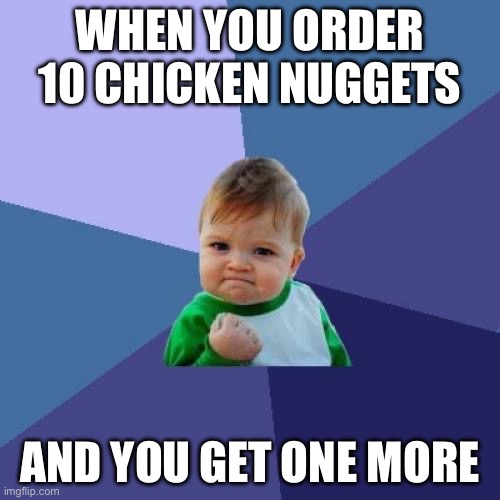
Learning Objectives
- Employ industry best practices: plan and design before you code.
- Create components in JSX and assemble them together to implement a single-page application.
- Leverage components for all reusable/recurring elements in your app.
- Style a single-page application using CSS classes.
- Employ interaction and visual design principles to create an intuitive and aesthetically pleasing single-page application.
Help & Support Resources
We want you to get the help and support you need. Use the course's support resources for help with this assignment.
Git Repository & Codespace
-
Create your assignment repository.
Visit https://landrace.infosci.cornell.edu/courses/info2310-2026sp/repos/project1 in your browser to create your assignment repository.
-
Open your assignment repository in GitHub.
After creating your repository, visit https://landrace.infosci.cornell.edu/courses/info2310-2026sp/repos/project1 in your browser and follow the link to open the repository on github.com
-
Open your assignment repository as a codespace.
Submission Requirements
Your assignment should meet the following requirements for credit:
-
Submit your own original work (design and code) for this assignment.
No credit is provided for submitting design and/or code that is taken from the course-provided examples.
-
Your code should be original. However, the structure of the code will mirror the class examples.
The structure of your code will align with the class examples. This is to be expected. We are learning web programming and there's only so many ways to structure code to solve its problems.
-
You are required to use the methods and techniques covered in class.
No credit is provided for using methods that are not covered in this class.
-
Your single-page application should be visible in the browser and functional upon launching the development web server Start Debugging from the Run menu.
If your single-page application does not launch using this method or is not visible in the browser after launching the server, we are unable to provide any credit.
-
All files should be in the location specified in this document for credit.
Professionalism is important. Incorrectly placed files will not be graded; no partial credit is provided either.
-
Follow the submission instructions below.
Submit all materials to your GitHub repository's main branch for this assignment. When you're finished stage, commit, and push your submission to GitHub. Then fill-out the submission form to complete your submission.
Failure to complete the submission form will result in 0 credit; no submission form = no submission. No leniency. No exceptions.
Part I: Design Your Meme Generator
Design your meme generator using sketches.
Requirements & Credit
Credit: ~10 points (Project 1)
This part is graded for correctness. Design an interactive meme generator single-page application that meets the following requirements for full credit:
Meme Generation:
- Required: The user should be able to select background image for the meme. (At least 3 background image choices are provided.)
- Recommended: provide the user with a choice of at least 3 images.
- Optional: more than 3 background image choices, but less than 10.
- Prohibited: use an uploaded image file or URL.
- Required: The user should be able to change the text for exactly 2 separate text elements placed over the background.
- Required: The user should be able to change the appearance of each text element independently.
- Recommended: change the font size for each text element.
- Optional: change the font appearance with "presets" (e.g. a preset for white text with black outline, a preset for yellow text with blue outline, etc.)
- Required: The user should be able to live preview their meme.
- The background, text, and text appearance should represent the user's selections.
- The preview should live update when the user changes a selection, not after pressing a "preview" button.
- Required: Accessible user inputs; use basic HTML input elements for all user input.
- Recommended: click/tap events and keyboard events only.
- Prohibited: The user may export their meme as an image file.
Design:
- Your interactive single-page application should include exactly one page.
- You may design for narrow or wide screens. (Design need not be responsive.)
- Your design should be intuitive for the user and employ familiar interaction design pattern. (Review the design principles from INFO 1300, if necessary.)
- Your design should be aesthetically pleasing and employ visual design principles. (Review the design principles from INFO 1300, if necessary.)
Planning:
- Plan your design through two iterations of hand-drawn sketching.
- Each sketch is well annotated to explain how the design functions.
- All sketches should be PNG, JPG, or WEBP files. (No HEIC files.)
- All sketches should be located in the
design-planfolder for credit.
Instructions
Limit yourself in this assignment to the minimum requirements. Simple is better. The more features you add, the harder this assignment becomes to implement. You may always add additional features later if you have time.
Below is a sample design that meets all the feature requirements for this project (but not the design requirements):
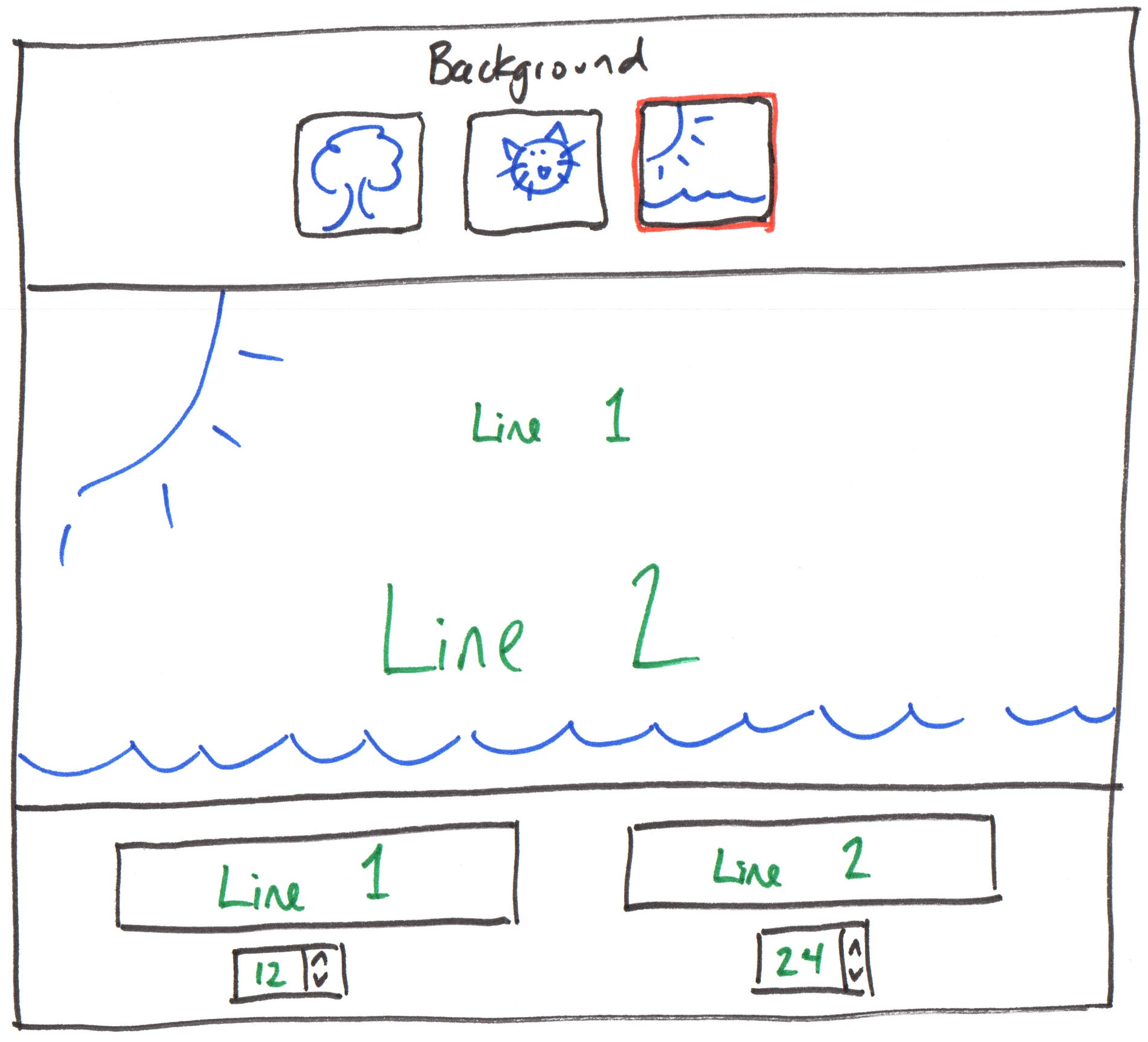
This sample design will not receive full credit. It does not meet the design requirements. The user experience is poor. For example: most elements are poorly labeled, the alignment does not guide the user's eye, and the design fails to employ common design patterns for interactivity.
-
Sketch version 1 of your meme generator design.
By hand, sketch the design of your interactive single-page application. Include sufficient detail so that any student in the course would be able to understand and implement your design.
Annotate your design to explain how the design works. Your annotations should describe how the interface works. (Do not plan CSS properties or HTML elements. Just explain how the design works.) Use arrows in your annotations to show the general user workflow for creating a meme.
You may not use Figma. You should sketch your design by hand.
-
Read "Practical Design Tips And Guidelines For Beginner Designers"
-
Take a moment to reflect on your first sketch given what you learned about design from the article.
Just think about this. There's nothing to write or submit here.
-
Iterate on your design. Sketch at least 1 additional design.
-
Upload all sketch iterations to your
design-planfolder at the root of your repository.Upload your sketches as PNG, JPG, or WEBP files. (No HEIC files.)
Submission
Stage, commit and push all changed files in your Git repository to the GitHub server. (All commits should reside on the main branch.)
Do not complete the submission form.
Part II: Draft Components
Now you'll begin to implement your design. You will only create draft components and a sample meme.
You will not implement any functionality, like changing the background image or text in this milestone. (You are prohibited from implementing editing functionality in this milestone. If editing functionality exists, 0 credit is provided for this part.)
Requirements & Credit
Credit: ~20 points (Project 1)
This part is graded for correctness. Implement a draft version of your interactive meme generator single-page application that meets the following requirements for full credit:
Single-Page Application:
- Implement your design in
App.jsx. - You should have exactly 4 components:
src/App.jsxsrc/components/MemePreview.jsxsrc/components/MemeText.jsxsrc/components/MemeTextEditor.jsx
- You may not have any additional components for this milestone.
- If additional components are present, they will not be graded.
- If you place required functionality in an additional component, you will not receive credit for that functionality.
- You may only use CSS classes to style your single-page application.
- You may not use inline styles for this milestone.
- If inline styles are used, 0 credit is provided for this part.
- All static resources, like images, should be stored in the
publicfolder.
Live Preview:
-
Implement a component for live previewing the meme:
components/MemePreview.jsx.- This component should display the meme's background, 2
MemeTextcomponents. - Hardcode one sample meme in this component for this milestone.
- Store the hardcoded sample meme's background image in the
public/imagesfolder. - The sample meme should have 2 lines of text. For this milestone, the lines of text should be identical.
- This component will not be functional at all for this milestone; only the sample meme will be shown.
- This component should display the meme's background, 2
-
Add your
MemePreviewcomponent toApp.jsx. -
Implement a component for displaying a text element in the
MemePreview:components/MemeText.jsx.- Hard-code the meme text for this milestone.
- The hard-coded text should be the same for all instances of this component in this milestone.
-
Instantiate two separate
MemeTextcomponents inMemePreview.
Meme Editing:
- Implement the background editing elements directly in
src/App.jsx.- You will not make these functional for this milestone.
- Simply add the
<input>or<button>elements to theAppcomponent.
- Implement a component for editing the text and appearance of a text element and add 2 of them to
App:components/MemeTextEditor.jsx.- Use an
<input type="text">element for editing the text. - Use an input element for editing the font appearance in some way.
- Use an
Do Not Implement Meme Editing:
You are required to implement your project using the methods taught in class. You cannot implement meme editing if you do not know how we will implement these features in this class.
- Do not implement any functionality to edit the meme. Only create the components.
- Do not add any event handlers.
- Do not use props or state.
- If any editing functionality exists (i.e. props, state, event handlers, etc.) 0 credit is provided for this part.
Instructions
Your single-page application will have exactly 4 components: App, MemePreview, MemeText, and MemeTextEditor. For example, your component layout might look like this:
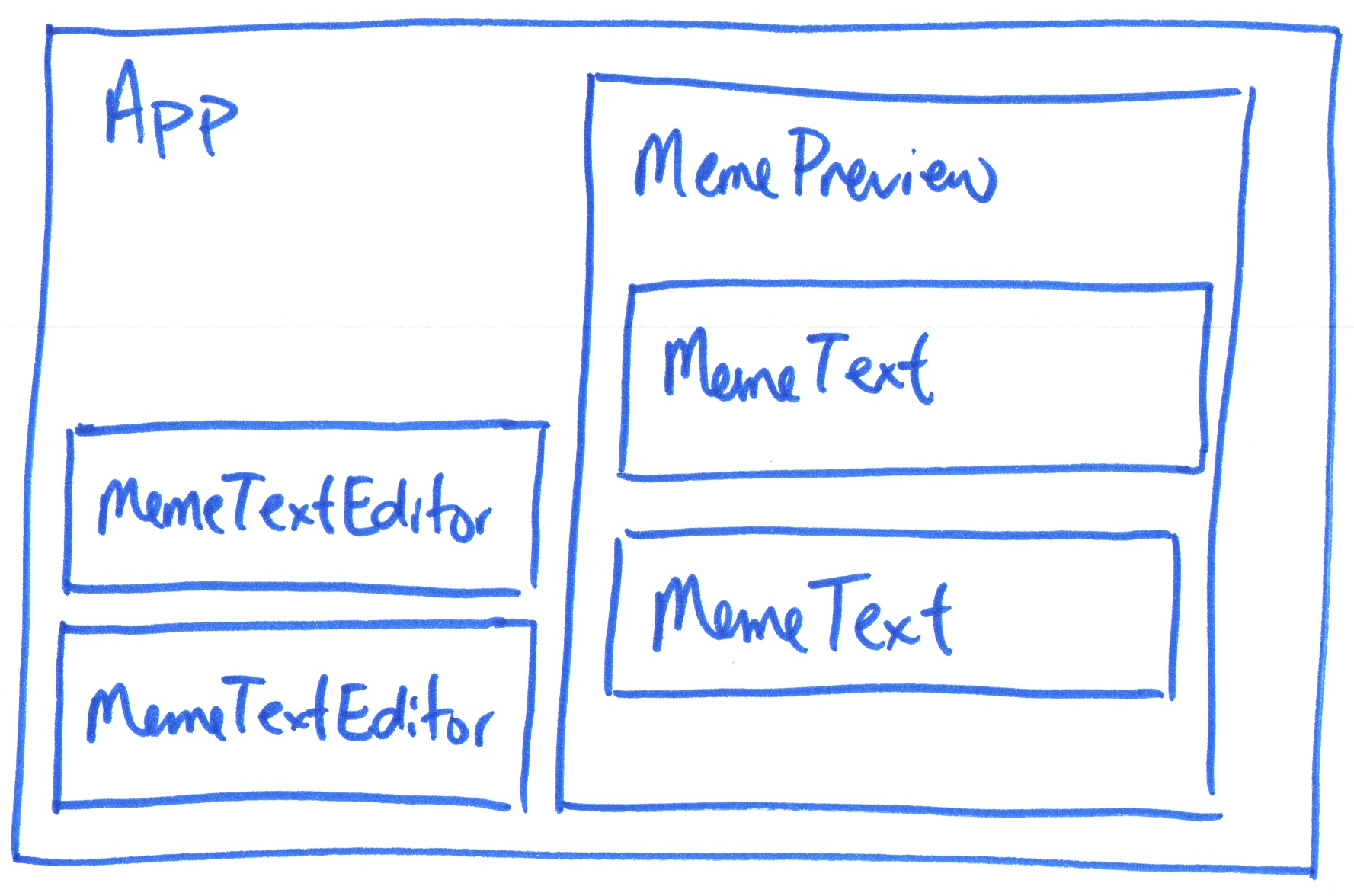
The course material needed to complete this part was covered in class 2.
-
Create the
MemePreviewcomponent.Review its requirements above. Set the image for your sample meme. (You may style it with a CSS class if necessary.)
Then add the
MemePreviewcomponent toApp.Verify that your MemePreview component displays the background for your sample meme.
-
Create the
MemeTextcomponent for the meme text and add sample meme text.Review its requirements above.
Then add two
MemeTextcomponents toMemePreview.Verify that your MemePreview component displays the text for your sample meme.
-
Style your
MemePreviewso that it looks like a polished sample meme using only CSS classes.For example justify the
MemeTexts, set their fonts. Tip: Consider using flexbox to align and space theMemeTextcomponents.Adjust the margins and padding to create a visually appealing sample meme.
-
In your
Appcomponent, add the<input>or<button>elements for changing the background.You will not make these functional for this milestone. Simply place them in the
Appcomponent. That's it. -
Create the
MemeTextEditorcomponent and add 2 of them toApp.Review its requirements above. Then create an
<input type="text">element for editing the text and an input element for editing the appearance of the text.Add 2
MemeTextEditorcomponents toApp. You will not make these functional for this milestone. Simply place them in theAppcomponent. That's it. -
Remember, none of your meme can be edited in this milestone.
You should have a sample meme that cannot be changed.
Sample Meme:
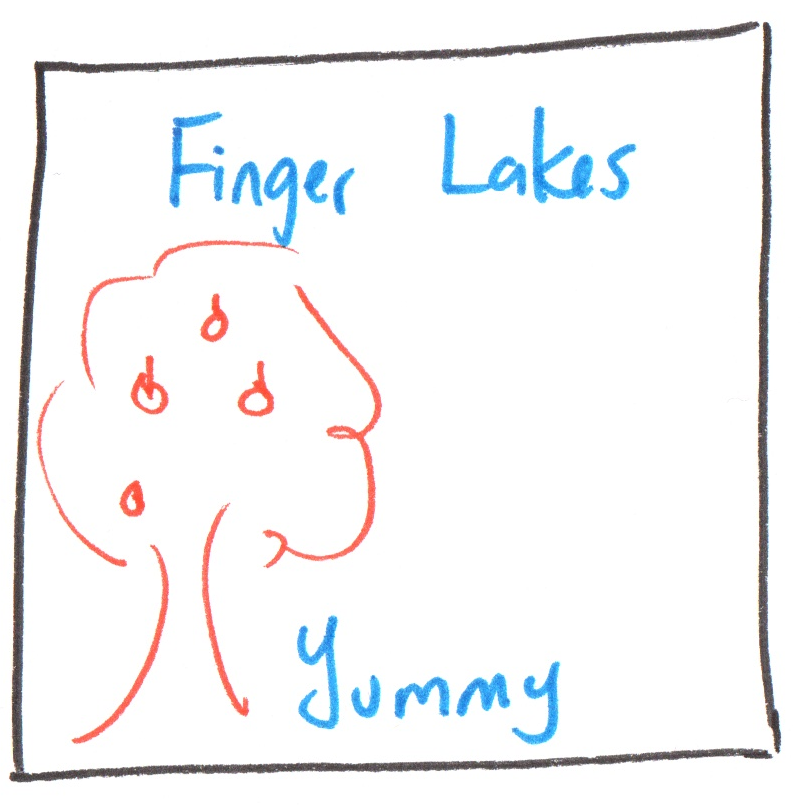
Do not work ahead. No credit is provided for this milestone if any events, props, or state are implemented. To demonstrate the learning objectives for this part you need exactly 4 components and a hard-code "sample" meme. That's it.
Submission
Stage, commit and push all changed files in your Git repository to the GitHub server. (All commits should reside on the main branch.)
Do not complete the submission form.
Part III: Styled Single-Page Application
It's time to style you interactive single-page application. Style it so that it looks like a polished single-page application. Employ the interaction and visual design principles you learned in INFO 1300.
Requirements & Credit
Credit: ~10 points (Project 1)
This part is graded for correctness. You should demonstrate the following objectives for full credit:
- Your design should be intuitive for the user and employ familiar interactive design pattern.
- Inputs should be clearly labeled.
- There should be a clear relationship between the editing inputs and the meme preview.
- Your design should be aesthetically pleasing and employ interaction and visual design principles.
- Review the design principles from INFO 1300, if necessary.
- Your elements should be well aligned and guide the user's eye through the design. (Center alignment is used sparingly.)
- The proximity of elements effectively communications their relationship.
- Related elements, like labels and inputs are close together, while unrelated elements are further apart.
- Your single-page application should be styled so that it looks like a polished single-page application.
- Your color choices should represent current design trends.
- Your design should employ margins and padding to align and space elements.
- Style your single-page application using only CSS classes.
- All static resources, like images, should be stored in the
publicfolder.
Instructions
Using the design principles you learned in INFO 1300, style your interactive single-page application using CSS classes.
The course material needed to complete this part was covered in class 2.
-
Style your entire single-page application so that it aligns with your final design sketch.
Add labels to your input elements, style your buttons, and add padding and margins to create a visually appealing single-page application, etc. Align the elements so that the user's eye is guided through your design.
Tip 1Flexbox is your friend for aligning elements. Review the "CSS Flexbox Layout Guide" for ideas.
Tip 2Many memes are square. If you want your meme preview to always be square, consider using the
aspect-ratioCSS property. -
Polish your design.
Make this look like a complete, functioning, and professional single-page application. (It won't function yet, we just want it to look like it.)
Submission
Stage, commit and push all changed files in your Git repository to the GitHub server. (All commits should reside on the main branch.)
Complete the submission form for p1m1 to submit the assignment.
Note: The submission form asks you to check your submission. Checking your work will ensure you receive credit for this assignment. We ask you to check your submission because this is where some students lose points. It's easy to forget something and checking your work prevents the heartache of getting a 0 because your submission wasn't submitted in a way that we can access and grade it.
Contributors
The following individuals made contributions to this assignment:
- Kyle Harms