Homework 5: LLM User Supported Task Prototype
In this homework, you will design and implement an app prototype that uses an LLM to support a user with a task.
You will need a laptop that supports WebGPU to complete this assignment.
Additionally, you will need at least 5 gigabytes of free disk space to complete this assignment.
Learning Objectives
- Design an app prototype that uses an LLM to support a user with a task.
- Implement an app prototype that uses an LLM to support a user with a task.
- Use GitHub Copilot to assist you with the implementation of your prototype app.
- Employ TailwindCSS utility classes to style a Vue.js app.
- Use the composition API to manage state and implement interactivity in a Vue.js app.
Help & Support Resources
We want you to get the help and support you need. Use the course's support resources for help with this assignment.
Git Repository & Codespace
-
Create your submission repository.
Visit https://landrace.infosci.cornell.edu/courses/info4340-2026sp/repos/hw5 in your browser.
-
Open your repository in GitHub.
After creating your repository, visit https://landrace.infosci.cornell.edu/courses/info4340-2026sp/repos/hw5 in your browser and follow the link to open the repository on github.com.
-
Open your repository as a codespace.
Overview
You will design and implement a prototype app that uses an LLM to support a user with a task. The LLM use should feel natural and be seamless to the user.
This is an opportunity to explore how LLMs can be used to support users with their tasks beyond chatbots. Use your creativity to come up with a novel and interesting way to support users with a task. (You may not implement a chat interface for this assignment.)
Examples: mood setting, to-do lists, recipes, simple games (e.g. trivia, word games, etc.), etc.
For example, you could implement the "Vibes" app from the beginning of the semester:
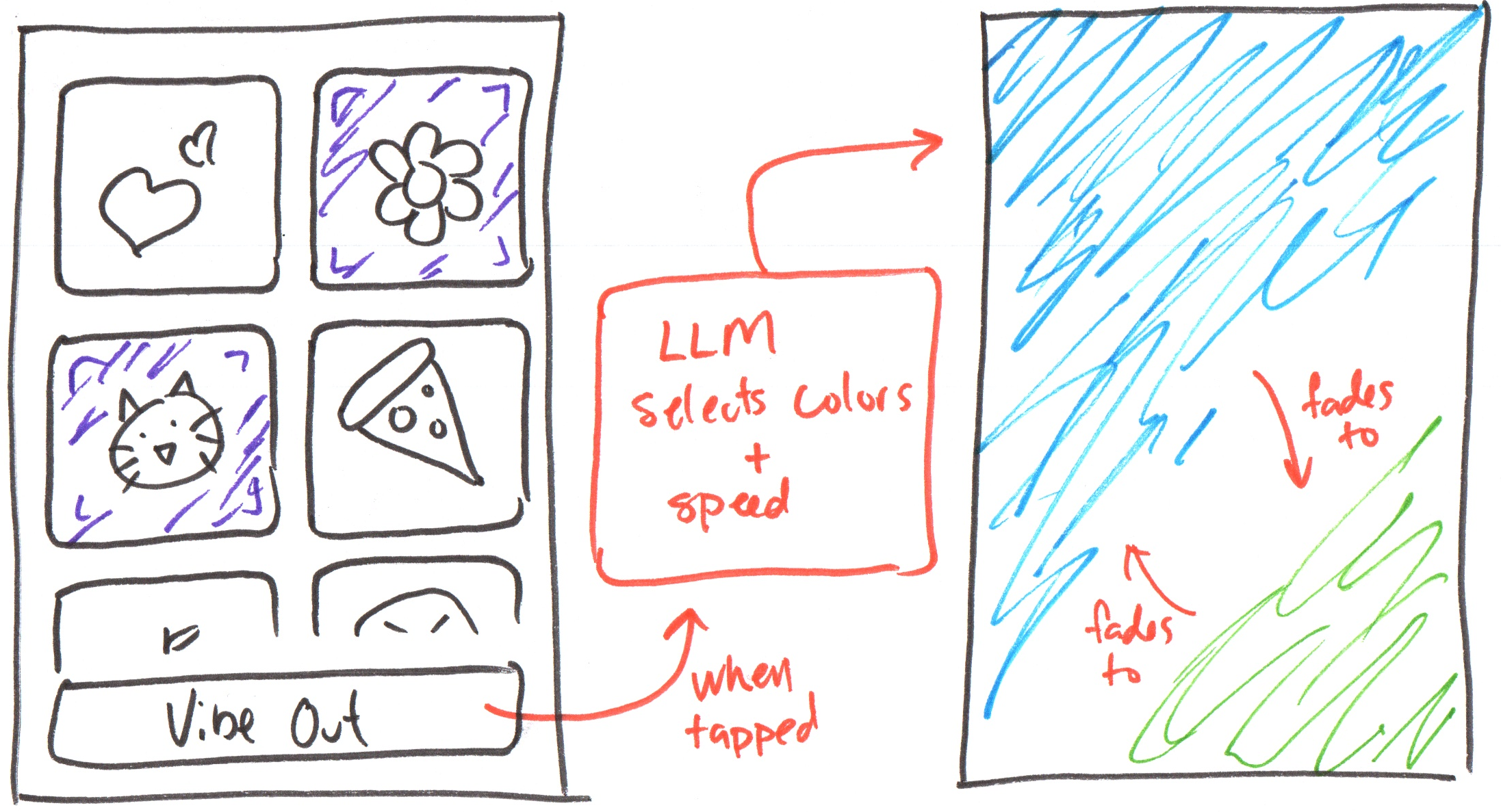
No credit is provided for implementing this example design or designs that are similar to this design. You must come up with your own original design for this assignment.
Requirements
Your prototype should demonstrate a similar level of complexity as the example design above. Avoid designs that are feature rich. Just get the minimum viable product implemented for your design. You can always add more features after you have the MVP implemented. Designs with less complexity than the example design above will not receive full credit.
Carefully instruct your LLM coding assistant (i.e. GitHub Copilot) to implement your prototype app according to your design. You should not write the code yourself, rather you should instruct the coding assistant to write code on your behalf. Review the generated code and instruct it to refine it as needed so that your prototype meets these requirements. This is a primary learning objective of this course. You should be able to effectively prototype using LLM agents, verify that the generated code meets the requirements, and iteratively refine the generated code as needed to meet the requirements.
Employ components to organize the implementation of your prototype. You must implement at least 3 components, but you may use as many components as you like. Each component should reasonably represent a piece of self-contained functionality and should not be too large (or too small; e.g. components with a single HTML element).
In your prototype, anytime you gather input from the user (i.e. a button click, text input, etc.) you are required to implement this functionality in its own component. (Think ColorPicker from the previous homework.) You may incorporate multiple inputs in a single component, but you should not have user inputs directly hard-coded into the App component. (This requirement exists because you are required to demonstrate your understanding of emitting a custom event in Vue.js for this assignment.)
Use the provided llm library and Vue.js' composition API to implement your prototype. You may only use the Vue.js methods and directives covered in class. No credit is provided for using additional Vue.js features not covered in class. No exceptions.
Your LLM use should provide an authentic experience for your user. Remember, we're using small LLMs that are not particularly accurate. Pick a use case where accuracy doesn't matter and still provides a good user experience.
Provide a well-designed loading and progress experience for the user while the LLM is loading and generating a response. The status messages from Homework 4 are not sufficient for this requirement. You should design and implement a more engaging and informative loading and progress experience for the user. Hint: use the isEngineReady ref to show progress.
Use only TailwindCSS utility classes for styling; no custom CSS is allowed.
All resources should be hosted locally; no CDN links; no hotlinking.
Part I: Design
Credit: ~10 points. Completion credit provided for meeting all the requirements below.
Sketch a design for your prototype app. Your sketch need not be hand-drawn; you can use any design tool you like (e.g. Figma, Adobe XD, etc.) to create your sketch.
The sketch should clearly communicate your design so that another INFO 4340/5440 student could implement your design based on the sketch alone.
Your design should be employ app design patterns (you are not designing a website) and should fill all available space in the app's window. If you're not sure, ask a peer or picture whether if you installed this app on your laptop it would look and feel like the other apps installed on your laptop.
Add your sketch (or sketches) to the design folder in your repository.
Stage, commit and push all changed files in your Git repository to the GitHub server. (All commits should reside on the main branch.)
Do not complete the submission form.
Part II: Component Plan
Credit: ~10 points. Completion credit provided for meeting all the requirements below.
Draw a sketch to plan your components for your prototype app. This sketch should look like the component sketch from Homework 3 where a box is drawn for each component and labeled.
Add your component plan sketch to the design folder in your repository.
Stage, commit and push all changed files in your Git repository to the GitHub server. (All commits should reside on the main branch.)
Do not complete the submission form.
Part III: Implementation
Credit: ~30 points. Completion credit provided for meeting all the requirements below.
Implement your prototype app according to your design and component plan. Use the provided llm library and Vue.js' composition API to implement your prototype.
Use GitHub Copilot to assist you with the implementation of your prototype. You should be able to effectively prototype using LLM agents, verify that the generated code meets the requirements, and iteratively refine the generated code as needed to meet the requirements.
Your implemented prototype should be the same design as your sketch from Part I and should have the same component structure as your sketch from Part II.
Your app should fill the entire window when installed (right to left, top to bottom) and should be responsive to resizing the window (though you need not make it responsive with media queries). h-screen and w-screen may be helpful for this part. As well as items-stretch for your flexbox containers. Do not code fixed dimensions for the app. (Do not have large empty spaces, like on the bottom edge of the app's window.)
Stage, commit and push all changed files in your Git repository to the GitHub server. (All commits should reside on the main branch.)
Do not complete the submission form.
Part IV: Publish
Credit: ~10 points. Completion credit provided for meeting all the requirements below.
Publish your prototype app using the procedure in Homework 3.
Stage, commit and push all changed files in your Git repository to the GitHub server. (All commits should reside on the main branch.)
Submission
Stage, commit and push all changed files in your Git repository to the GitHub server. (All commits should reside on the main branch.)
Complete the submission form for hw5 to submit the assignment.
Note: The submission form asks you to check your submission. Checking your work will ensure you receive credit for this assignment. We ask you to check your submission because this is where some students lose points. It's easy to forget something and checking your work prevents the heartache of getting a 0 because your submission wasn't submitted in a way that we can access and grade it.
Contributors
Copyright © 2023 - 2026:
- Kyle Harms